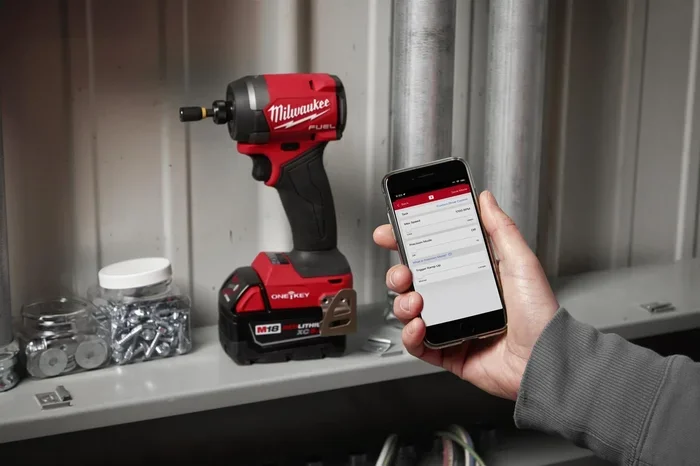
Can You Track Milwaukee Tools On Your Mobile Phone
Yes, you can track Milwaukee tools on your mobile phone using Bluetooth technology, dedicated apps, and third-party tracking devices. This guide covers the best methods to keep your Milwaukee tools safe, organized, and easy to locate on any job site. Learn how tool tracking works, which apps work best, and practical tips to never lose your gear again.
Have you ever misplaced a Milwaukee drill on a busy job site? Or worse, had a tool stolen from your truck? It happens to the best of us. Tracking Milwaukee tools on your mobile phone is no longer just a dream. With modern technology, you can now keep tabs on your favorite power tools right from your pocket.
In this guide, we will walk you through everything you need to know about tool tracking for Milwaukee equipment. Whether you are a contractor managing a full fleet or a DIY enthusiast with a growing collection, this article has you covered. We will explore the methods, apps, and smart devices that make locating tools on your phone simple and effective.
The good news is that Milwaukee Tool has embraced connected technology. Many of their newer tools come with Bluetooth capabilities. And even if your older tools do not have built-in tech, there are plenty of ways to add tracking to any Milwaukee tool. Let us dive in and find out exactly how this works.
Key Takeaways
- Multiple tracking options exist: Milwaukee tools can be tracked using Bluetooth, GPS trackers, and smart apps on your phone.
- Built-in Bluetooth is key: Many Milwaukee tools use Bluetooth connectivity to pair with the Milwaukee Tool app for location tracking.
- Third-party trackers work too: Devices like Tile and Apple AirTag can be attached to Milwaukee tools for extra security.
- Job site organization matters: Using tracking tools alongside good storage habits keeps your equipment safe and productive.
- Prevention is better than cure: Regular inventory checks and labeling reduce tool loss significantly.
- Battery life matters: Keep your tracking devices and Milwaukee batteries charged for reliable performance.
📑 Table of Contents
- Can You Track Milwaukee Tools on Your Mobile Phone?
- How Milwaukee Tool Tracking Technology Works
- Best Apps and Methods to Track Your Milwaukee Tools
- Benefits of Tracking Your Milwaukee Tools on Your Phone
- Common Mistakes People Make When Tracking Tools
- Expert Tips to Keep Your Milwaukee Tools Safe and Organized
- Comparison: Tracking Methods for Milwaukee Tools
- Conclusion
Can You Track Milwaukee Tools on Your Mobile Phone?
The short answer is yes. You can track Milwaukee tools on your mobile phone using several different methods. Milwaukee has integrated Bluetooth technology into many of their power tools, especially within the M18 and M12 tool families. This means your phone can communicate directly with the tool to share location data.
But tracking does not stop at Bluetooth. You can also use third-party tracking devices, GPS-enabled tags, and specialized tool management apps. The method you choose depends on your needs, budget, and the type of Milwaukee tools you own. Some solutions work great for individual tools, while others are better suited for large teams and job sites.
Here are the main ways people track Milwaukee tools on their phones:
- Milwaukee Tool app with Bluetooth: The official Milwaukee app connects to compatible tools and helps you find them nearby.
- Tile trackers: Small Bluetooth devices you attach to your tools. They show the last known location on your phone.
- Apple AirTag: Works similarly to Tile but integrates seamlessly with the Apple ecosystem.
- GPS tracking devices: These use cellular networks to track tools anywhere, even off job sites.
- Third-party tool management apps: Apps designed for contractors to log and locate all their equipment in one place.
Each method has its strengths. Bluetooth-based tracking works best for short-range searches, like finding a tool left in your truck or on a job site. GPS tracking is better for long-range protection, especially if you worry about theft. Let us look at how the technology actually works under the hood.
How Milwaukee Bluetooth Tracking Works
Milwaukee uses Bluetooth Low Energy (BLE) in their connected tools. This is a short-range wireless signal that your phone can pick up. When you open the Milwaukee Tool app, it scans for nearby Bluetooth-enabled tools and shows their approximate distance.
The process is simple:
- Your Milwaukee tool emits a Bluetooth signal.
- Your phone detects that signal through the Milwaukee app.
- The app displays the tool’s location relative to your phone.
- You follow the signal strength to find the tool.
This works great for finding a tool within about 100 feet. It is not perfect for tracking tools across town, but it is excellent for daily job site use. The Milwaukee M18 Fuel line and many other recent models support this feature.
How Milwaukee Tool Tracking Technology Works
Understanding how Milwaukee tool tracking technology works helps you get the most out of it. Milwaukee has invested heavily in connected tool technology over the past few years. Their goal is to give professionals a simple way to manage their equipment.
The core of the system relies on Bluetooth beacons inside the tools. Each compatible Milwaukee tool has a tiny chip that broadcasts a unique signal. Your phone picks up this signal, and the app identifies which specific tool it is. From there, you can see how far away the tool is and in which direction.
Some newer Milwaukee tools also integrate with the Milwaukee ONE-KEY platform. ONE-KEY is Milwaukee’s digital tool management system. It lets you register your tools, track their location, and even monitor usage data. The platform is available through the Milwaukee app on both iOS and Android devices.
The Role of Bluetooth in Tool Tracking
Bluetooth is the backbone of most Milwaukee tracking features. It is low-power, which means it does not drain your tool battery quickly. A Bluetooth beacon uses very little energy, so your Milwaukee battery still lasts for hours of work.
However, Bluetooth has limitations. The range is typically under 100 feet. Walls, metal structures, and other obstacles can weaken the signal. This means Bluetooth tracking works best for finding tools in your immediate vicinity. It is not designed for tracking tools across a city or state.
For that reason, many users pair Bluetooth tracking with external devices like Tile or AirTag for broader coverage. We will explore those options in the next section.
Best Apps and Methods to Track Your Milwaukee Tools
Choosing the right tracking method depends on your situation. A solo contractor has different needs than a large construction company. Below, we break down the best apps and methods for tracking Milwaukee tools on your mobile phone.
Milwaukee Tool App
The official Milwaukee Tool app is the first place to start. It is free to download and works with most Bluetooth-enabled Milwaukee tools. The app lets you register your tools, check battery levels, and locate tools using your phone’s Bluetooth receiver.
Key features of the Milwaukee app include:
- Tool registration: Log your tools and add purchase dates and warranty info.
- Location tracking: Use Bluetooth to find nearby tools.
- Battery monitoring: Check charge levels without picking up the tool.
- Usage logs: Track how often you use each tool.
- Warranty management: Keep digital copies of your receipts and warranties.
The app is straightforward and well-designed. It does not require any extra hardware. If you own Bluetooth-compatible Milwaukee tools, this app should be your first stop.
Tile Tracker Integration
Tile trackers are small, affordable devices that attach to your tools. Each Tile has a Bluetooth chip and a corresponding app. When you cannot find a tool, you open the Tile app and it shows you the last place your Tile was detected.
Tile works well for Milwaukee tools because you can stick or clip them anywhere. They are lightweight and do not interfere with tool performance. The Tile network also uses other Tile users’ phones to help locate lost tools, even when you are far away.
Here is why many professionals love Tile for tool tracking:
- Affordable: Tiles cost around $25 to $35 each.
- Compact: They fit inside tool cases or attach with adhesive.
- Replaceable battery: The battery lasts about a year.
- Community find: Other Tile users can help locate your lost tool.
Apple AirTag for Milwaukee Tools
If you use an iPhone, Apple AirTag is a great option for tracking Milwaukee tools. AirTags use Bluetooth and Apple’s vast Find My network to locate lost items. The setup is simple, and the precision finding feature uses UWB (Ultra Wideband) technology for very accurate location data.
You can slip an AirTag inside a Milwaukee tool case or attach it to the outside with a mount. The AirTag then pairs with your iPhone through the Find My app. You can see the location of your tool on a map, get directions to it, or play a sound to find it nearby.
AirTags are especially useful because of their accuracy. The UWB chip in newer iPhones gives you down-to-foot precision, which is a big advantage on crowded job sites.
GPS Trackers for Long-Range Protection
For the ultimate in tool security, consider a GPS tracking device. Unlike Bluetooth trackers, GPS trackers use satellite signals and cellular networks. This means they can show you exactly where your tool is, anywhere in the world, as long as there is cell service.
GPS trackers are larger and more expensive than Bluetooth options, but they offer unmatched range. Popular choices include:
- LandAirSea Overdrive: Small, magnetic, and GPS-enabled. Great for attaching to tool boxes.
- Tracki 4G: A compact real-time GPS tracker with a mobile app.
- Jiobit: Designed for asset tracking and works well with professional tool fleets.
GPS trackers require a monthly subscription for cellular data. They are best for contractors who transport expensive tools between job sites or leave tools in vehicles overnight.
Benefits of Tracking Your Milwaukee Tools on Your Phone
Investing time in tool tracking for Milwaukee equipment pays off in many ways. Let us look at the biggest benefits that come from keeping tabs on your tools through your phone.
Save Time on Job Sites
Every minute you spend looking for a missing tool is a minute you are not working. Job site productivity increases dramatically when you can locate tools instantly from your phone. Instead of searching through your truck or toolbox, you open your app and see exactly where the tool is.
This is especially valuable on large job sites with multiple workers. When everyone knows tools can be found quickly, the whole team stays on schedule.
Prevent Tool Theft
Tool theft is a real problem in the construction industry. Thousands of dollars in tools disappear from job sites and vehicles every year. A GPS tracker or Bluetooth tag gives you a better chance of recovering stolen tools. You can see their last known location and share that information with police.
Even the knowledge that your tools are tracked can deter thieves. They are less likely to target equipment that is easy to trace.
Keep Better Inventory Records
Tracking apps help you maintain an accurate inventory of all your Milwaukee tools. You can see what you own, where each tool is, and when it was last used. This is incredibly helpful for billing, tax deductions, and insurance claims.
Many contractors use their tracking data to prove tool ownership and usage to clients or insurance companies after a loss or damage claim.
Extend Tool Lifespan
When you know where your tools are and how often you use them, you can take better care of them. Tool management apps often include maintenance reminders. You can set alerts for battery replacements, calibration checks, and scheduled servicing.
Well-maintained tools last longer and perform better. This saves you money in the long run and keeps your Milwaukee equipment running at peak efficiency.
Common Mistakes People Make When Tracking Tools
Even with the best tracking technology, people make mistakes that reduce its effectiveness. Here are the most common tool tracking mistakes and how to avoid them.
Forgetting to Charge Tracking Devices
Bluetooth trackers and GPS devices need power to work. Many people forget to check the battery levels of their tracking tags. When the battery dies, you are back to square one. Make it a habit to check tracker batteries during your regular tool maintenance routine.
Set a recurring reminder on your phone every three months to replace or recharge all your tracking devices. This small habit can save you from a big headache.
Not Registering Your Tools
The Milwaukee Tool app only works if your tools are registered. Many people buy a new Milwaukee tool, use it once, and never register it. Without registration, the app cannot identify or locate that specific tool.
Take five minutes after each purchase to register your tool in the app. Enter the model number, serial number, and purchase date. This information is invaluable for warranty claims and theft recovery.
Relying on Only One Tracking Method
No single tracking method is perfect. Bluetooth works for short range but not long range. GPS works anywhere but costs more. The best approach is to combine multiple tracking methods for full coverage.
Use the Milwaukee app for daily job site tracking and a GPS device for off-site protection. This layered approach ensures you always have a way to find your tools.
Ignoring App Updates
App developers release updates regularly to fix bugs and improve tracking accuracy. If you ignore updates, you may miss performance improvements and new features. Keep your Milwaukee app and any tracking apps up to date for the best experience.
Expert Tips to Keep Your Milwaukee Tools Safe and Organized
Tracking your tools is only half the battle. The other half is keeping them organized and secure. Here are some expert tips that seasoned professionals use to manage their Milwaukee tool collections.
Label Every Tool
Use a permanent marker or a label maker to put your name and contact info on every tool. This simple step makes it easier to recover lost tools and deters theft. If someone finds your tool, they can reach out to you directly.
Use a Tool Check-In System
At the start and end of each workday, do a quick tool check. Make sure every tool is accounted for before you leave the job site. This habit takes just a few minutes but prevents tools from being left behind.
Some contractors use a simple clipboard with a tool checklist. Others use a digital checklist in the Milwaukee app or a dedicated tool management app. Find the system that works for you and stick with it.
Store Tools Securely Overnight
Never leave tools in an unlocked vehicle overnight. Invest in a sturdy toolbox or a lockable tool trailer. Even better, bring your tools inside at the end of each day. The extra effort is worth the peace of mind.
If you must leave tools in your vehicle, use a GPS tracker so you can monitor their location in real time. Some GPS devices send instant alerts if a tool moves outside a designated area.
Build a Tool Inventory Spreadsheet
Keep a detailed spreadsheet or use a digital tool management platform to log every tool you own. Include the purchase date, cost, warranty info, and current location. This serves as a backup to any app-based tracking system and is useful for insurance purposes.
Train Your Team
If you work with a crew, make tool tracking a team effort. Train everyone on how to use the tracking app and check in tools at the start and end of each day. When everyone is on the same page, tool loss drops significantly.
Leverage the Milwaukee ONE-KEY Platform
Milwaukee’s ONE-KEY platform is a powerful tool for managing your entire collection. Beyond location tracking, ONE-KEY lets you customize tool settings, track maintenance schedules, and share tool access with team members. If you are serious about tool management, ONE-KEY is worth exploring.
Comparison: Tracking Methods for Milwaukee Tools
Not sure which tracking method is right for you? Here is a quick comparison of the most popular options.
| Feature | Milwaukee App (Bluetooth) | Tile Tracker | Apple AirTag | GPS Tracker |
|---|---|---|---|---|
| Range | Up to 100 feet | Up to 200 feet | Up to 30 feet (UWB) | Unlimited (cellular) |
| Cost per Device | Free (app) | $25-$35 | $29-$39 | $50-$150+ |
| Monthly Fee | Free | Free | Free | $5-$25/month |
| Best For | Daily job site use | Budget-friendly tracking | iPhone users | Long-range/theft protection |
| Accuracy | Good (nearby) | Moderate | Excellent (UWB) | Excellent (GPS) |
| Setup Difficulty | Easy | Easy | Very Easy | Moderate |
As you can see, each method has its place. The best strategy is often a combination. Use the Milwaukee app for everyday tracking and a GPS tracker for peace of mind when tools are left unattended.
Conclusion
Tracking Milwaukee tools on your mobile phone is not only possible, it is easier than ever. Whether you use the official Milwaukee app, a Tile tracker, an Apple AirTag, or a full GPS tracking system, you have options to keep your tools safe and accounted for. The key is to choose the method that fits your workflow and stick with it consistently.
Start by downloading the Milwaukee Tool app and registering your Bluetooth-compatible tools. Then consider adding a Tile or AirTag to your most valuable or frequently misplaced tools. For maximum protection, pair Bluetooth tracking with a GPS device for long-range coverage.
Remember, tool tracking is about more than just finding lost items. It is about protecting your investment, boosting productivity, and giving yourself peace of mind on every job site. Take the steps today to set up your tracking system. Your future self will thank you the first time you find a tool in seconds instead of searching for twenty minutes.
Stay organized, stay protected, and make the most of your Milwaukee tool collection. With the right tracking setup, you will never lose a tool again.
Frequently Asked Questions
Can I track any Milwaukee tool with my phone?
Not all Milwaukee tools have built-in Bluetooth tracking. The feature is available on many newer models, especially in the M18 and M12 lines. Check your tool’s manual or the Milwaukee website to confirm compatibility. For older tools without Bluetooth, you can still track them using external devices like Tile, AirTag, or GPS trackers.
Do I need a special phone to track Milwaukee tools?
You need a smartphone with Bluetooth capability. Most modern phones, whether iPhone or Android, work perfectly with the Milwaukee Tool app. For GPS tracking, you also need a cellular connection or Wi-Fi access to receive location updates. The app is free to download on both the App Store and Google Play.
How accurate is Bluetooth tool tracking?
Bluetooth tracking is accurate within about 10 to 15 feet for nearby tools. It works well for finding a tool on your job site or in your truck. However, it is not designed for long-range tracking. For greater accuracy and range, consider pairing Bluetooth with a GPS tracker or an Apple AirTag with UWB precision finding.
Are there any subscription fees for tracking Milwaukee tools?
The Milwaukee Tool app is completely free with no subscription required. Third-party trackers like Tile and AirTag also have no monthly fees. GPS trackers do require a monthly subscription for cellular data, typically ranging from $5 to $25 per month depending on the service plan you choose.
What should I do if my Milwaukee tool is stolen?
If your tool is stolen, first check the last known location in your tracking app. Share the location data with local law enforcement. If you used a GPS tracker, you can monitor the tool’s movement in real time. Having registered your tool with the Milwaukee app also helps prove ownership when filing a police report or insurance claim.
Can I track multiple Milwaukee tools at once?
Yes, you can track multiple tools at once through the Milwaukee app or any third-party tracking app. The Milwaukee app lets you register and view all your Bluetooth-compatible tools in one dashboard. For external trackers like Tile or AirTag, each device has its own app, but you can use multi-tracker apps to manage all your tags from a single interface.
=== KEY TAKEAWAYS ===
Key Takeaways
- Multiple tracking options exist: Milwaukee tools can be tracked using Bluetooth, GPS trackers, and smart apps on your phone.
- Built-in Bluetooth is key: Many Milwaukee tools use Bluetooth connectivity to pair with the Milwaukee Tool app for location tracking.
- Third-party trackers work too: Devices like Tile and Apple AirTag can be attached to Milwaukee tools for extra security.
- Job site organization matters: Using tracking tools alongside good storage habits keeps your equipment safe and productive.
- Prevention is better than cure: Regular inventory checks and labeling reduce tool loss significantly.
- Battery life matters: Keep your tracking devices and Milwaukee batteries charged for reliable performance.