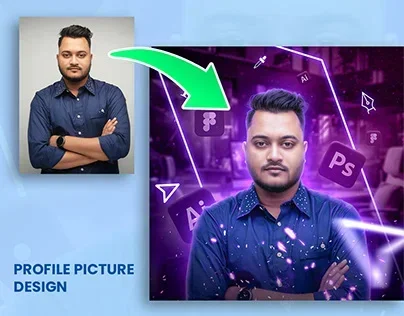
Try This PFP Generator to Design Your Next Profile Picture
A PFP generator helps you create eye-catching profile pictures in minutes without any design skills. Whether you need a profile pic for social media, gaming, or professional use, the right tool makes it simple. This guide walks you through what a PFP generator is, why it matters, and how to pick the best one for your needs.
Your profile picture is your digital handshake. It shows up everywhere, from LinkedIn to Instagram, and even in your favorite online games. A PFP generator makes it super easy to create a profile image that actually represents you. You do not need to be a designer or own expensive software. With the right tool, you can have a professional-looking profile picture in just a few minutes.
More people are turning to AI profile picture tools and online avatar makers to stand out. Whether you are building a personal brand or just want to look great on social media, a profile photo maker does the heavy lifting for you. In this guide, we will break down everything you need to know about using a PFP generator to design your next profile picture.
Key Takeaways
- What a PFP generator is: A simple online tool that helps you design custom profile pictures quickly.
- Why it matters: Your profile picture is the first thing people notice online, and a great one builds trust.
- Key features to look for: AI-powered templates, easy customization, and high-resolution downloads.
- Step-by-step process: Choose a style, add your details, customize, and download your new PFP.
- Common mistakes: Using blurry images, ignoring platform sizes, and picking generic templates.
- Who benefits: Gamers, professionals, social media users, and anyone who wants a polished online presence.
📑 Table of Contents
What Is a PFP Generator?
A PFP generator is a software tool that helps you create profile pictures without needing graphic design skills. These tools use templates, artificial intelligence, and simple drag-and-drop editors to produce custom images. You can find options for everything from digital portraits to cartoon-style avatars.
The best profile picture maker tools offer ready-made designs you can personalize. You pick a template, add your name or face, choose colors, and download the result. Some advanced generators use AI to create unique profile images from scratch based on your preferences.
Types of PFP Generators
Not all picture generators work the same way. Here are the most common types you will find:
- AI-Powered Generators: These use artificial intelligence to create unique profile pics based on your input. You describe what you want, and the AI builds it.
- Template-Based Makers: These offer pre-designed layouts you can customize with your own text, colors, and photos.
- Avatar Builders: These let you build a cartoon or stylized version of yourself by choosing features like hair, eyes, and outfits.
- Headshot Generators: These focus on professional-looking headshots for LinkedIn, resumes, and business profiles.
Why Your PFP Matters More Than You Think
First impressions happen fast. When someone visits your profile, your profile picture is the first thing they see. Studies show that people with a strong online identity get more engagement on social media. A well-designed PFP can make you look trustworthy, professional, and approachable.
Think about it. When you scroll through your feed, do you stop on profiles with blank icons or blurry photos? Probably not. A great social media profile image grabs attention and makes people want to learn more about you. Whether you are a gamer, a freelancer, or a business owner, your profile branding starts with your picture.
Where Your PFP Shows Up
Your profile image appears in more places than you might think:
- Social media platforms like Instagram, Twitter, and Facebook
- Professional networks like LinkedIn
- Gaming profiles on Steam, Discord, and Xbox
- Online forums and community sites
- Email signatures and business cards
Because your picture shows up everywhere, using a profile pic creator to keep it consistent and polished makes a big difference.
How to Choose the Best PFP Generator
Not every picture design tool is created equal. With so many options out there, how do you pick the right one? Here are the key features to look for when choosing a PFP generator.
Features to Look For
- Easy-to-Use Interface: The tool should be simple enough that anyone can use it without a tutorial.
- Customization Options: Look for generators that let you adjust colors, fonts, layouts, and images.
- High-Resolution Downloads: Your profile photo should look sharp on all devices and platforms.
- AI Capabilities: AI-powered tools can create unique designs that match your style perfectly.
- Free or Affordable: Many great avatar makers offer free plans or low-cost options.
- Platform-Specific Sizes: The best tools let you export images in the right dimensions for different sites.
Comparison of Popular PFP Generators
Here is a quick look at what to expect from popular profile picture maker tools:
- Canva: Offers tons of templates and a free tier. Great for beginners who want full creative control.
- Bitmoji: Focuses on cartoon-style avatars. Perfect for casual social media use and messaging apps.
- LinkedIn Profile Photo Editors: Built-in tools that help you create professional headshots quickly.
- AI Headshot Generators: Use machine learning to turn casual photos into polished professional images.
- Dedicated PFP Makers: Standalone tools designed specifically for creating profile pictures with unique styles.
When picking a photo editor for your profile, think about what you need most. If you want something fast and simple, go with a template-based tool. If you want something unique and creative, try an AI-powered profile picture generator.
Step-by-Step: Creating Your Perfect PFP
Using a PFP generator is easier than you might think. Follow these simple steps to design a profile picture you will love.
Step 1: Choose Your Style
Start by deciding what kind of profile image you want. Are you going for a professional look? A fun cartoon style? A minimalist design? Knowing your style helps you pick the right template and tools.
Step 2: Pick a Template
Browse through the available templates in your chosen profile photo maker. Most tools have categories for different styles, occasions, and platforms. Pick one that matches your personality and where you plan to use the picture.
Step 3: Customize Your Design
This is the fun part. Add your name, change the colors, upload your photo if the tool allows it, and adjust the layout. Make it feel like you. A good PFP generator gives you enough flexibility to make the design truly yours without overwhelming you with options.
Step 4: Preview and Adjust
Before you download, preview your profile pic on different devices. Check how it looks on mobile, desktop, and tablet. Make any final tweaks to ensure it looks great everywhere.
Step 5: Download and Upload
Download your new profile picture in the highest quality available. Then upload it to your chosen platforms. Most PFP generators let you export in multiple sizes, so you can grab the right dimensions for each site.
Tips for a Standout Profile Picture
Creating your PFP is only half the battle. Here are some tips to make sure your profile image really shines.
Keep It Simple
Less is more when it comes to profile branding. A clean design with a clear focal point works better than a cluttered image. People should be able to recognize your face or your brand at a glance.
Use High-Quality Images
Blurry or pixelated photos hurt your online identity. Always use sharp, high-resolution images. If you are using a headshot generator, make sure the output looks crisp and professional.
Match Your Platform
Different platforms have different profile image size requirements. A square crop works best for most sites, but some platforms prefer circular images. Check the recommended dimensions before you download your final design.
Stay Consistent
Using the same or similar profile picture across platforms helps people recognize you. It builds trust and strengthens your online persona. If you use a profile pic creator to make a consistent style, you will look more polished and professional everywhere.
Update Regularly
Your digital portrait should reflect who you are right now. If your style has changed or you have a new look, update your PFP. A fresh profile photo shows that you are active and engaged online.
Common Mistakes to Avoid
Even with a great PFP generator, some mistakes can hurt your results. Here is what to watch out for.
- Using Low-Resolution Images: This makes your profile image look blurry and unprofessional.
- Ignoring Platform Sizes: A picture that is cropped wrong can cut off important parts of your design.
- Overloading with Text: Too much text on a small avatar makes it hard to read.
- Picking Generic Templates: If everyone uses the same template, your profile pic will not stand out.
- Forgetting to Preview: Always check how your image looks on different devices before finalizing.
- Using Inappropriate Content: Make sure your online identity matches the tone of the platform you are using.
Avoiding these mistakes helps you get the most out of your profile picture maker and ensures your PFP generator results look their best.
Who Can Benefit from a PFP Generator?
Almost anyone with an online presence can use a PFP generator to improve their profile image. Here are some examples of who benefits the most.
Social Media Users: Whether you are posting on Instagram, TikTok, or Twitter, a great profile picture helps you stand out. A profile pic creator makes it easy to design something fun and unique.
Professionals and Job Seekers: Your LinkedIn profile photo is often the first thing a recruiter sees. Using a headshot generator or a professional profile photo maker can give you an edge in a competitive job market.
Gamers: Your gaming avatar is part of your identity on platforms like Steam, Discord, and Xbox. A dedicated avatar maker helps you create a look that matches your gaming style.
Small Business Owners: Consistent profile branding across social media builds trust with customers. A picture generator helps you create cohesive images for all your business profiles.
Content Creators: Youtubers, bloggers, and influencers need recognizable profile images that reflect their brand. A digital portrait tool makes it easy to create polished, professional-looking pictures.
Final Thoughts
Your profile picture is one of the most important elements of your online identity. It is the first thing people see, and it sets the tone for every interaction you have online. Using a PFP generator takes the guesswork out of creating a great profile image. Whether you need a casual avatar for gaming or a professional headshot for LinkedIn, the right tool makes it simple and fun.
Take some time to explore different profile picture maker options. Find one that fits your style and needs. Experiment with templates, colors, and layouts until you find a design that feels like you. A strong profile pic does more than just look good, it helps you build trust, make connections, and stand out in a crowded online world.
So go ahead, try a PFP generator today, and give your online presence the upgrade it deserves. Your next profile picture could be the one that makes all the difference.
Frequently Asked Questions
What is a PFP generator?
A PFP generator is a software tool that helps you create custom profile pictures quickly and easily. It uses templates, AI, or avatar builders to design a unique profile image without needing design skills.
Do I need design experience to use a PFP generator?
No. Most profile picture makers are built for beginners. They use simple drag-and-drop editors and pre-made templates so anyone can create a professional-looking PFP in minutes.
Can I use a PFP generator for free?
Yes, many profile photo maker tools offer free plans. These usually include a good selection of templates and export options. Some advanced features may require a paid subscription.
What size should my profile picture be?
Profile picture sizes vary by platform. Most sites use square images around 400×400 pixels. A good PFP generator will let you export in multiple sizes to fit different platforms perfectly.
Are AI-generated profile pictures safe to use?
Yes, most AI profile picture tools are safe and private. However, you should always check the privacy policy of the tool you use. Make sure your uploaded photos and personal data are handled securely.
Can I use a PFP generator for business profiles?
Absolutely. Many professionals use a headshot generator or profile photo maker to create polished images for LinkedIn, company pages, and business cards. Consistent profile branding helps build trust with clients and partners.
=== CONCLUSION ===
A PFP generator is one of the easiest ways to improve your online identity and make a strong first impression. Your profile picture is a small detail that has a big impact, and using the right profile picture maker puts you in control of how you appear online. From casual avatars to professional headshots, these tools make it simple to create something that truly represents you.
Now that you know what to look for and how to use a PFP generator effectively, you are ready to design a profile picture that stands out. Pick a tool, choose a style, and create your new profile image today. Your upgraded online presence starts with one great picture.