Create Stunning Embed Generator Content for Your Site
An embed generator helps you add rich content to your website without writing complex code. This guide walks you through everything you need to know about choosing and using the right embed generator tool. You will learn key features, step-by-step methods, and common mistakes to avoid for better site performance.
Adding content to your website can feel like a big challenge. You want your site to look great, load fast, and keep visitors coming back. One of the best ways to do all of that is by using an embed generator. This simple tool lets you pull in videos, social media posts, maps, and other rich content without touching a single line of complex code.
If you have ever stared at a blank page wondering how to make your site more dynamic, you are in the right place. This guide covers everything from the basics to advanced tips. By the end, you will know exactly how to use an embed generator to make your website stand out. Let us dive in.
Think of an embed generator like a magic box. You put in a link or a piece of content, and it gives you back a short code snippet. You paste that code into your website, and the content appears right on your page. It is fast, simple, and incredibly useful for bloggers, business owners, and web designers alike.
Key Takeaways
- What an embed generator is: A tool that creates code snippets to display external content on your site.
- Why it matters: Embedding content boosts engagement, improves SEO, and saves time.
- Key features to look for: Ease of use, customization options, responsive design, and fast loading.
- How to choose the right tool: Consider your site type, budget, and content goals.
- Common mistakes: Over-embedding, ignoring mobile views, and using slow embed codes.
📑 Table of Contents
What Is an Embed Generator?
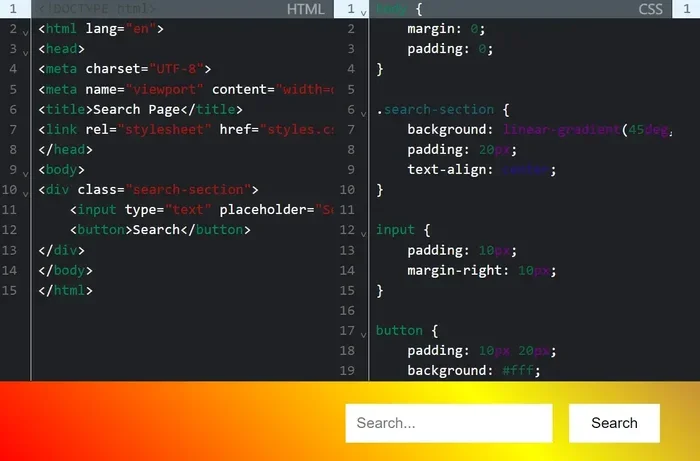
An embed generator is a software tool that creates embed codes for website content. These codes are small pieces of HTML or JavaScript that tell your web browser how to display external content. Instead of manually writing code, the generator does the work for you.
The process is straightforward. You find content you want to show on your site, such as a YouTube video or a Twitter post. You paste the original link into the embed generator tool. The tool creates a code block. You copy that code and paste it into your website’s HTML. The content then appears on your page exactly as it should.
How Embed Generators Work
Most embed generator tools follow a simple three-step process. First, you input the source URL or select the content type. Second, the tool processes the request and generates a custom embed code. Third, you copy the code and place it on your website. Some advanced tools even let you preview the embed before you add it to your page.
The generated code usually includes an iframe or a script tag. An iframe creates a window within your page that displays the external content. A script tag loads content dynamically using JavaScript. Both methods work well, but iframes are more common for simple embeds.
Types of Content You Can Embed
The beauty of an embed generator is how versatile it is. You can embed many different types of content on your site. Here are some popular options:
- Videos: YouTube, Vimeo, and Dailymotion videos are among the most commonly embedded content types.
- Social media posts: Tweets, Instagram posts, Facebook posts, and Pinterest pins all work well.
- Maps: Google Maps embeds are great for showing business locations or event venues.
- Presentations: Slideshare or Google Slides presentations can be embedded for easy viewing.
- Audio players: SoundCloud or Spotify tracks can be embedded for music lovers.
- Forms and widgets: Newsletter sign-up forms, surveys, and interactive calculators.
Each of these content types serves a purpose. Videos keep visitors on your page longer. Social media posts build trust and show your online presence. Maps help local customers find you. The right mix of embedded content can transform a dull page into an engaging experience.
Why You Need an Embed Generator for Your Website
You might wonder why you need a special tool for this. Can you not just copy and paste links? The answer is yes, but an embed generator does so much more. It ensures your content looks clean, loads properly, and fits perfectly within your site design.
Here are the main reasons every website owner should consider using an embed generator:
1. It Saves You Time
Writing embed code from scratch takes time and technical skill. An embed generator does it in seconds. You paste a link, click a button, and get your code. This frees you up to focus on creating great content instead of wrestling with code.
2. It Improves Site Performance
Good embed generators create clean, optimized code. This means your site loads faster. Fast-loading sites rank better on search engines and keep visitors happy. A slow site with heavy, poorly written embed code can hurt your rankings and drive people away.
3. It Boosts Engagement
Embedded content makes your pages more interactive. Visitors can watch videos, scroll through social feeds, and explore maps without leaving your site. This keeps them engaged and encourages them to spend more time on your pages. More engagement often leads to more conversions.
4. It Keeps Your Site Design Consistent
An embed generator lets you control the size, style, and appearance of embedded content. You can match the embed to your site’s colors, layout, and branding. This creates a seamless experience that looks professional and polished.
Top Features to Look For in an Embed Generator Tool
Not all embed generator tools are created equal. Some are simple and basic, while others offer powerful features. Here is what you should look for when choosing a tool:
Ease of Use
The best embed generator tools are simple to use. You should not need to know how to code. Look for a tool with a clean interface, clear instructions, and a straightforward workflow. If you can generate an embed code in under a minute, that is a great sign.
Customization Options
A good tool lets you customize the embed before you add it to your site. You should be able to adjust the width, height, autoplay settings, and display options. Some tools even let you change the color scheme or remove branding from the embedded content.
Responsive Design Support
More than half of all web traffic comes from mobile devices. Your embedded content must look great on phones and tablets. Look for an embed generator that creates responsive codes. These codes automatically adjust to fit any screen size.
Fast Loading Speed
Nobody wants to wait for content to load. A quality embed generator produces lightweight code that does not slow down your site. Check reviews and test the tool yourself to make sure the embeds load quickly.
Broad Platform Compatibility
The tool should support embeds from many popular platforms. YouTube, Twitter, Instagram, Google Maps, Spotify, and Vimeo are just a few examples. The more platforms it supports, the more useful the tool will be for your specific needs.
Security and Reliability
Make sure the embed generator you choose follows web security best practices. The generated code should not introduce vulnerabilities to your site. Stick with well-known tools that have a solid reputation and regular updates.
How to Choose the Right Embed Generator for Your Needs
Choosing the right embed generator depends on your specific situation. Different websites have different needs. Here is a simple way to think about it.
If you run a blog, you might need an embed generator that handles videos and social media posts well. If you run an e-commerce site, you may want a tool that supports product embeds and review widgets. If you manage a local business website, Google Maps embeds and review displays are probably your top priority.
Think about what content you embed most often. Make a short list of your needs. Then compare tools based on the features we discussed above. Most good embed generator tools offer free plans or trials. Take advantage of these to test before you commit.
Also consider the learning curve. Some tools are designed for beginners, while others cater to advanced users. If you are new to web content, start with a simple, beginner-friendly tool. You can always upgrade to a more advanced option later as your skills grow.
Free vs Paid Embed Generators
Many embed generator tools offer free versions with basic features. These are perfect for getting started. Paid versions usually include more customization options, faster loading, priority support, and advanced analytics. For most small to medium websites, a free tool is more than enough to get the job done.
Step-by-Step Guide to Using an Embed Generator
Now that you understand the basics, let us walk through the actual process of using an embed generator. Follow these steps to add rich content to your website.
Step 1: Find the Content You Want to Embed
Start by locating the content you want to display on your site. This could be a YouTube video, a social media post, a Google Map, or any other supported content type. Copy the URL or link of that content. You will need it for the next step.
Step 2: Paste the Link into the Embed Generator
Open your chosen embed generator tool. Look for the input field or paste box. Drop your copied link into that field. Some tools let you select the content type from a dropdown menu before you paste the link. This helps the tool generate the most accurate code.
Step 3: Customize Your Embed Settings
Most tools offer customization options before generating the code. You can set the width and height of the embed. You can choose whether the video auto-plays or starts muted. You can decide if the embed should show controls or hide certain elements. Take a moment to adjust these settings to match your site’s design.
Step 4: Generate the Embed Code
Once you are happy with your settings, click the generate button. The embed generator will create a code snippet for you. This code is usually an iframe or a script tag. It will look something like a block of text that starts with <iframe or <script.
Step 5: Copy the Code
Click the copy button to grab the generated code. Make sure you copy the entire code block. A missing bracket or tag can cause the embed to fail. If you are unsure, paste the code into a plain text editor first to check it is complete.
Step 6: Paste the Code into Your Website
Now go to your website’s content editor or HTML editor. Find the page or post where you want the embedded content to appear. Paste the code into the appropriate spot. Save your changes and preview the page to make sure everything looks right.
If the embed does not appear immediately, do not worry. Sometimes it takes a few minutes for the content to load. Check that you pasted the code correctly and that your website supports the type of embed you are using.
Step 7: Test on Multiple Devices
Before you publish, test the embed on different devices. Check how it looks on a desktop computer, a tablet, and a smartphone. Make sure the content is responsive and displays properly on all screen sizes. This final step ensures your visitors have a great experience no matter how they access your site.
Common Mistakes to Avoid with Embed Generators
Using an embed generator is easy, but there are a few common pitfalls to watch out for. Avoiding these mistakes will save you headaches and keep your site running smoothly.
1. Embedding Too Much Content on One Page
It can be tempting to embed videos, social feeds, maps, and widgets all on the same page. But too many embeds slow down your site and overwhelm your visitors. Be selective. Choose the content that adds the most value and embed that. Quality matters more than quantity.
2. Ignoring Mobile Responsiveness
Not all embed codes look good on mobile devices. Some embeds are too wide or display incorrectly on smaller screens. Always test your embeds on mobile before publishing. Choose an embed generator that creates responsive codes, and adjust your settings accordingly.
3. Using Outdated or Broken Links
Embedding content from a link that no longer works creates a blank space on your page. This looks unprofessional and frustrates visitors. Before you embed anything, make sure the source link is active and the content is still available. Check your embeds periodically to ensure they are still working.
4. Overlooking Page Load Speed
Every embed you add to your page adds to the load time. Heavy embeds, especially auto-playing videos, can significantly slow down your site. This hurts both your user experience and your search engine rankings. Use embeds sparingly and choose lightweight options when possible.
5. Forgetting to Check Security
Some embed codes can introduce security risks to your site. They may load external scripts that track your visitors or expose your site to vulnerabilities. Only use trusted embed generator tools from reputable providers. Keep your tools and plugins updated to stay protected.
Quick Tips for Better Embeds
Here are a few quick tips to get the most out of your embed generator:
- Always preview your embed before publishing.
- Keep your embed codes in a text file for easy reuse.
- Use lazy loading for embeds that appear below the fold.
- Update your embeds regularly to ensure content stays current.
- Choose embeds that add real value to your visitors.
Conclusion
An embed generator is one of the most useful tools you can add to your website toolkit. It makes adding rich content quick, easy, and professional. Whether you are embedding videos, social media posts, maps, or interactive widgets, the right embed generator saves you time and improves your site.
The key is to choose a good tool, follow best practices, and avoid common mistakes. Start with the basics, experiment with different content types, and gradually build your skills. Over time, you will create a website that is engaging, fast, and full of rich content that keeps visitors coming back.
Take action today. Pick an embed generator tool that fits your needs and start adding great content to your site. Your visitors will thank you for it. The more value you provide through embedded content, the more successful your website will become.
Frequently Asked Questions
What is an embed generator?
An embed generator is a tool that creates code snippets for displaying external content on your website. You paste a link, and the tool generates the embed code you need. It saves time and removes the need to write code manually.
Do I need coding skills to use an embed generator?
No, you do not need any coding skills. Most embed generator tools are designed for beginners. You simply paste a link, adjust a few settings, and copy the code. The tool handles all the technical work for you.
Is using an embed generator free?
Many embed generator tools offer free plans with basic features. These are usually enough for most websites. Paid plans unlock more advanced features like extra customization, faster support, and analytics. You can start free and upgrade later if needed.
Can embed generators slow down my website?
Poorly optimized embeds can slow down your site. However, a good embed generator creates lightweight, clean code that does not hurt your page speed. Always test your embeds and use them sparingly to keep your site fast.
What types of content can I embed on my site?
You can embed videos, social media posts, maps, audio players, presentations, forms, and more. Most embed generator tools support popular platforms like YouTube, Twitter, Instagram, Google Maps, and Spotify. The options are nearly endless.
How do I make sure my embeds work on mobile devices?
Choose an embed generator that creates responsive codes. Test your embeds on different screen sizes before publishing. Adjust the width and height settings to ensure the content displays properly on phones and tablets. Always preview before you go live.