Goblin Tools Explained What They Are and Why You Need Them
Goblin Tools is a free, open-source productivity suite designed to help people break down overwhelming tasks into manageable steps. It includes a collection of small, focused tools like Magic To-Do, Tone Checker, and a built-in timer that make daily planning simpler. People with ADHD and executive dysfunction especially benefit from its intuitive, low-friction design. The entire suite runs in your browser and requires no installation, making it incredibly accessible. If you struggle with starting tasks or staying organized, Goblin Tools might be the solution you have been looking for.
Key Takeaways
- What Goblin Tools Is: A free, open-source suite of micro-productivity tools built to simplify task management and reduce cognitive load.
- Who It Helps: People with ADHD, executive dysfunction, and anyone who feels overwhelmed by large tasks or daily planning.
- Key Features: Magic To-Do breaks tasks into small steps, Tone Checker helps with communication, and the Timer keeps you focused.
- Easy to Use: No installation needed. Everything runs in the browser with a clean, minimal interface.
- Completely Free: Goblin Tools is open source and available to everyone at no cost.
- Builds Better Habits: By lowering the barrier to starting tasks, it supports consistent habit building and improved organization skills.
📑 Table of Contents
- What Are Goblin Tools?
- Who Can Benefit from Goblin Tools?
- Key Features That Make Goblin Tools Stand Out
- How Goblin Tools Boosts Your Daily Productivity
- Getting Started with Goblin Tools
- Tips for Getting the Most Out of Goblin Tools
- Common Mistakes People Make with Productivity Tools
- Expert Insights on Why Simple Tools Work Best
- Key Takeaways
What Are Goblin Tools?
Have you ever stared at a huge to-do list and felt completely frozen? You know the feeling. There are so many things to do that you do not even know where to start. That is exactly the problem Goblin Tools was built to solve.
Goblin Tools is a free, open-source collection of small productivity apps designed to help you tackle tasks one step at a time. Think of it as a set of tiny digital helpers that live right in your browser. Each tool does one specific job really well, and together they form a powerful productivity system.
The project was created by a developer who wanted to build tools that work with how our brains actually function. Instead of demanding perfection or complex setups, Goblin Tools meets you where you are. Whether you are neurodivergent, dealing with executive dysfunction, or just someone who struggles with daily planning, these tools are made for you.
The best part? You do not need to download anything. There is no account to create, no subscription to pay for, and no steep learning curve. You open the site, pick a tool, and start working. It is that simple.
The Story Behind Goblin Tools
Goblin Tools was born from a very personal need. The creator wanted a set of simple digital helpers that could reduce the mental effort required to get things done. The name “Goblin” might sound a bit playful, but it captures the idea perfectly. These are small, clever tools that do the heavy lifting for you. They handle the boring, overwhelming parts of task management so your brain can focus on actually doing the work.
The entire suite is open source, which means anyone can use it, contribute to it, or even modify it. This community-driven approach keeps the tools free and constantly improving. The developer regularly updates the suite based on user feedback, making Goblin Tools a living project that evolves with its users’ needs. It is one of the most beloved free apps in the productivity space right now, and for good reason.
What Is Included in the Suite?
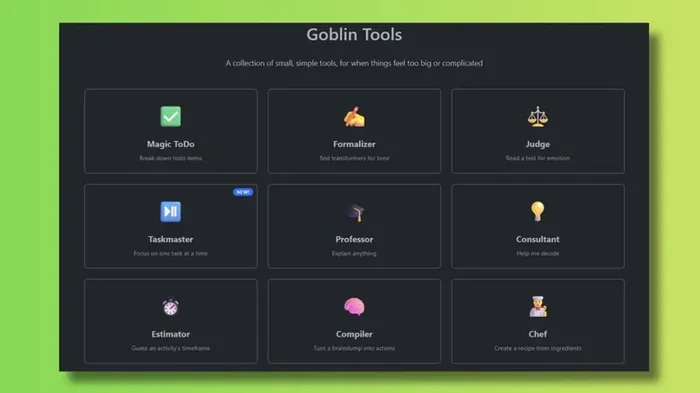
Goblin Tools comes with several individual utilities, each targeting a different part of your workflow. Here is a quick look at what is inside:
- Magic To-Do: This is the star of the show. You type in a big, vague task and it breaks it down into tiny, actionable steps. Instead of “clean the house,” you get “pick up clothes from the floor,” “wipe the kitchen counter,” and “take out the trash.”
- Tone Checker: Ever worried about how your email or message sounds? This tool analyzes your text and tells you the tone. It is incredibly helpful for people who struggle with social communication or want to double-check their writing before hitting send.
- Timer: A simple, clean countdown timer that helps you stay focused. It works great with the Pomodoro technique or any time-blocking method you prefer.
- Trie: A visual file structure tool that helps you understand and organize your folders and files.
- Sort: A list-sorting utility that helps you organize tasks or items by priority or category.
- Calndr: A minimal calendar view for quick date and schedule checks.
- How Do I?: A tool that helps you figure out what your very next step should be when you feel stuck.
- Chess: A built-in chess game for mental breaks. Because rest matters too.
Each of these tools is lightweight and focused. There is no bloat, no clutter, and no unnecessary features. Just simple, effective productivity tools that get out of your way and let you do the work.
Who Can Benefit from Goblin Tools?
While Goblin Tools was designed with neurodivergent users in mind, anyone can benefit from using it. The tools are universally helpful because they address universal struggles: getting started, staying organized, and managing your time. The beauty of this suite is that it does not require a specific diagnosis or label to be useful. If your brain works in a way that makes starting tasks difficult, these tools can help.
People with ADHD and Executive Dysfunction
For people with ADHD, the biggest challenge is often not the work itself but getting started. The brain wants to do the task, but the signal to begin gets lost in a storm of distractions and overthinking. Goblin Tools cuts through that noise. Magic To-Do, for example, takes a daunting task and turns it into a clear, step-by-step path. This reduces cognitive load and makes starting feel possible instead of impossible.
The executive dysfunction that comes with ADHD, anxiety, depression, or other conditions can make even simple decisions feel paralyzing. Should I clean the kitchen first or do the laundry? Goblin Tools removes that decision fatigue by giving you a clear sequence of small, doable actions. You just follow the steps. One at a time. That is it. This approach to task management is what sets Goblin Tools apart from other apps on the market.
Anyone Struggling with Productivity
You do not need to have a diagnosis to benefit from Goblin Tools. If you have ever felt overwhelmed by a long to-do list, struggled with procrastination, or found it hard to maintain a daily routine, these tools can help. They are especially useful for people who work from home, students managing multiple projects, or anyone juggling a busy schedule.
The task management approach used by Goblin Tools is rooted in a simple but powerful idea: big things become manageable when you break them into small pieces. This principle applies to everyone, regardless of how your brain works. The suite also supports better time management by giving you clear, structured ways to approach your work. Whether you are a student, a freelancer, or a full-time employee, Goblin Tools fits into your life naturally.
Key Features That Make Goblin Tools Stand Out
There are many productivity apps and digital tools out there. What makes Goblin Tools different? It is the philosophy behind every single feature. Let us look at what makes this suite special.
Magic To-Do: Your Best Friend for Task Breakdown
Magic To-Do is the crown jewel of the suite. You type in something broad like “plan a birthday party” and the tool generates a list of specific, bite-sized actions. It might suggest “make a guest list,” “set a budget,” “choose a venue,” and “send invitations.”
This task breakdown approach is incredibly powerful. Instead of staring at one big scary item on your list, you see a clear path forward. Each small step feels achievable, which builds momentum. You finish one step, check it off, and move to the next. That sense of progress is incredibly motivating. For people who struggle with motivation or habit building, this is a game changer.
Here is how to get the most out of Magic To-Do:
- Be as specific as possible when entering your main task.
- Review the generated steps and adjust them to fit your situation.
- Start with the easiest step to build early momentum.
- Use it every morning to plan your day before you start working.
Tone Checker: Improve Your Communication
Writing an email or message can be stressful, especially if you worry about coming across the wrong way. The Tone Checker in Goblin Tools analyzes your text and gives you feedback on how it might be perceived. It is like having a quick, judgment-free communication coach right at your fingertips.
This feature is particularly valuable for people who experience social anxiety or who want to be more intentional in their written communication. It helps you catch unintended tones before they cause misunderstandings. Over time, using the Tone Checker can also help you develop better organization skills in your writing. Clear communication leads to fewer misunderstandings, less stress, and smoother workflows.
The Timer: Stay Focused Without Burnout
Focus can be hard to maintain, especially for people with ADHD. The built-in Timer in Goblin Tools keeps things simple. You set a duration, start it, and work until the timer goes off. It is a straightforward way to implement time-blocking or the Pomodoro technique without needing a separate app.
Using a timer creates a sense of urgency that can help overcome motivation barriers. When you know the clock is ticking, it becomes easier to push through the initial resistance of starting a task. And when the timer rings, you get a built-in signal to take a break, which helps prevent burnout. This kind of structured focus tool is essential for anyone trying to build a sustainable workflow.
How Goblin Tools Boosts Your Daily Productivity
The real value of Goblin Tools shows up in your daily life. Here is how these tools translate into real productivity gains.
First, Goblin Tools reduces the mental energy needed to plan your day. Instead of spending 20 minutes agonizing over your to-do list, you can type in your tasks and let Magic To-Do organize them for you. That saved mental energy goes straight toward actually doing the work. Less planning, more doing. That is the whole point.
Second, the suite helps you maintain a consistent daily routine. When tasks feel manageable and your planning process is simple, you are far more likely to stick with it day after day. Consistency is the secret sauce of productivity, and Goblin Tools makes consistency easy. You build momentum through small wins, and those small wins add up over time.
Third, the tools support habit building by lowering the barrier to entry. Starting a new habit is hard enough without also having to set up complex systems or learn new software. Goblin Tools removes all of that friction. You open the site, use the tool, and move on with your day. The less resistance there is, the more likely you are to keep going.
Finally, the suite helps you manage cognitive load throughout the day. Every decision you make drains a little bit of mental energy. By handling the planning and organizing for you, Goblin Tools preserves that energy for the tasks that actually matter. This is especially important for people with neurodivergent minds who already expend more energy on processing and filtering information.
Getting Started with Goblin Tools
Starting with Goblin Tools takes less than one minute. Here is a simple step-by-step guide to get you up and running.
- Visit the Goblin Tools website in your browser.
- Explore the tools available on the main page.
- Start with Magic To-Do and type in one task that has been weighing on you.
- Review the generated steps and pick the first one to complete.
- Use the Timer to set a focused work session for that step.
- Check off the step and move to the next one.
- Repeat daily and explore other tools as you get comfortable.
That is all there is to it. No accounts, no settings to configure, no tutorials to watch. You can start seeing benefits immediately, which is one of the reasons Goblin Tools has become so popular among people looking for simple focus tools and planning tools. The entire experience is designed to be frictionless from the very first click.
Tips for Getting the Most Out of Goblin Tools
To really make Goblin Tools work for you, try these practical tips:
- Use it every morning. Spend five minutes each morning breaking down your day. This sets a clear intention and gives your day structure.
- Pair it with a timer. Use the built-in Timer for each small task. This creates a gentle pace and keeps you from spending too long on any single step.
- Check your tone before sending important messages. The Tone Checker is great for work emails or sensitive conversations. A quick check can save you from miscommunication.
- Keep it visible. Bookmark the Goblin Tools site so it is always one click away. The easier it is to access, the more likely you are to use it.
- Do not overthink it. The whole point of Goblin Tools is simplicity. Do not spend more time planning than doing. Use the tools, trust them, and move forward.
- Take breaks with Chess. The built-in Chess game is not just for fun. Short mental breaks improve focus and creativity when you return to work.
Common Mistakes People Make with Productivity Tools
Even the best tools can fall flat if you use them the wrong way. Here are a few common pitfalls to avoid when using Goblin Tools or any productivity software:
- Overcomplicating your setup. Do not try to use every single tool at once. Start with Magic To-Do and the Timer. Add more tools as you build confidence.
- Skipping the task breakdown. It might be tempting to just write a big task and leave it at that. But the real magic happens when you break it down into small steps.
- Expecting instant results. Like any habit, using productivity tools effectively takes practice. Give yourself a few weeks to adjust before judging whether it works.
- Using it as a crutch instead of a tool. Goblin Tools helps you do the work, but it does not do the work for you. The goal is to build your own workflow and organization skills over time.
Expert Insights on Why Simple Tools Work Best
Productivity experts often emphasize that the simplest tools are the ones people actually use. Complex systems with dozens of features often end up abandoned because they require too much setup and maintenance. Goblin Tools aligns perfectly with this philosophy. It strips away everything unnecessary and leaves only what helps you get things done.
Research in behavioral psychology shows that reducing friction around task initiation is one of the most effective ways to improve productivity. When the path from “I should do this” to “I am doing this” is short and clear, people are far more likely to follow through. Goblin Tools shortens that path dramatically. Each tool removes a layer of friction, making it easier to start, stay focused, and finish what you started.
For people with neurodivergent minds, this friction reduction is especially important. The brain already processes information differently, and adding complex systems on top of that can make things worse, not better. Simple, clean, focused tools like those in the Goblin Tools suite respect how your brain works instead of fighting against it.
Many users report that within just a few days of using Goblin Tools, they feel less overwhelmed and more in control of their daily routine. The combination of task breakdown, time management, and communication support creates a holistic productivity system that is greater than the sum of its parts. It is not just another app on your phone. It is a genuine productivity solution that fits into your life.
Key Takeaways
- Goblin Tools Is a Free Suite: It is completely open source and costs nothing to use. No subscriptions, no hidden fees, no catch.
- It Breaks Tasks Down: Magic To-Do turns overwhelming projects into small, actionable steps that are easy to start and finish.
- It Supports Multiple Needs: From ADHD and executive dysfunction to general productivity struggles, the tools address real challenges people face every day.
- No Installation Required: Everything runs in your browser. You can start using it immediately from any device.
- It Reduces Cognitive Load: By handling the planning and organizing, Goblin Tools frees up mental energy for actual work.
- It Builds Better Habits: Consistent use helps you develop stronger organization skills and a more reliable daily routine.
- Community Driven: Being open source means the tools improve constantly based on real user feedback.
Frequently Asked Questions
What exactly are Goblin Tools?
Goblin Tools is a free, open-source collection of small productivity applications designed to help people manage tasks, stay focused, and reduce overwhelm. The suite includes tools like Magic To-Do, Tone Checker, Timer, and several others, all built to simplify your daily workflow and make starting easier.
Who created Goblin Tools?
The suite was created by a developer who wanted to build simple, effective tools for people who struggle with task initiation and organization. It is an open-source project, meaning anyone can use it for free and the community can contribute to its ongoing development and improvement.
Is Goblin Tools only for people with ADHD?
No. While Goblin Tools was designed with neurodivergent users and people with executive dysfunction in mind, anyone can benefit from it. If you struggle with procrastination, task management, or staying organized, these tools can help you get more done with less stress and mental effort.
Do I need to download or install anything?
Not at all. Goblin Tools runs entirely in your web browser. There is no software to install, no account to create, and no updates to manage. Just visit the website and start using the tools right away from any device.
Can I use Goblin Tools on my phone?
Yes. Since Goblin Tools is a web-based suite, it works on any device with a browser, including smartphones and tablets. You can access your tools on the go, making it easy to stay productive wherever you are and maintain your daily routine even when you are away from your computer.
Are there any costs or hidden fees with Goblin Tools?
Absolutely not. Goblin Tools is completely free and open source. There are no premium tiers, no hidden subscriptions, and no paywalls. The tools are built to be accessible to everyone, which is a big part of why they have gained such a loyal following.
=== CONCLUSION ===
Goblin Tools is one of the most thoughtful and accessible productivity tools available today. Whether you live with ADHD, deal with executive dysfunction, or simply want a simpler way to manage your tasks, this free suite delivers real value. The combination of Magic To-Do, Tone Checker, Timer, and the other utilities creates a complete system that supports you from planning to execution.
What makes Goblin Tools truly special is its philosophy. It does not try to overwhelm you with features. Instead, it strips productivity down to what matters most: helping you take the next small step. In a world full of complex apps and demanding workflows, sometimes the simplest solution is the best one.
If you have been searching for a way to reduce overwhelm, build better habits, and regain control of your daily routine, give Goblin Tools a try. It is free, it is simple, and it just might change the way you approach your work and your day. Start with one task today and see how breaking it down can transform your entire workflow.