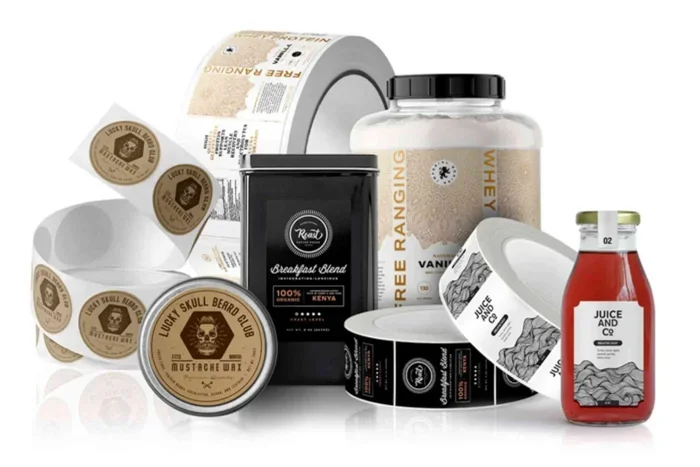
The Best Label Generator for Creating Custom Labels Fast
A label generator lets you design, customize, and print professional labels in minutes without needing design experience. Whether you need product labels, shipping labels, or address labels, the right tool saves time and money. This guide covers the best options, key features, and step-by-step tips to get started today.
A label generator is a software tool that helps you create custom labels quickly and easily. Whether you run a small business, manage inventory, or need address labels for your mail room, a good label maker can change the way you work. Instead of spending hours designing labels from scratch, you can pick a template, add your text, and print in minutes.
In this guide, we will walk you through everything you need to know about label generator tools. We will cover what they are, what features matter most, the best options available, and how to get started. By the end, you will know exactly which tool fits your needs.
The world of custom label design has changed a lot in recent years. Old-school methods involved expensive design software and printing specialists. Today, anyone with a computer and a printer can produce sharp, professional-looking labels. Let us dive in.
Key Takeaways
- Time Savings: A label generator cuts design time from hours to minutes with pre-built templates.
- Cost Effective: You avoid hiring designers or buying expensive software.
- Customization Options: Most tools offer logos, barcodes, QR codes, and variable data fields.
- Wide Compatibility: Top generators work with popular printers and label sheets like Avery.
- User-Friendly: No design skills needed — drag, drop, and print.
- Bulk Printing: Create hundreds of labels in one go for inventory or shipping.
📑 Table of Contents
What Is a Label Generator and Why Do You Need One?
A label generator is a digital tool — often web-based or desktop software — that helps you design and print labels. These tools come with built-in templates, fonts, graphics, and layout options. You do not need to be a graphic designer to use them.
Think of a label creator like a digital stencil kit. You choose a shape, add your text, insert a logo, and the tool formats everything to fit perfectly on a label sheet. Some advanced tools even let you generate barcode labels and QR code labels automatically.
Who Benefits from Using a Label Generator?
Many different people and businesses use label design software every day:
- Small business owners who need product labels for their goods.
- E-commerce sellers who print hundreds of shipping labels daily.
- Warehouse managers who organize inventory with barcode labels.
- Event planners who create name badges and seating labels.
- Home users who need address labels for personal mail or school projects.
No matter who you are, a label generator can save you significant time and frustration. Instead of hand-writing labels or wrestling with complex design programs, you get a simple, streamlined process.
Why Traditional Label Design Falls Short
Before digital label printing tools existed, people relied on manual methods. You would type labels on a typewriter, cut them out by hand, or buy pre-printed labels in limited styles. These approaches were slow, inflexible, and often looked unprofessional.
Modern label maker software solves all of these problems. You get unlimited customization, professional fonts, and the ability to print on demand. If you need to change a single word or update a price, you can do it instantly.
Top Features to Look for in a Label Generator
Not all label design tools are created equal. When you are shopping for the right one, look for these essential features.
Template Library
A good label generator should offer a wide variety of templates. Look for tools that include templates for product labels, shipping labels, name tags, barcodes, and more. The more options you have, the faster you can get started.
Many popular tools support Avery label templates, which is a huge plus. Avery is one of the most common label sheet brands, so compatibility matters a lot.
Custom Fonts and Graphics
You want a tool that lets you upload your own logos and choose from a broad font library. This way, your labels match your brand identity. The best label formatting tools let you adjust colors, spacing, and alignment with just a few clicks.
Barcode and QR Code Support
If you are labeling products or inventory, you need barcode label generation built right in. The best tools let you type in a product number and automatically generate a scannable barcode. QR code support is also valuable for linking labels to websites or digital product information.
Variable Data Printing
This feature lets you print hundreds of unique labels in one batch. For example, you can print address labels where each one has a different name and address. This is a game-changer for mailing campaigns and product packaging.
Print Preview and Alignment Tools
Nothing is worse than printing labels that are misaligned. A quality label layout editor gives you a print preview so you can check everything before you hit print. Alignment guides and grid overlays help you get pixel-perfect results every time.
Compatibility with Common Printers
Make sure the label creator app you choose works with your printer. Most modern tools support inkjet and laser printers. Some even support thermal printers, which are common in warehouses and retail environments.
Best Label Generators for Different Needs
There are many label printing software options out there. Let us break down some of the best choices based on different use cases.
Best for Small Businesses
If you run a small business and need a product label maker, look for a tool that offers professional templates and brand customization. Tools like Canva, Avery DesignPro, and NiceLabel are popular choices. They give you enough power without overwhelming you with features you do not need.
Canva, for example, has a free label design tool with thousands of templates. You can add your logo, change colors, and print directly from your browser. It is one of the easiest ways to create beautiful labels without any design experience.
Best for E-Commerce and Shipping
Online sellers need a shipping label generator that integrates with platforms like Shopify, Amazon, and Etsy. Tools like ShipStation and Pirate Ship handle label creation and printing in one workflow. They auto-fill addresses, calculate postage, and generate scannable barcodes automatically.
These platforms save enormous amounts of time if you ship more than a few orders per day. The bulk label printing feature alone is worth the investment.
Best for Industrial and Warehouse Use
For large-scale operations, you need a heavy-duty label branding software solution. NiceLabel and BarTender are industry leaders in this space. They handle complex label formats, integrate with inventory systems, and support thermal printers.
These tools are more expensive, but they pay for themselves quickly in a busy warehouse. You can generate thousands of labels per day with consistent quality and accuracy.
Best Free Options
If you are on a tight budget, several free digital label maker tools work well. Canva offers a free tier with solid label templates. Avery also provides a free online design tool that works with their label sheets. LibreOffice has a labels and business cards wizard that handles basic needs at no cost.
Free tools may lack advanced features like variable data printing or barcode generation, but they are perfect for simple projects and personal use.
How to Create Custom Labels in Minutes
Using a label generator is simpler than you might think. Here is a step-by-step walkthrough of the process.
Step 1: Choose Your Label Generator
Pick a tool that fits your needs. Consider the types of labels you need, your budget, and your printer type. Most tools offer free trials, so you can test them before committing.
Step 2: Select a Template
Browse the template library and pick a design that matches your purpose. If you are making product labels, choose a product label template. If you need address labels, pick an address label template. Most tools let you filter by size, shape, and brand.
Step 3: Customize Your Design
Now comes the fun part. Replace the placeholder text with your own content. Add your logo, adjust the font, and choose your brand colors. Keep it clean and readable. A cluttered label looks unprofessional, so leave plenty of white space.
Use the label layout editor to fine-tune positioning. Make sure your text and graphics sit exactly where you want them on the label.
Step 4: Add Barcodes or QR Codes (If Needed)
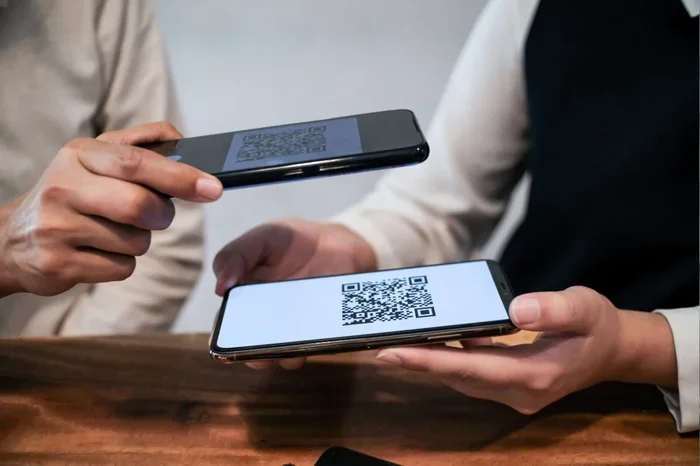
If your labels need scannable codes, use the built-in barcode or QR code generator. Simply enter the data, and the tool creates the code for you. Test the code with your phone to make sure it scans correctly before printing a full batch.
Step 5: Print a Test Sheet
Always print a test sheet first. Check alignment, colors, and readability. Adjust settings if needed before printing your final batch. This one simple step saves wasted label sheets and frustration.
Step 6: Print and Apply
Once you are happy with the test print, load your label sheets and print the full batch. Peel and apply your labels. Congratulations — you just created professional labels in minutes!
Quick Tips for Better Label Designs
- Use high-resolution logos to avoid blurry prints.
- Keep text large enough to read from a comfortable distance.
- Choose contrasting colors for text and background.
- Save your designs as templates for future use.
- Always test-print on the same label sheets you plan to use for the final batch.
Common Mistakes to Avoid When Using a Label Generator
Even with a great label generator, mistakes can happen. Here are the most common ones and how to avoid them.
Skipping the Test Print
Never skip the test print. Templates can shift slightly depending on your printer model and label sheet brand. A quick test print saves time, paper, and ink.
Using Low-Quality Images
Logos and graphics that look fine on screen may appear blurry or pixelated when printed. Always use high-resolution images (at least 300 DPI) for the best results.
Ignoring Label Sheet Compatibility
Not all label sheets are the same. Avery, Online Labels, and Sticker Mule all have slightly different dimensions. Make sure your label design tool matches the exact specifications of your label sheets.
Overcomplicating the Design
More is not always better. A clean, simple label often looks more professional than a cluttered one. Stick to two or three fonts, use plenty of white space, and keep your message clear.
Forgetting About Adhesive Quality
The design is only half the battle. The adhesive on your label matters too. For outdoor use or cold environments, choose label sheets with strong, weather-resistant adhesive. Cheap adhesive can cause labels to peel off or fall apart.
Final Thoughts on Choosing the Right Label Generator
Finding the right label generator does not have to be complicated. Start by identifying your needs. Are you printing product labels, shipping labels, or address labels? Do you need barcode support or bulk printing capabilities?
Once you know what you need, pick a tool that matches. Most of the best options offer free trials or free tiers, so you can test them risk-free. Focus on ease of use, template variety, and print quality.
A good label maker software pays for itself quickly. You save time, reduce errors, and present a professional image to your customers. Whether you are a solo entrepreneur or managing a large warehouse, the right tool makes a real difference.
Take the time to explore your options today. The perfect label design tool is out there, and it can transform the way you work. Start designing your first custom label and see how easy it can be.
If you are running a business that relies on label printing alongside other equipment, you may also want to consider your power setup. For instance, if you operate in a location with unreliable electricity, having a reliable backup power source matters. You might want to look into what size generator you need to keep your equipment running smoothly, such as checking out resources on whole house generator sizing to ensure your workspace stays powered during outages.
Similarly, understanding your fuel costs is important when running any generator-powered equipment for extended periods. You can learn more about fuel consumption at how much gas does a generator use to plan your budget accordingly.
Finally, if you are setting up a dedicated workspace for your label printing operations, proper electrical wiring is essential for safety. Check out how to wire a generator to a breaker box for guidance on safe and compliant setup.
Conclusion
A label generator is one of the most practical and time-saving tools available for businesses and individuals alike. Whether you need custom label design for products, shipping, or personal use, the right tool makes the process fast, easy, and affordable. With templates, barcode support, and bulk printing features, you can create professional labels in minutes.
Take action today. Explore the tools mentioned in this guide, pick the one that fits your needs, and start creating your first custom labels. You will wonder how you ever managed without one.
Frequently Asked Questions
What is the best free label generator available?
Canva and Avery DesignPro both offer excellent free tiers that work well for most users. They provide a wide range of templates and basic customization features. For simple projects and personal use, these free options are hard to beat.
Can a label generator create barcode labels?
Yes, most modern label generator tools include built-in barcode and QR code generation. You simply enter your data, and the tool creates a scannable code. This feature is essential for inventory management and product labeling.
Do I need special software to use a label generator?
No. Many label design tools are web-based and work directly in your browser. You do not need to install anything. Some tools offer downloadable desktop versions for users who prefer offline access.
Can I use a label generator with my existing printer?
Absolutely. Most label printing software works with standard inkjet and laser printers. Just make sure you have the correct label sheets for your printer type. Thermal printers are also supported by many industrial-grade tools.
How do I ensure my labels print in the correct size?
Always match your label generator settings to the exact dimensions of your label sheets. Use the print preview feature to check alignment before printing a full batch. Printing a single test label first is the best way to avoid wasted materials.
Can a label generator handle bulk printing?
Yes, many tools support bulk label printing with variable data. You can import a spreadsheet of names, addresses, or product numbers and print hundreds of unique labels in one session. This is incredibly useful for mailing campaigns and product packaging.