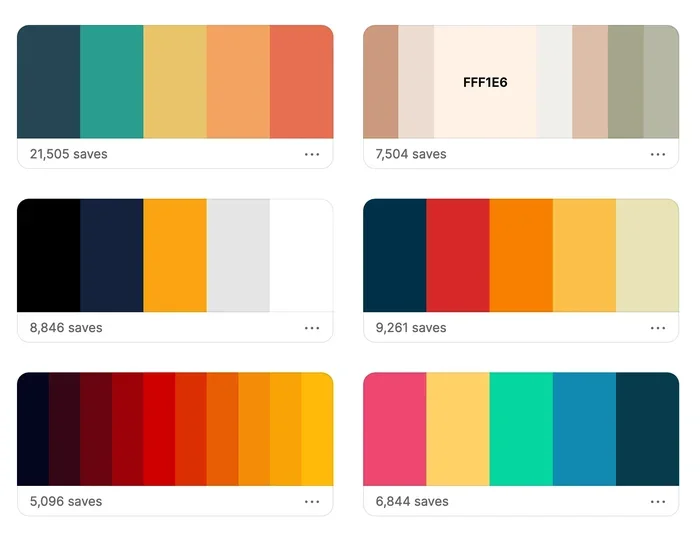
Adobe Color Palette Generator for Stunning Design Ideas
The Adobe Color Palette Generator is a powerful free tool that helps designers create beautiful color schemes in seconds. Whether you are building a website, designing a logo, or working on a digital project, this tool takes the guesswork out of choosing colors. You will learn how to use it, why it matters, and tips for creating palettes that truly pop.
Design is all about color. The right color palette can make a website feel warm and inviting. It can make a brand feel bold and modern. It can turn a boring layout into something people remember. But finding the perfect combination of hues is not always easy. That is where the adobe color palette generator comes in. It is a free, powerful tool that takes the hard work out of choosing colors. Whether you are a beginner or a seasoned designer, this tool can level up your work in minutes.
So what exactly is the adobe color palette generator, and why should you care? In simple terms, it is an online tool from Adobe that helps you build color schemes for any project. You pick a base color, choose a harmony rule, and the tool generates a full palette in real time. It also lets you extract colors from photos, save your favorites, and export the codes you need. Think of it as your personal color assistant that never runs out of ideas.
In this article, we will walk through everything you need to know. We will cover how the tool works, the different color rules it offers, practical tips for getting the best results, and common mistakes to avoid. By the end, you will feel confident creating color combinations that look professional and polished every single time.
Key Takeaways
- Easy to use: The adobe color palette generator is free and built right into Adobe Creative Cloud.
- Multiple color rules: You can explore complementary, analogous, triadic, and other color harmony rules instantly.
- Extract colors from images: Upload any photo and the tool pulls out a ready-made palette.
- Save and share: Store your favorite palettes and export hex codes, RGB values, and more.
- Great for all skill levels: Beginners and professionals alike benefit from its intuitive interface.
- Boosts creativity: It sparks new ideas and helps you break out of color rut.
- Works across devices: Access it from your browser or through Adobe desktop apps.
📑 Table of Contents
- What Is the Adobe Color Palette Generator?
- How Does the Adobe Color Palette Generator Work?
- Color Harmony Rules Explained
- Extracting Colors From Images
- Why Color Palette Generators Matter for Design
- Common Mistakes to Avoid
- Comparing Adobe Color Palette Generator With Other Tools
- Final Thoughts on the Adobe Color Palette Generator
What Is the Adobe Color Palette Generator?
The adobe color palette generator is a web-based tool found at color.adobe.com. It is part of the Adobe Creative Cloud ecosystem. You do not need to pay for it or download anything special. All you need is a free Adobe account and a web browser. From there, you can start building custom color schemes right away.
This tool is built around color theory, which is the science and art of how colors work together. It uses established principles like the color wheel to suggest harmonious combinations. Instead of guessing which colors go well together, you get science-backed suggestions at your fingertips. The interface is clean and intuitive. You see a live preview of your palette as you make changes. You can swap out colors, adjust shades, and experiment until you find the perfect match.
One of the standout features is the ability to extract colors from images. You upload a photo, and the tool analyzes it to pull out the dominant colors. This is incredibly useful when you want a palette inspired by nature, architecture, or any image that moves you. It saves hours of manual color picking and gives you a head start on every project.
Who Should Use It?
Honestly, almost anyone involved in creative work. Web designers use it to pick UI color palettes that look clean and user-friendly. Graphic designers rely on it for logos, posters, and marketing materials. Brand managers use it to define consistent brand colors across all assets. Even photographers and interior designers find it helpful when they need to visualize how colors work together. If you have ever stared at a blank canvas wondering what colors to choose, this tool is for you.
How Does the Adobe Color Palette Generator Work?
Using the adobe color palette generator is straightforward. You start by visiting color.adobe.com and signing in with your free Adobe account. Once you are in, you see the main workspace. There, you can choose a base color by clicking on the color wheel or entering a specific hex code. From there, you pick a color rule that determines how the other colors in your palette are generated.
The tool gives you a visual wheel that shows your base color and the colors it pairs with. You can click on any color in the palette to adjust it. You can also lock colors you like and regenerate the others. When you are happy with your scheme, you can save it to your Adobe account, name it, and come back to it anytime. Exporting is just as easy. You can copy hex codes, RGB values, or HSB values directly into your design software.
Step-by-Step Guide to Creating Your First Palette
Here is how to get started in just a few minutes:
- Go to color.adobe.com and sign in.
- Click on the color wheel to pick your base color.
- Choose a color harmony rule from the menu.
- Adjust individual colors by clicking on them and picking new shades.
- Lock colors you want to keep and regenerate the rest.
- Save the palette with a descriptive name.
- Export the color codes for use in your design software.
That is it. It really is that simple. Within minutes, you can have a complete color scheme ready for your next project.
Color Harmony Rules Explained
The adobe color palette generator offers several built-in color harmony rules. These rules are based on the color wheel and determine how the colors in your palette relate to each other. Each rule creates a different mood and visual effect. Let us break them down so you can choose the right one for your project.
Complementary Colors
Complementary colors sit opposite each other on the color wheel. Think red and green, blue and orange, or yellow and purple. This rule creates high contrast and visual energy. It works great for designs that need to grab attention. Use it for call-to-action buttons, banners, or any element you want to stand out. Just be careful not to use pure complementary colors at full saturation everywhere. That can feel overwhelming. Instead, use one color as the dominant shade and the other as an accent.
Analogous Colors
Analogous colors sit next to each other on the color wheel. They share a common base hue, which makes them feel natural and harmonious. Think of a sunset palette with oranges, reds, and purples. This rule creates a calm, cohesive look. It is perfect for backgrounds, gradients, and designs where you want a smooth, flowing feel. Analogous palettes are very popular in web design because they are easy on the eyes and create a sense of unity.
Triadic Colors
Triadic colors are evenly spaced around the color wheel, forming a triangle. This rule gives you three colors that are vibrant yet balanced. It is more dynamic than analogous but less jarring than complementary. Triadic palettes work well for illustrations, children’s designs, and any project that needs a playful, energetic feel. They give you enough variety to create visual interest without feeling chaotic.
Split-Complementary Colors
This rule starts with a base color and then uses the two colors adjacent to its complement. It offers the contrast of complementary colors but with less tension. It is a versatile choice that works for almost any project. If you want boldness without the clash, split-complementary is a solid pick.
Square and Rectangular Tones
Square tones use four colors evenly spaced on the wheel. Rectangular tones use four colors that form a rectangle. Both rules offer rich variety and work well for complex designs that need multiple accent colors. They take a bit more skill to balance, but the results can be stunning.
Extracting Colors From Images
One of the most exciting features of the adobe color palette generator is the image extraction tool. You can upload any image, and the tool will analyze it and pull out the dominant colors. This is a game-changer for designers who want palettes inspired by real-world visuals.
For example, say you are designing a website for a coffee shop. You upload a photo of a latte art cup. The tool extracts warm browns, creamy whites, and deep espresso tones. Instantly, you have a color combination that matches the brand’s vibe. No guessing, no searching through endless color picker options. The image does the work for you.
You can also use this feature to match existing brand assets. Have a logo or a photo that already has a defined color scheme? Upload it and pull the exact colors. This ensures consistency across all your design work. It is one of the fastest ways to get a professional-looking palette off the ground.
Tips for Best Results With Image Extraction
- Use high-quality images with clear color contrast.
- Choose photos that represent the mood you want for your project.
- Experiment with different images to discover unexpected color pairings.
- Adjust extracted colors slightly to fine-tune the palette.
- Save multiple palettes from the same image and compare them side by side.
Why Color Palette Generators Matter for Design
Choosing colors might seem like a small detail, but it has a huge impact on the final design. The right color palette sets the tone, builds trust, and guides the viewer’s eye. The wrong colors can make even the best layout feel off. Here is why tools like the adobe color palette generator are so valuable.
First, they save time. Instead of spending hours testing random combinations, you get curated suggestions instantly. Second, they are based on proven color theory principles. Every palette you generate follows rules that have been refined over centuries of art and design. Third, they help with consistency. When you save palettes in your Adobe account, you can reuse them across projects. This is especially important for brands that need a unified look across websites, social media, and print materials.
Fourth, they spark creativity. Sometimes you just need a starting point. A palette generated by the tool might give you an idea you never would have had on your own. It pushes you to explore new creative color schemes and think outside the box. Finally, they make design accessible. You do not need years of training to create a beautiful palette. The tool does the heavy lifting so you can focus on the creative vision.
Quick Tips for Using the Adobe Color Palette Generator
- Start with a mood. Think about the feeling you want your design to convey before picking a base color.
- Use the lock feature to keep colors you love while experimenting with the rest.
- Always check your palette for accessibility. Make sure there is enough contrast for text and backgrounds.
- Save multiple versions of the same palette so you can compare them later.
- Share your palettes with teammates for feedback before finalizing.
- Combine extracted colors from images with manually chosen hues for a unique look.
- Export your palettes in multiple formats so they work across different design tools.
Common Mistakes to Avoid
Even with a great tool like the adobe color palette generator, it is easy to make mistakes. Here are some common pitfalls and how to avoid them.
Using too many colors. A palette with five or six bold colors can feel chaotic. Stick to two or three main colors and use neutrals as supporting shades. Ignoring contrast. If your text color blends into the background, nobody can read your content. Always check that there is enough contrast between foreground and background colors. Following trends blindly. Trendy colors can date your design quickly. Build palettes that feel timeless and versatile. Not testing on real designs. A palette that looks great on the generator might not work in your actual layout. Always test your colors in the context of your project before committing.
Comparing Adobe Color Palette Generator With Other Tools
There are several color palette tools out there, but the Adobe tool stands out for a few key reasons. It is deeply integrated with Adobe Creative Cloud, which means seamless workflows between Photoshop, Illustrator, and other apps. It offers a wide range of harmony rules and image extraction features. And it is completely free to use with an Adobe account.
Other tools like Coolors, Paletton, and Color Hunt are also popular. They each have their strengths. But for designers already working in the Adobe ecosystem, the built-in adobe color palette generator is the most convenient and powerful option. It keeps everything in one place and eliminates the need to switch between multiple tools.
Final Thoughts on the Adobe Color Palette Generator
The adobe color palette generator is one of the most useful free tools available for designers today. It takes the complexity of color theory and turns it into a simple, visual experience. Whether you are building a website, designing a logo, or working on a personal project, this tool gives you the building blocks for beautiful color schemes. It saves time, sparks creativity, and helps you make confident color choices every time.
So go ahead and give it a try. Open color.adobe.com, pick a base color, and see what the tool creates. You might be surprised at how quickly you find a palette that captures the exact look and feel you want. Great design starts with great colors, and this tool makes it easier than ever to find them.
Remember, the best designers are not the ones who never struggle with color. They are the ones who use the right tools to make the process faster and more fun. The adobe color palette generator is one of those tools. It belongs in every designer’s toolkit, whether you are just starting out or have been creating for years. Start exploring today, and let your color creativity flow.
Frequently Asked Questions
Is the Adobe Color Palette Generator free to use?
Yes, it is completely free. You just need a free Adobe account to access it. There are no hidden fees or premium tiers required. Anyone can start creating palettes right away at color.adobe.com.
Can I use the Adobe Color Palette Generator without Adobe Creative Cloud?
Absolutely. The tool runs in your web browser and does not require any desktop software. You only need an Adobe account and an internet connection. It works on both desktop and mobile devices.
What color formats can I export from the generator?
You can export colors as hex codes, RGB values, and HSB values. These formats work with virtually all design software including Photoshop, Illustrator, Figma, and Sketch. You can also copy individual color codes directly to your clipboard.
Can I save my palettes for later use?
Yes, you can save unlimited palettes to your Adobe account. Each palette gets a name and is stored in your library. You can access, edit, or delete your saved palettes anytime from any device.
How accurate is the image color extraction feature?
The extraction tool is very accurate. It analyzes the dominant colors in your uploaded image and generates a palette based on the most prominent hues. You can always adjust individual colors to fine-tune the result to match your exact vision.
What is the best color harmony rule for beginners?
Analogous and complementary are the best starting points for beginners. Analogous palettes feel natural and harmonious, while complementary palettes create bold contrast. Both are easy to work with and produce professional-looking results right away.
=== CONCLUSION ===
The adobe color palette generator is a must-have tool for anyone who works with color. It makes the process of building color schemes fast, fun, and backed by solid design principles. From complementary colors to image extraction, it covers everything you need to create palettes that truly shine. Start using it today and watch your design work transform.
Pair it with your favorite design software, save your best palettes, and share them with your team. The more you use it, the better you will get at choosing colors intuitively. The adobe color palette generator is not just a tool. It is your gateway to stunning design ideas that leave a lasting impression.


