AI Image Generator Image To Image Transform Your Photos
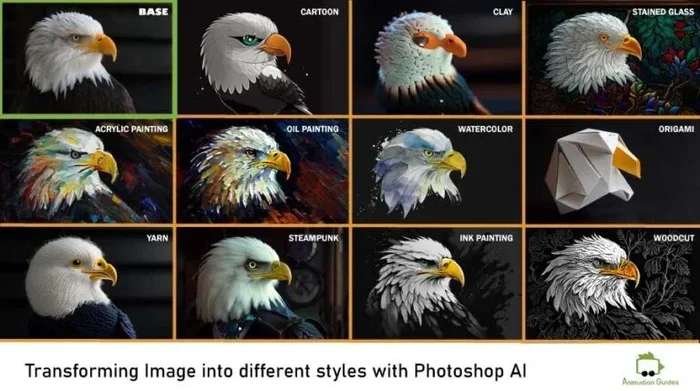
The AI image generator image to image feature lets you turn ordinary photos into creative masterpieces with just a few clicks. Using advanced neural networks, this technology restyles, enhances, and completely reimagines your existing pictures. Whether you want to turn a selfie into a painting or create product mockups, the right AI image to image tool makes it simple and fast.
This is a comprehensive guide about ai image generator image to image.
Key Takeaways
- Image-to-image AI transforms photos: You can upload any photo and let AI reshape it into a new style, scene, or format.
- Multiple tools fit every budget: Free and paid options exist, from beginner-friendly apps to professional-grade platforms.
- Understanding how it works helps you get better results: Knowing the basics of neural networks and style transfer gives you more control.
- Practical uses are everywhere: From marketing to personal art, image-to-image AI saves time and sparks creativity.
- Common mistakes slow you down: Avoid low-quality inputs, unclear prompts, and skipping fine-tuning for best outcomes.
- Keep learning: The technology evolves fast, so staying updated helps you stay ahead.
[FEATURED_IMAGE_PLACEHOLDER]
What Is AI Image Generator Image To Image?
Have you ever wished you could take a regular photo and turn it into something completely different? Maybe a cartoon version of your pet, or a watercolor painting of your living room. That is exactly what AI image generator image to image technology does. It takes an existing picture and transforms it into a new version based on the style, mood, or description you provide.
This technology has exploded in popularity over the last couple of years. Tools like Stable Diffusion, Midjourney, and DALL-E have made it possible for anyone to create stunning visuals without needing design skills. The image-to-image process is different from text-to-image generation because it uses your original photo as a starting point. Think of it like giving an artist a sketch and asking them to paint it in a new style.
The magic behind this all comes from deep learning models. These are computer systems trained on millions of images. They learn patterns, textures, colors, and styles. When you feed in a photo and tell the AI what you want, it uses those learned patterns to create something fresh. The result can be breathtaking, sometimes even surprising.
One important thing to know: this is not the same as a what kind of generator do I need for physical power needs. AI generators work with data and algorithms, not fuel or electricity for your home. They run on powerful computers and cloud servers, making them accessible from almost any device with an internet connection.
AI image to image tools are now used by marketers, artists, photographers, and hobbyists alike. The barrier to entry has dropped dramatically. You do not need expensive software or years of training anymore. A few clicks and you can see magic happen.
How Does Image-to-Image AI Actually Work?
Understanding the basics of how image-to-image AI works can help you use these tools more effectively. You do not need to be a tech expert, but a little knowledge goes a long way. Let us break it down in simple terms.
The Role of Neural Networks
At the heart of every AI image generator is a neural network. This is a computer model inspired by the human brain. It has layers of artificial neurons that process information. When you upload a photo, the neural network analyzes it. It looks at shapes, colors, lighting, and textures. Then it uses your instructions to reshape the image.
These models are trained on huge datasets. They have seen millions of photos, paintings, and digital artworks. That training is what allows them to understand styles. When you ask an AI image generator image to image tool to make your photo look like a sketch, it draws on patterns it has learned from millions of sketches.
From Input Photo to Output Image
The process happens in a few key steps:
- Upload: You start with your original photo. This is your input.
- Analyze: The AI examines the image and extracts key features.
- Transform: Based on your prompt or style choice, the AI reshapes the image.
- Refine: The output is generated and you can adjust settings to improve it.
The speed of this process depends on the tool and your hardware. Some tools generate images in seconds. Others might take a minute or more for high-resolution results. Unlike a how long a generator can run on fuel, AI processing time depends on server load and model complexity.
Diffusion Models Explained Simply
Most modern AI image generators use something called diffusion models. Here is how they work in plain language. The AI starts with random noise, kind of like TV static. Then it gradually removes the noise, step by step, shaping it into an image. When you use image-to-image mode, it starts with your photo’s structure and uses that noise-removal process to create the final result.
This is why image-to-image results look so good. The AI keeps the basic composition of your photo while applying new styles, colors, and details. It is like giving a sculptor a block of marble and letting them carve something new while keeping the original shape.
Top AI Image Generators for Photo Transformation
Not all AI image generator image to image tools are the same. Some are better for certain tasks than others. Here is a look at the most popular options available right now.
Stable Diffusion
Stable Diffusion is one of the most powerful open-source tools available. It gives you a lot of control over the transformation process. You can adjust settings like denoising strength, which controls how much the AI changes your original photo. A higher value means more dramatic changes. A lower value keeps your photo closer to its original look.
The best part? Stable Diffusion is free to use if you have the right hardware. Many websites also host it for free or at low cost. It works well for turning photos into paintings, adding artistic effects, and creating concept art from real images.
Midjourney
Midjourney is known for its stunning artistic quality. It is a paid service that runs through Discord. You upload your photo, add a style prompt, and the AI does the rest. Midjourney excels at creating beautiful, painterly transformations. It is a favorite among digital artists and designers.
While it does not offer the same level of fine-tuning as Stable Diffusion, it is incredibly easy to use. If you want gorgeous results without learning complex settings, Midjourney is a great choice. It is similar to how a how much a Generac generator costs compares to other power options, you get what you pay for with quality and convenience.
DALL-E and Other Cloud-Based Tools
DALL-E, created by OpenAI, offers a simple and accessible interface. You can upload a photo and describe the transformation you want. It is beginner-friendly and works right in your browser. Other tools like Leonardo AI, RunwayML, and Adobe Firefly also offer strong image-to-image features.
Each tool has its strengths. Some are better at photorealistic transformations. Others shine with artistic styles. The key is to try a few and see which one fits your workflow best.
| Tool | Best For | Price | Ease of Use |
|---|---|---|---|
| Stable Diffusion | Full control, advanced users | Free (open source) | Moderate |
| Midjourney | Artistic, painterly styles | $10-$60/month | Easy |
| DALL-E | Quick, simple transformations | Pay-per-use | Very Easy |
| Leonardo AI | Game assets, concept art | Free tier available | Easy |
| Adobe Firefly | Professional design workflows | Subscription | Easy |
Practical Uses for Image-to-Image AI
The AI image generator image to image technology is not just a fun toy. It has real, practical applications that can save you time and money. Let us explore some of the most common uses.
Marketing and Advertising
Businesses use image-to-image AI to create marketing visuals quickly. Need a product photo with a different background? AI can do that. Want to see your logo on a billboard in a tropical setting? Done. Marketing teams love this technology because it cuts down on photoshoot costs and turnaround time.
Small business owners especially benefit. You can create professional-looking ads without hiring a photographer or designer. Just upload your product photo, pick a style, and the AI does the heavy lifting.
Personal Art and Creative Projects
On the personal side, people use AI photo transformation to create unique gifts and keepsakes. Turn family photos into oil paintings. Create fantasy versions of your friends. Design custom phone wallpapers. The creative possibilities are nearly endless.
Many artists also use these tools as a starting point. They generate a base image with AI and then refine it manually. This hybrid approach combines the speed of AI with the precision of human creativity.
Interior Design and Home Visualization
Interior designers use image-to-image AI to show clients how a room could look with different styles. Upload a photo of your empty living room and ask the AI to render it in a modern minimalist style. Or a rustic farmhouse look. The AI handles the furniture, colors, and lighting.
This saves designers hours of work and helps clients visualize changes before any money is spent. It is a powerful tool for home staging and real estate marketing too.
Fashion and E-Commerce
Fashion brands use AI to create virtual try-on experiences. They can show how clothes look on different body types without doing a physical photoshoot. E-commerce sites use AI image transformation to generate multiple product views from a single photo.
This not only saves money but also speeds up product launches. When you can generate dozens of lifestyle images in minutes, your time to market shrinks dramatically.
Tips for Getting the Best Results
Using AI image to image tools effectively takes a bit of practice. Here are some proven tips to help you get amazing results every time.
Start with High-Quality Input Photos
The better your original photo, the better your output will be. Use clear, well-lit images with good resolution. If your input photo is blurry or dark, the AI will have a hard time creating something sharp. Think of it like baking a cake, the quality of your ingredients matters.
Try to use photos with good contrast and distinct subjects. The AI needs clear features to work with. A photo of a person with a plain background will give you much better results than a cluttered, busy scene.
Be Specific with Your Prompts
Vague prompts lead to vague results. Instead of saying “make it look cool,” try “transform this photo into a cyberpunk cityscape with neon lights and rain.” The more specific you are, the closer the AI will get to what you envision.
Use descriptive words for style, mood, lighting, and color palette. Words like “cinematic,” “vintage,” “watercolor,” or “hyper-realistic” give the AI clear direction. Think of your prompt as instructions for a very talented but literal-minded artist.
Experiment with Denoising Strength
If your tool allows it, play with the denoising strength setting. This controls how much the AI changes your original image. A low setting (0.2 to 0.4) keeps your photo mostly intact while adding subtle style changes. A high setting (0.7 to 0.9) creates dramatic transformations.
Finding the sweet spot takes experimentation. Start in the middle range and adjust from there. Save your favorite settings so you can reuse them later.
Iterate and Refine
Rarely does the first result look perfect. That is completely normal. The key is to generate multiple versions and refine. Adjust your prompt, change the style, or tweak the settings. Each iteration gets you closer to the image you have in your head.
Many tools let you upscale your final image for higher resolution. This is especially useful if you plan to print your creation or use it in professional materials.
Common Mistakes to Avoid with AI Image Transformation
Even with the best tools, mistakes can happen. Here are some common pitfalls and how to avoid them.
Using Low-Quality Source Images
This is the number one mistake people make. If your input photo is pixelated, overexposed, or poorly framed, the output will be just as bad. Always start with the best quality photo you can find. A great source image makes all the difference in the final result.
Overcomplicating Your Prompt
While being specific is good, overloading the AI with too many instructions can confuse it. Keep your prompts focused on 2 to 3 key style elements. Let the AI do its magic rather than trying to control every tiny detail.
Ignoring Copyright and Ethics
Be mindful of using other people’s photos without permission. If you are transforming a photo of someone else, make sure you have their consent. Also, be careful about claiming AI-generated images as completely original artwork when they are based on existing photos.
Ethical use of AI image generation builds trust and keeps the creative community healthy. Respect the work of other photographers and artists.
Expecting Perfect Results Every Time
AI is powerful but not magic. Sometimes the results will be quirky or unexpected. That can be a good thing! Embrace the surprises. Some of the most creative images come from happy accidents. If a result does not work, adjust and try again.
The Future of AI Image-to-Image Technology
The AI image generator image to image space is evolving incredibly fast. New models and techniques appear almost every month. Here is what we can expect in the near future.
We are seeing faster processing times, higher resolution outputs, and more realistic transformations. Some tools now allow you to control exactly which parts of the photo get transformed, while others stay the same. This level of precision was not possible just a year ago.
Integration with other tools is also growing. You can now find image-to-image AI features built into photo editors, design suites, and even mobile apps. The technology is becoming more accessible to everyone. As models continue to improve, the line between what is real and what is AI-generated will keep blurring.
One thing is certain: AI photo transformation is not a passing trend. It is a fundamental shift in how we create and edit visual content. Whether you are a professional designer or someone who just wants to make fun photos of your dog, these tools put incredible power at your fingertips.
Stay curious, keep experimenting, and remember that the best results come from combining AI capabilities with your own creative vision. The technology is a tool, and like any tool, it is only as good as the person using it.
Conclusion
AI image generator image to image technology has opened up a world of creative possibilities for everyone. From turning everyday photos into works of art to streamlining professional design workflows, the applications are vast and growing. The tools are more accessible than ever, and the results can be truly stunning.
Remember to start with quality input photos, write clear prompts, and experiment with different settings. Avoid common mistakes like using blurry images or expecting perfection on the first try. With a little practice, you will be creating amazing transformed images in no time.
The future of visual creativity is here, and it is powered by AI image to image technology. Whether you are a hobbyist exploring new creative outlets or a professional looking to speed up your workflow, now is the perfect time to dive in. Try a few tools today and see what kind of magic you can create with your own photos.
FAQs
What is the difference between text-to-image and image-to-image AI generation?
Text-to-image AI creates a picture from scratch based on a written description. Image-to-image AI takes an existing photo and transforms it using your instructions. Both use similar underlying technology, but image-to-image gives you more control over the final result because it keeps the structure of your original photo.
Do I need a powerful computer to use AI image generators?
Not necessarily. Many popular tools run in the cloud, which means the heavy lifting happens on remote servers. You just need a device with a web browser and an internet connection. However, if you want to run advanced models like Stable Diffusion locally, a powerful GPU will give you much faster results.
Can I use AI image-to-image tools for commercial projects?
Yes, most tools allow commercial use, but the terms vary by platform. Always check the licensing agreement before using AI-generated images for business purposes. Some tools require attribution, while others grant full commercial rights depending on your subscription level.
How long does it take to generate an image-to-image transformation?
Most transformations take just a few seconds to a couple of minutes. The exact time depends on the tool, your image resolution, and server load. Cloud-based tools are generally faster because they use powerful remote servers. This is different from a physical ozone generator that needs time to process air, AI image tools process visual data almost instantly.
Are AI-generated images considered art?
This is a topic of ongoing debate. Many people consider AI-assisted images to be a form of art because they involve creative direction and vision. The human who guides the process, chooses styles, and refines results plays a key creative role. Whether you call it art depends on your perspective, but the results can be genuinely beautiful and meaningful.
What are the best free AI image-to-image tools available?
Stable Diffusion is the most popular free option if you have the technical setup. Several websites also offer free tiers with limited credits, including Leonardo AI and Craiyon. These platforms let you experiment with image-to-image AI without spending money. They are a great way to learn the basics before committing to a paid tool.
Frequently Asked Questions
What is ai image generator image to image?
ai image generator image to image is an important topic with many practical applications.