The MTV Music Generator Guide for Creating Amazing Music
The MTV Music Generator is a powerful music creation tool that lets you produce professional-quality tracks right from your computer. Whether you are a beginner or an experienced music producer, this guide covers everything you need to know about using the MTV Music Generator to make beats, mix tracks, and craft original songs. You will learn about the key features, setup steps, and creative techniques that help you get the most out of this popular music production software.
Key Takeaways
- Easy to Use: The MTV Music Generator is designed for all skill levels, from complete beginners to seasoned producers.
- Built-In Sound Library: It comes packed with high-quality sounds, samples, and loops to jumpstart your creativity.
- Flexible Music Creation: You can produce beats, arrange full tracks, and mix audio all in one place.
- Affordable Music Production: It offers a cost-effective alternative to expensive studio setups.
- Powerful Editing Tools: The software includes intuitive tools for melody creation, rhythm programming, and sound design.
- Great for Electronic Music: It excels at producing electronic music, hip-hop, pop, and more.
📑 Table of Contents
What Is the MTV Music Generator?
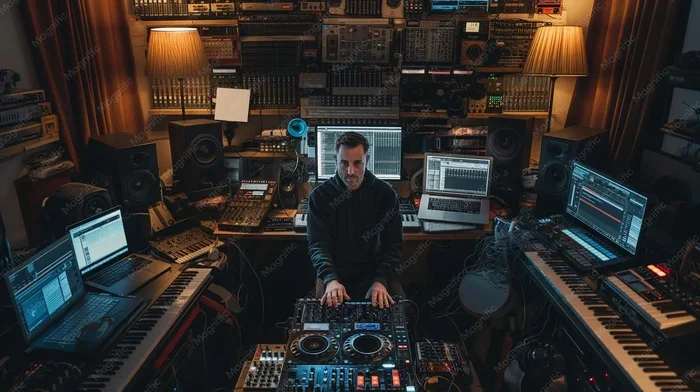
The MTV Music Generator is a digital music production tool that helps you create music from scratch. Think of it as a virtual studio inside your computer. You do not need expensive equipment or a professional recording space. All you need is your laptop and a bit of creativity.
This software gives you everything you need to write, produce, and edit music. It includes built-in sounds, effects, and mixing tools. Whether you want to make hip-hop beats, electronic tracks, or pop melodies, this tool has you covered.
Many people choose this generator because it is simple yet powerful. You do not need years of training to start making great music. The interface is clean and easy to navigate. You can start producing your first track within minutes of opening the software.
Why Choose the MTV Music Generator for Your Music?
There are many music creation tools out there. So why should you pick the MTV Music Generator? The answer comes down to a few key reasons that make it stand out from the competition.
First, it is incredibly user-friendly. The layout is intuitive, and the controls are straightforward. You will not get lost in a maze of confusing menus. Everything is laid out in a way that makes sense, even if you have never used music production software before.
Second, it offers a rich sound library. You get access to hundreds of high-quality samples, loops, and presets. This means you have plenty of material to work with right from the start. You can mix and match sounds to create something truly unique.
Third, the software is versatile. It works well for many different genres of music. Whether you are into EDM, rock, R&B, or lo-fi beats, the MTV Music Generator adapts to your style. You are not locked into one sound or one workflow.
Finally, it is a budget-friendly option. Professional studio setups can cost thousands of dollars. This generator gives you studio-quality capabilities at a fraction of the price. It is one of the best choices for aspiring music producers who want professional results without the big price tag.
Key Features That Make It Stand Out
The MTV Music Generator comes loaded with features that make music production fun and efficient. Here are some of the highlights:
- Drag-and-Drop Interface: You can easily move sounds and loops around your timeline with simple clicks.
- Built-In Effects: The software includes reverb, delay, EQ, compression, and more. You can shape your sound without needing extra plugins.
- MIDI Support: You can connect external keyboards and controllers for a more hands-on experience.
- Multi-Track Recording: Record multiple layers of audio and mix them together seamlessly.
- Export Options: Save your finished tracks in various formats for sharing online or burning to CD.
How to Get Started with the MTV Music Generator
Getting started is simple. Follow these steps to set up your workspace and begin creating music right away.
First, download and install the software on your computer. Make sure your system meets the minimum requirements for smooth performance. Once installed, launch the application and explore the main dashboard.
Next, take a tour of the sound library. Browse through the categories and preview different samples. Find sounds that inspire you and save them to your favorites. This will speed up your workflow later on.
Now, create a new project. Choose a tempo and key that match the vibe you want. Start laying down basic elements like drums, bass, and melody. Do not worry about making it perfect right away. The goal is to get ideas flowing.
As you build your track, use the mixing tools to balance the levels. Adjust the volume, pan the sounds left or right, and add effects to create depth. These small touches make a big difference in how professional your music sounds.
Setting Up Your Workspace
A good setup helps you stay focused and productive. Here are a few tips:
- Find a quiet space where you will not be disturbed.
- Use headphones or studio monitors for accurate sound playback.
- Keep your workspace organized with clear project folders.
- Save your work frequently to avoid losing progress.
Creating Beats and Rhythms
One of the most exciting parts of the MTV Music Generator is beat creation. The rhythm programming tools let you build custom drum patterns with ease. You can choose from preset beats or design your own from the ground up.
Start by selecting a drum kit that fits your genre. For hip-hop, you might want deep kicks and sharp snares. For electronic music, try bright hi-hats and punchy claps. The software lets you tweak every sound until it feels just right.
Use the step sequencer to arrange your drum hits. This visual grid makes it easy to see your pattern and make adjustments. You can also record beats in real time if you prefer a more natural feel.
Once you have a solid drum pattern, add a bass line. The bass gives your track weight and movement. Experiment with different bass sounds and rhythms to find the perfect match for your beat.
Tips for Crafting Great Beats
- Keep your patterns simple at first. Complexity can come later as you refine the track.
- Listen to professional tracks in your genre for inspiration.
- Use swing and swing settings to add groove and feel.
- Layer multiple percussion sounds for a richer, more dynamic rhythm.
- Test your beat on different speakers to make sure it sounds good everywhere.
Mixing and Polishing Your Tracks
Mixing is where your music really comes together. The MTV Music Generator gives you solid mixing tools that help you blend all the elements of your track into a cohesive whole.
Start by balancing the volumes of each track. Your kick and bass should sit low in the mix, while vocals and melodies take the lead. Use the built-in EQ to carve out space for each sound. This prevents muddiness and keeps things clean.
Add effects like reverb and delay to create a sense of space. These tools make your mix sound wider and more immersive. Just be careful not to overdo it. A little goes a long way.
When you are happy with your mix, export the final track. The software supports multiple file formats so you can share your music on any platform. Upload it to streaming services, send it to friends, or keep it for your personal portfolio.
Common Mixing Mistakes to Avoid
- Overloading the mix: Too many sounds at once can make your track sound cluttered and messy.
- Ignoring headroom: Leave some space in your levels to prevent distortion during mastering.
- Skipping breaks: Take short breaks while mixing. Fresh ears catch problems you might otherwise miss.
- Comparing too early: Focus on your own track first. Compare to professional songs only after you have a solid mix.
Advanced Techniques for Music Producers
Once you are comfortable with the basics, it is time to explore advanced techniques. These methods will help you take your music to the next level and develop your own signature sound.
Try experimenting with sound design. The MTV Music Generator includes synthesis tools that let you create custom sounds from scratch. You can design unique leads, pads, and textures that no one else has. This is how you make your music truly yours.
Another powerful technique is audio sampling. You can import your own recordings or sample snippets from other tracks. Layer these samples with your original sounds to create something fresh and unexpected. Just make sure you understand copyright rules when using samples from other artists.
Automation is also a game-changer. Use automation to gradually change parameters like volume, panning, and effects over time. This adds movement and interest to your tracks. Small automated changes can transform a flat mix into a dynamic, engaging listening experience.
Building a Productive Workflow
A consistent workflow helps you produce music faster and with better results. Here are some habits that successful producers follow:
- Start with a clear idea or vision for each track.
- Work in stages: beat, melody, arrangement, mixing, and mastering.
- Set time limits for each stage to avoid overthinking.
- Save multiple versions of your projects so you can revisit earlier ideas.
- Collaborate with other producers to learn new techniques and gain fresh perspectives.
Final Thoughts on the MTV Music Generator
The MTV Music Generator is an excellent choice for anyone who wants to create music without the hassle of a full studio setup. It combines ease of use with powerful features that give you professional-level results. Whether you are making your first beat or finishing your tenth album, this tool has everything you need.
The software is versatile, affordable, and fun to use. It removes the barriers that often keep people from making music. You do not need expensive gear or years of experience. All you need is the desire to create and the willingness to experiment.
So go ahead and give it a try. Open the MTV Music Generator, explore the sounds, and start building your next track today. You might be surprised at how quickly your musical ideas come to life. The best music often starts with a simple beat and a spark of creativity. Let this tool be the spark that ignites your next masterpiece.
Frequently Asked Questions
What is the MTV Music Generator used for?
The MTV Music Generator is a music production software used to create, edit, and mix music. It helps producers make beats, arrange tracks, and polish their audio all in one place. It works well for genres like hip-hop, electronic music, pop, and more.
Do I need experience to use the MTV Music Generator?
No, the software is designed for users of all skill levels. Beginners can start making music within minutes thanks to the intuitive interface. Experienced producers will also find powerful tools for advanced music creation and sound design.
Can I use the MTV Music Generator on any computer?
The software works on most modern computers that meet the minimum system requirements. You should check the official website for the latest compatibility information. A reasonably modern computer with enough RAM and storage will run the program smoothly.
How is the MTV Music Generator different from other music software?
What sets it apart is the combination of simplicity and versatility. It offers a rich sound library and powerful mixing tools without the steep learning curve of professional digital audio workstations. It is an ideal choice for those who want quality music production without the complexity.
Can I export my music created with the MTV Music Generator?
Yes, you can export your finished tracks in multiple audio formats. This makes it easy to upload your music to streaming platforms, share files with collaborators, or burn tracks to a CD. The export options give you flexibility for any use case.
Is the MTV Music Generator a good choice for beginners?
Absolutely. It is one of the most beginner-friendly music creation tools available. The drag-and-drop interface, built-in tutorials, and preset sounds make it easy to start producing music right away. It is a great first step for anyone interested in music production.
=== CONCLUSION ===
The MTV Music Generator is a fantastic tool for anyone who wants to create music with ease and confidence. From building your first beat to polishing a complete mix, this software gives you everything you need. It is accessible, affordable, and packed with features that rival much more expensive options.
If you have been looking for a way to start producing music or want to upgrade your current setup, the MTV Music Generator is worth exploring. Follow the tips in this guide, experiment with the tools, and let your creativity flow. Great music starts with the right tool and the right mindset.