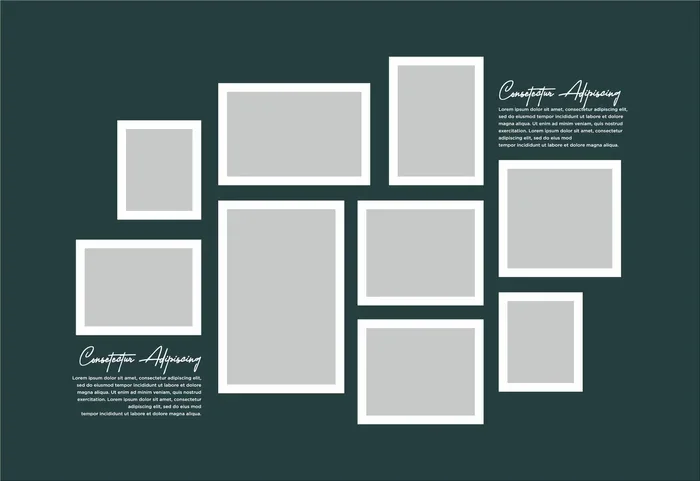
Gallery Wall Template Generator for Stunning Walls
A gallery wall template generator is a powerful digital tool that helps you design beautiful wall arrangements before you hang a single frame. Whether you are decorating a living room, hallway, or bedroom, these generators save time, reduce mistakes, and give you a clear visual plan. You will learn how they work, what features matter, and how to create a gallery wall that turns heads.
A gallery wall is one of the most popular ways to transform a blank wall into a stunning focal point. But planning one can feel overwhelming. You have frames of different sizes, art pieces, photos, and maybe even shelves or mirrors. Where do you start? This is exactly where a gallery wall template generator comes in handy.
Think of a gallery wall template generator as your personal design assistant. It takes the guesswork out of arranging wall art. You input your wall dimensions, choose your frames, and the tool creates a layout you can follow with confidence. Whether you are a DIY beginner or a seasoned decorator, this tool changes the game. In this article, we will explore everything you need to know about gallery wall template generators, from how they work to the best tips for creating a jaw-dropping display.
Key Takeaways
- Saves Time and Effort: A gallery wall template generator lets you plan your layout digitally, so you skip the trial-and-error hanging process.
- Visualizes Your Space: You can see exactly how your frames, canvases, and shelves will look on your wall before making any marks.
- Customizable Layouts: Most generators offer grid, salon, salon-style, and asymmetric patterns to match your taste.
- Prevents Costly Mistakes: By planning digitally first, you avoid buying the wrong sizes or arranging pieces poorly.
- Works for Any Room: From living rooms to hallways, these tools adapt to any wall size and decor style.
- Free and Paid Options Available: Many quality generators are free online, while premium tools offer advanced features.
📑 Table of Contents
What Is a Gallery Wall Template Generator?
A gallery wall template generator is a digital tool that helps you plan and visualize the arrangement of wall art before you physically hang anything. It works like a virtual canvas where you drag and drop frames, photos, and other decorative items onto a representation of your wall.
These generators come in many forms. Some are simple web-based tools that let you pick a template and drop in your images. Others are more advanced apps that use augmented reality to show you how the gallery wall will look in your actual space. The core idea is the same: you get a preview before you commit.
What makes these tools so valuable is that they remove the biggest pain point of gallery wall creation: the endless rearranging. Instead of poking holes in your walls and moving heavy frames around, you can experiment with dozens of layouts in minutes. It is a smart, efficient, and creative approach to wall design.
How Does a Gallery Wall Template Generator Work?
Most generators follow a simple process. First, you enter your wall dimensions. You can usually input the width and height in inches or feet. Some tools even let you mark out obstacles like light switches, outlets, or windows.
Next, you select your frames and art pieces. You can choose from a library of common frame sizes or input custom dimensions. The generator then suggests layouts based on your wall size and the number of pieces you want to display. You can drag, drop, rotate, and resize until the arrangement feels just right.
Many generators also let you choose a template style. Popular options include grid layouts, salon-style arrangements, symmetrical patterns, and eclectic mixes. Each style gives your gallery wall a different vibe, and the generator makes it easy to switch between them.
Benefits of Using a Gallery Wall Template Generator
Using a gallery wall template generator offers several real advantages. Let us break them down so you can see why so many homeowners and renters are making the switch to digital planning.
Saves Time and Reduces Frustration
Planning a gallery wall by hand can take hours. You have to measure, tape out positions on the wall, and constantly move things around. A template generator cuts that time dramatically. You can try out multiple layouts in the time it would take to tape out just one arrangement on your wall.
Think about it. Without a generator, you might spend an entire Saturday wrestling with frames and string. With a generator, you can finalize your layout in under 30 minutes. That is time you can spend actually enjoying your new wall art instead of stressing over it.
Helps You Choose the Right Sizes
One of the biggest mistakes people make with gallery walls is choosing frames that are too small or too large for the space. A template generator forces you to think about proportions. When you see your frames laid out on a virtual wall that matches your actual wall size, it becomes much easier to judge what works.
For example, if you have a large empty wall, a grid of tiny frames might look lost. The generator helps you see that and adjust. Similarly, if your wall is small, oversized frames can dominate too quickly. The visual feedback is immediate and incredibly helpful.
Lets You Experiment Without Risk
One of the best things about a digital template is that there is zero risk. You can try a bold asymmetric layout, then switch to a clean grid with one click. You can test dark frames against light frames, mix square and rectangular frames, or add a shelf or two. Nothing gets damaged. Nothing gets hung wrong.
This freedom to experiment is what makes gallery wall planning fun again. You are not stuck with a decision you made in a hurry. You can explore creative possibilities that you might never have considered otherwise.
Great for Shopping and Budgeting
When you have a finalized layout from your generator, shopping becomes much easier. You know exactly how many frames you need, what sizes to buy, and how the pieces will fit together. This helps you stick to your budget and avoid impulse purchases that do not fit your plan.
Some generators even integrate with online stores so you can purchase the frames directly. This seamless experience saves even more time and takes the guesswork out of the entire process.
How to Use a Gallery Wall Template Generator
Using a gallery wall template generator is straightforward, but a few tips will help you get the best results. Here is a step-by-step guide to walk you through the process.
Step 1: Measure Your Wall
Start by measuring the width and height of the wall you want to decorate. Use a tape measure and write down the dimensions. Also note any features that will affect your layout, such as doors, windows, light switches, or heating vents. These details matter because they impact where your frames can go.
Step 2: Gather Your Art and Frames
Collect all the pieces you want to include in your gallery wall. Measure each frame and note the dimensions. If you have not purchased frames yet, decide on the sizes you want and add them to your list. Having this information ready makes the template process much smoother.
Step 3: Choose Your Generator Tool
There are many free and paid gallery wall template generators available online. Some popular options include Canva, Wallary, and Gallery Designer apps. Pick one that suits your needs and budget. Free tools work great for most people, but premium options may offer more customization.
Just like choosing the right kind of generator for your power needs, picking the right template generator depends on your specific situation. A simple free tool works for basic layouts, while advanced tools help with complex arrangements.
Step 4: Input Your Wall and Frame Data
Enter your wall dimensions into the generator. Then add your frames one by one, inputting their sizes. Most generators will show you a scaled representation of your wall and frames, so everything looks proportional.
Step 5: Pick a Layout Style
Choose a layout template that appeals to you. Common styles include:
- Grid Layout: Frames arranged in neat rows and columns. This is clean, modern, and easy to pull off.
- Salon Style: Frames of various sizes grouped together in an eclectic, curated look. This is trendy and dramatic.
- Symmetrical Layout: Frames mirrored on either side of a central point. This creates balance and formality.
- Asymmetrical Layout: Frames arranged in an organic, unbalanced way. This feels artistic and dynamic.
- Horizontal Row: Frames lined up in a single horizontal line. This works great above sofas or beds.
Step 6: Adjust and Fine-Tune
Now comes the fun part. Drag your frames around, resize them, and experiment with spacing. Pay attention to the gaps between frames. A good rule of thumb is to keep spacing consistent, usually between 2 and 3 inches. The generator makes it easy to adjust and see how changes look instantly.
Step 7: Print or Save Your Plan
Once you are happy with your layout, save it or print it out. Many generators let you download a PDF or image of your plan. You can bring this printout to the store when shopping for frames or use it as a guide when hanging your art.
Top Features to Look For in a Gallery Wall Template Generator
Not all gallery wall template generators are created equal. Here are the key features you should look for to get the most out of your tool.
Custom Wall Dimensions
The best generators let you input your exact wall size. This ensures your layout is proportional and realistic. Avoid tools that only offer preset wall sizes, as they may not match your actual space.
Frame Library with Custom Sizes
Look for a generator that offers a wide range of frame sizes and styles. Even better is one that lets you input custom dimensions. This way, you can match the exact frames you own or plan to buy.
Multiple Layout Templates
Variety is key. The more layout options a generator offers, the more creative freedom you have. Look for at least 5 to 10 different template styles to choose from.
Drag-and-Drop Interface
A user-friendly interface makes the whole experience enjoyable. You should be able to easily move frames around, resize them, and adjust spacing without any technical skills.
Realistic Preview
The best generators show a realistic preview of your wall, sometimes even letting you choose wall colors or textures. This helps you see how your art will look in the actual space.
Save and Share Options
Being able to save your designs and share them with others is a great feature. You can get feedback from family members or friends before committing to a layout. Some tools even let you share your plan on social media for inspiration.
Tips for Creating a Stunning Gallery Wall
A gallery wall template generator gives you the blueprint, but the art you choose and how you arrange it makes all the difference. Here are some expert tips to make your gallery wall truly spectacular.
Start with a Focal Point
Every great gallery wall needs a centerpiece. This is usually your largest or most striking piece. Place it at eye level, which is typically about 57 to 60 inches from the floor. Build the rest of your arrangement around this focal point.
Mix Frame Sizes and Styles
Do not be afraid to mix things up. A gallery wall looks most interesting when it has variety. Combine large and small frames, mix wood and metal finishes, and blend different art styles. Just keep a unifying element, like a consistent color palette, to tie everything together.
Mind the Spacing
Consistent spacing is what makes a gallery wall look polished and intentional. Use your template generator to set uniform gaps between frames. In real life, you can use simple spacers or even a ruler to maintain that consistency when hanging your pieces.
Consider Your Wall Color
The color of your wall plays a big role in how your gallery wall looks. White and light neutral walls are classic choices that let your art shine. But do not be afraid to try a bold wall color or even a wallpaper background for a dramatic effect.
Think About the Room’s Purpose
The style of your gallery wall should match the room. A living room gallery wall might feature family photos, artwork, and mirrors in a salon-style arrangement. A hallway gallery wall could showcase a more linear, sequential layout of travel photos or prints. A bedroom gallery wall might include softer, more personal pieces like framed quotes or favorite illustrations.
Add Dimension
Do not limit yourself to flat frames. Adding shelves, small plants, or three-dimensional objects gives your gallery wall depth and visual interest. Many template generators now include shelf and object placement options. Use them to plan a truly layered look.
Step Back and Evaluate
Once you have your plan, step back and look at it from a distance. Does it feel balanced? Is there a flow to the arrangement? A gallery wall template generator makes this evaluation easy because you can zoom out and see the full picture. Trust your instincts and adjust until it feels right.
Common Mistakes to Avoid
Even with a great template generator, it is easy to make mistakes. Here are some common pitfalls to watch out for.
- Skipping Measurements: Always measure your wall and frames accurately. Even small errors can throw off your entire layout.
- Ignoring Wall Obstacles: Forgetting about outlets, switches, or windows leads to frustration when you start hanging art.
- Choosing Frames That Are Too Similar: A gallery wall with identical frames can look boring. Mix it up for a more dynamic feel.
- Hanging Everything Too High: A common mistake is hanging the gallery wall too high on the wall. Keep the center at eye level for the best visual impact.
- Not Planning for Future Changes: Leave some flexibility in your layout. You may want to swap out pieces or add new ones later.
Conclusion
A gallery wall template generator is one of the smartest investments you can make for your home decor projects. It takes the stress out of planning, saves you time and money, and helps you create a wall display that truly reflects your style. Whether you are a first-time decorator or a seasoned design enthusiast, these tools make the process enjoyable and rewarding.
The beauty of a gallery wall template generator is that it puts creative control right in your hands. You can experiment freely, refine your layout, and walk away with a clear plan that works. No more guessing, no more wasted frames, and no more holes in the wrong places.
So the next time you have a blank wall staring back at you, skip the frustration. Fire up a template generator, start arranging, and watch your vision come to life. Your dream gallery wall is just a few clicks away. And just like knowing how long a generator can run helps you plan your power needs, knowing how to plan your gallery wall layout helps you create a space you love. Start designing today and transform your walls into art.
Frequently Asked Questions
What is a gallery wall template generator?
A gallery wall template generator is a digital tool that helps you plan and visualize the arrangement of wall art before you hang anything. You input your wall size and frame dimensions, and the tool creates a layout you can follow.
Are gallery wall template generators free to use?
Many generators offer free versions with basic features. Some premium tools charge a fee for advanced features like augmented reality previews or larger frame libraries. You can find quality free options that work great for most users.
Can I use a gallery wall template generator for any room?
Yes! These generators work for any room in your home. Whether you are decorating a living room, bedroom, hallway, or even an office, you can input your wall dimensions and plan a layout that fits the space perfectly.
Do I need design experience to use a gallery wall template generator?
Not at all. These tools are designed to be user-friendly and intuitive. Anyone can use them, regardless of design experience. The drag-and-drop interface makes it easy to experiment and find a layout you love.
How accurate are the templates compared to my actual wall?
Most generators are very accurate as long as you input correct measurements. The layouts are scaled to match your wall dimensions, so what you see on screen closely represents the real result. Just make sure to measure carefully for the best outcome.
Can I print out my gallery wall plan?
Yes, most generators let you download or print your layout as a PDF or image. This printed plan serves as a handy guide when you go shopping for frames or when you start hanging your art on the wall.