Computer Repair Tool Kit Guide with All Essential Tools
A computer repair tool kit is a must-have for anyone who fixes desktops, laptops, or other devices. This guide covers every essential tool you need, from screwdrivers to anti-static gear, so you can tackle repairs with confidence. We also share tips on choosing the right kit, avoiding common mistakes, and keeping your tools organized for years to come.
Have you ever opened up a computer and felt completely lost? Maybe the screws were tiny, the parts were fragile, and you did not know where to start. That is exactly why a computer repair tool kit matters so much.
Whether you are a hobbyist fixing old desktops or someone who wants to save money on laptop repairs, having the right tools changes everything. A well-built kit gives you the confidence to open any device, replace parts, and solve problems without guessing. In this guide, we will walk you through every essential tool, explain why each one matters, and help you choose the best electronic repair kit for your needs.
Let us be real for a second. Buying random tools one by one is a waste of money and time. A proper hardware repair kit bundles everything you need into one neat package. By the end of this article, you will know exactly what to look for, what to avoid, and how to build or buy the perfect kit. Let us get started.
Key Takeaways
- Complete Coverage: A quality computer repair tool kit includes screwdrivers, anti-static gear, tweezers, and more.
- Right Tool Matters: Using the correct precision screwdriver prevents damage to screws and devices.
- Anti-Static Protection Is Non-Negotiable: An anti-static wrist strap and mat protect sensitive electronics from static discharge.
- Organization Saves Time: A good parts organizer or portable case keeps everything where you can find it.
- Avoid Common Mistakes: Skipping anti-static gear or using the wrong screwdriver are the top errors beginners make.
- Start Simple: You do not need every tool at once. Build your kit over time based on the repairs you do most.
📑 Table of Contents
- What Is a Computer Repair Tool Kit?
- Essential Tools Every Computer Repair Tool Kit Should Include
- Comparison: Budget vs Professional Computer Repair Tool Kits
- How to Choose the Right Computer Repair Tool Kit
- Common Mistakes to Avoid When Using a Repair Kit
- Expert Tips for Getting the Most Out of Your Repair Kit
- Building Your Kit Over Time
- Final Thoughts
What Is a Computer Repair Tool Kit?
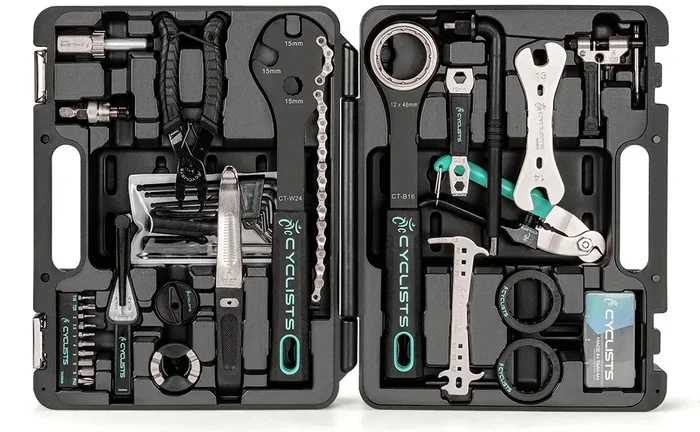
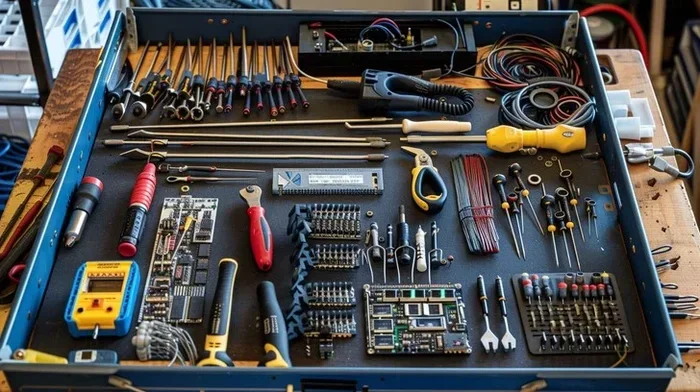
A computer repair tool kit is a collection of tools designed specifically for fixing and maintaining computers and laptops. These kits come in different sizes, from basic sets with a handful of tools to professional-grade bundles with dozens of specialized instruments.
Most kits include screwdrivers, anti-static protection, tweezers, and cleaning tools. Some also add advanced items like multimeters, spudgers, and soldering irons. The goal is to give you everything in one place so you are ready for almost any repair task.
Why Should You Use a Dedicated Repair Kit?
You might wonder why you need a special kit instead of grabbing random tools from your garage. Here is the truth. Regular tools are often too big, not precise enough, or lack anti-static protection. Using the wrong tool can strip screws, crack plastic clips, or fry sensitive components.
A dedicated laptop repair tools set is built with the tiny screws and fragile parts inside computers in mind. The drivers fit perfectly. The materials are safe for electronics. And the whole setup keeps you organized and efficient.
- Right-sized tools: Precision drivers match the tiny screws in laptops and desktops.
- Anti-static safety: Protects components from static damage that can happen without you even knowing.
- Organization: Everything has a place, so you spend less time searching and more time fixing.
- Cost savings: One kit costs less than buying each tool separately.
Essential Tools Every Computer Repair Tool Kit Should Include
Not all kits are created equal. Some are bare-bones starter sets, while others are packed with professional-grade equipment. Here is a breakdown of the must-have tools that every computer maintenance kit should have.
1. Precision Screwdriver Set
The screwdriver is the heart of any PC maintenance kit. Computers use dozens of tiny screws in different sizes and types. A quality precision screwdriver set includes Phillips, flathead, Torx, hex, and pentalobe bits.
Look for a set that comes in a magnetic holder or a rotating case. Magnetic tips are a lifesaver because they hold screws in place while you work. A rotating case lets you flip through bits quickly without digging through a messy drawer.
Quick Tip: Always check that the screwdriver sizes match your device. Using a too-large driver will strip the screw head, making removal much harder.
2. Anti-Static Wrist Strap and Mat
Static electricity is invisible but deadly to computer parts. A single shock that you do not even feel can fry a motherboard or RAM stick. This is why an anti-static wrist strap is absolutely essential.
The strap wraps around your wrist and connects to a ground point, safely draining any static buildup. An anti-static mat goes underneath your work surface to protect components while you handle them.
Some kits include both. Others sell them separately. Either way, do not skip this part. It is one of the cheapest ways to prevent expensive damage.
3. Tweezers and Spudger Tools
Tweezers and spudgers handle the small, delicate jobs that screwdrivers cannot do. Tweezers help you pick up tiny screws, jumpers, or connectors. A spudger is a flat, pry-like tool used to open cases, disconnect cables, and release clips without scratching or breaking them.
Look for plastic spudgers for fragile work and metal ones for tougher tasks. Many precision screwdriver kits include both in one package, which is a great value.
4. Compressed Air and Cleaning Tools
Dust is the number one enemy of computer performance. Over time, dust builds up inside fans, heatsinks, and vents, causing overheating and slowdowns. A can of compressed air or a small electric air blower makes cleaning quick and easy.
You should also include a soft brush, microfiber cloths, and isopropyl alcohol for wiping down surfaces. These simple cleaning tools keep your computer running cool and extend its lifespan significantly.
5. Multimeter
A multimeter measures voltage, current, and resistance. It is an advanced tool that helps you diagnose electrical problems in power supplies, cables, and connectors. If you are serious about electronic repair kit work, a digital multimeter is a valuable addition.
You do not need the most expensive model. A basic digital multimeter with a decent display and test leads will handle most repair tasks just fine.
6. Parts Organizer or Portable Case
Once you have all your tools, you need a place to put them. A portable tool case with compartments keeps everything sorted and easy to carry. Some kits come with a built-in case, while others require you to buy one separately.
Look for cases with removable dividers so you can customize the layout. A good case also protects your tools from dust and moisture when you are not using them.
Comparison: Budget vs Professional Computer Repair Tool Kits
When shopping for a computer repair tool kit, you will see options at every price point. Here is a quick comparison to help you decide.
| Feature | Budget Kit | Professional Kit |
|---|---|---|
| Number of Tools | 10-20 | 50-100+ |
| Screwdriver Quality | Basic steel | Chrome-vanadium, hardened |
| Anti-Static Protection | Wrist strap only | Wrist strap, mat, and ground |
| Case Quality | Basic pouch | Hard shell with dividers |
| Price Range | $15-$40 | $60-$200+ |
| Best For | Simple fixes and beginners | Frequent repairs and pros |
A budget kit works great if you only do basic repairs like swapping RAM or replacing hard drives. A professional kit is worth the investment if you repair devices regularly or work on more complex jobs like motherboard replacements or soldering.
How to Choose the Right Computer Repair Tool Kit
Not sure where to start? Follow these simple steps to find the perfect computer repair tool kit for your needs.
Step 1: Identify Your Repair Needs
Think about what kinds of repairs you plan to do. Are you mostly opening laptops to clean dust or replace RAM? Or do you want to tackle motherboard-level repairs? Your repair goals determine the type of kit you need.
For basic users, a simple precision screwdriver set with anti-static protection is plenty. For advanced users, look for kits that include multimeters, soldering stations, and specialized picks.
Step 2: Check Tool Quality
Cheap tools strip screws and break easily. Look for kits with hardened steel drivers that stay sharp over time. The handles should feel comfortable and grip well. If you are investing in a hardware repair kit, quality matters more than quantity.
Step 3: Consider Portability
If you carry your tools to client sites or work in different rooms, a compact portable case is essential. Some kits fold flat, while others have rigid hard shells. Choose based on how and where you plan to use your kit.
Step 4: Read Reviews
Before buying, check reviews from other users. Look for feedback on durability, completeness, and ease of use. Real-world experiences tell you a lot more than product descriptions alone.
Common Mistakes to Avoid When Using a Repair Kit
Even with the best tools, mistakes happen. Here are the most common errors people make during computer repairs and how to avoid them.
Mistake 1: Skipping Anti-Static Protection
This is the number one mistake beginners make. They skip the wrist strap and mat because they seem unnecessary. But static damage is silent and often fatal to computer components. Always ground yourself before touching any internal parts.
Mistake 2: Using the Wrong Screwdriver Size
Forcing a screwdriver that does not fit properly will strip the screw. Once a screw is stripped, it becomes much harder to remove and can damage the surrounding area. Always match the driver to the screw head exactly.
Mistake 3: Working on a Wet or Cluttered Surface
A messy workspace leads to lost screws and accidental damage. Work on a clean, dry, flat surface. Use a magnetic mat to keep screws organized as you remove them from the device.
Mistake 4: Forcing Parts Together
If a part does not fit easily, stop and check the alignment. Forcing connectors, cables, or components can bend pins, crack sockets, or break clips. Patience is one of the most important tools in any repair job.
Expert Tips for Getting the Most Out of Your Repair Kit
Experienced technicians have been using these tools for years. Here are some insider tips that will level up your repair game.
Label your screws. When you open a device, different screws hold different parts together. Use a small parts tray or tape to label where each screw came from. Mixing them up can lead to stripped threads or weak connections.
Keep a repair log. Write down what you did for each device. This helps you remember what worked, what did not, and which screws go where next time. It sounds simple, but it saves hours of confusion.
Replace worn drivers regularly. Screwdriver tips wear down over time. Worn tips strip screws more easily. Check your drivers often and replace them when they start to look rounded or damaged.
Invest in thermal paste. When you replace a CPU cooler or heatsink, fresh thermal paste makes a huge difference in heat transfer. Most kits do not include paste, so keep a tube on hand separately.
Use a flashlight or headlamp. Computer interiors can be dark and tight. A small LED light helps you see connectors, labels, and tiny components clearly. This simple addition prevents mistakes and speeds up your work.
Building Your Kit Over Time
You do not need to buy everything at once. Start with the basics and expand as your skills grow. Here is a suggested timeline for building your computer repair tool kit step by step.
- Month 1: Buy a basic precision screwdriver set and an anti-static wrist strap.
- Month 2: Add tweezers, a spudger, and a can of compressed air.
- Month 3: Get an anti-static mat and a small parts organizer tray.
- Month 4: Add a multimeter for electrical testing and diagnostics.
- Month 5: Invest in a quality portable case to hold everything together.
- Month 6: Add specialized tools like a torque screwdriver or soldering iron based on the repairs you do most.
This approach keeps costs manageable and lets you learn each tool before adding the next. Over time, you will build a complete PC maintenance kit that covers almost any repair scenario.
Final Thoughts
A good computer repair tool kit is one of the smartest investments you can make for your devices. Whether you fix your own computer, help family and friends, or run a small repair business, having the right tools makes every job faster, safer, and more satisfying.
Start with the essentials, avoid the common mistakes we covered, and build your kit over time. The goal is not to buy everything at once but to have the right tool for every job. With the guidance in this article, you are now equipped to choose, use, and maintain a computer repair tool kit that will serve you well for years to come.
So go ahead. Pick a kit, open up a device, and start learning. Every repair you complete builds your skills and your confidence. Happy fixing!
Frequently Asked Questions
What tools are included in a basic computer repair tool kit?
A basic kit typically includes a precision screwdriver set with multiple bit types, an anti-static wrist strap, tweezers, a spudger, and a small parts tray. These tools handle most common repairs like RAM upgrades, hard drive replacements, and dust cleaning.
Do I need an expensive kit for simple repairs?
No. For simple tasks like swapping RAM or replacing a hard drive, a budget-friendly kit with a quality screwdriver and anti-static strap is more than enough. You only need professional-grade tools for advanced repairs like motherboard-level work or soldering.
Can I use regular household tools for computer repair?
It is not recommended. Regular tools are often too large, lack precision, and do not have anti-static protection. Using the wrong screwdriver can strip screws or damage internal components. A dedicated computer repair tool kit is designed specifically for electronics work.
How often should I replace tools in my repair kit?
Check your screwdrivers every few months for wear. Replace any driver with a rounded or chipped tip immediately. Other tools like tweezers, anti-static straps, and compressed air cans should be replaced as needed based on usage and condition.
What is the most important tool in a computer repair kit?
The anti-static wrist strap is arguably the most important tool. Static electricity can damage components without you seeing or feeling it. Combined with a quality set of precision screwdrivers, these two tools form the foundation of any effective PC maintenance kit.
Are portable repair kits good for on-site repairs?
Yes, portable kits are excellent for on-site work. They are compact, organized, and easy to carry. Look for a hard-shell case with removable dividers so you can customize the layout. Many professional technicians rely on portable laptop repair tools kits for client visits.