What Are CMS Tools and Why Your Website Needs Them
CMS tools are software applications that let you build, manage, and update websites without writing code. They power over 40% of all websites on the internet and make web publishing simple for beginners and experts alike. This guide covers everything you need to know about choosing and using the right CMS platform for your site.
Key Takeaways
- Easy Content Creation: CMS tools let anyone create and publish web content quickly, no coding skills required.
- Cost-Effective Solution: Using a content management system saves money on development and ongoing maintenance.
- Built-In SEO Features: Most CMS platforms include tools that help your site rank higher on search engines.
- Scalable for Growth: Whether you run a blog or an online store, CMS software grows with your business.
- Wide Range of Options: From WordPress to Joomla, there is a CMS tool for every type of website.
- Team Collaboration: Multiple users can work on your site at the same time with different access levels.
- Plugin Ecosystem: Extend your site’s functionality with thousands of free and paid add-ons.
📑 Table of Contents
What Are CMS Tools?
So, what exactly are CMS tools? A CMS tool, short for Content Management System tool, is a software application that helps you create, edit, organize, and publish content on a website. Think of it as the control panel for your entire website. You do not need to be a programmer to use one.
These tools handle the behind-the-scenes work. They manage your web content, store your pages, and present them beautifully to visitors. The most popular example is WordPress, which powers roughly 43% of all websites on the internet. That tells you something about how important these platforms have become.
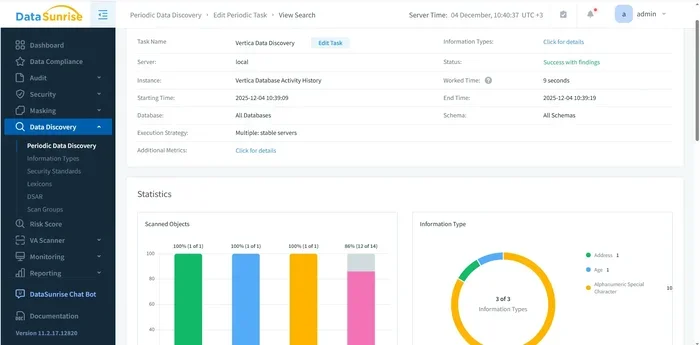
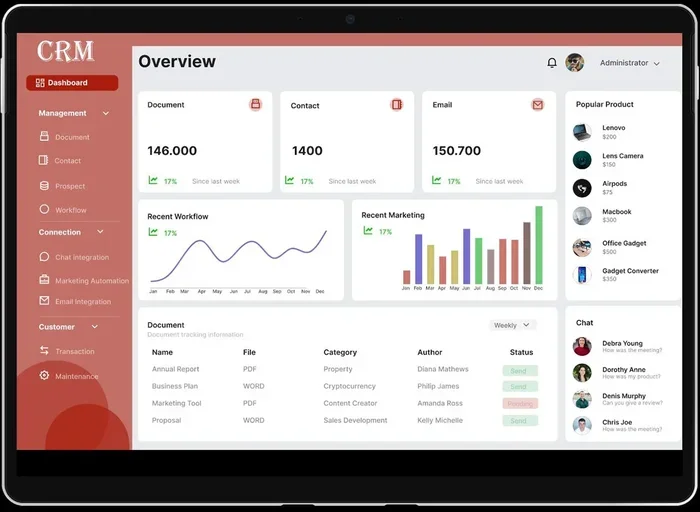
When you use a content management system, you get a dashboard. This dashboard is where you write blog posts, upload images, change your site layout, and much more. Everything happens through a simple, visual interface. No need to touch a single line of code.
CMS tools come in different shapes and sizes. Some are free and open source. Others are premium and come with dedicated support. They all share one goal: making website management easy and accessible for everyone.
How Do CMS Tools Work?
A CMS platform has two main parts. The first part is the Content Management Application (CMA). This is what you see and interact with. It is the front-end dashboard where you add text, images, and videos. The second part is the Content Delivery Application (CDA). This takes your content and delivers it to your visitors’ browsers.
Here is a simple way to think about it. The CMA is like the kitchen in a restaurant. You prepare and arrange everything there. The CDA is like the dining room. It presents the finished product to your guests. Together, they make the whole experience seamless.
Most CMS software uses a database to store your content. It also uses templates to control how your site looks. You can swap themes, change colors, and rearrange layouts without affecting your actual content. This separation of design and content is one of the biggest advantages.
Why CMS Tools Matter for Your Website
If you are wondering whether you really need a CMS tool, the answer is almost certainly yes. These platforms solve real problems that website owners face every day. Let us break down why they matter so much.
First, CMS tools save you a ton of time. Without one, you would have to hand-code every page. That means writing HTML, CSS, and possibly JavaScript for every single update. With a content management system, you can publish a new page in minutes.
Second, they keep your site organized. A good CMS platform lets you categorize your content with tags, categories, and menus. This makes it easy for visitors to find what they need. It also helps search engines understand your site better.
Third, CMS tools make collaboration possible. If you have a team, multiple people can work on the site at the same time. You can assign different roles and permissions. One person might write content. Another might manage the design. A third might handle user accounts.
The Rise of Website Builders and CMS Platforms
Over the past decade, the line between website builders and CMS platforms has blurred. Many website builders now include CMS features like blog posting, content scheduling, and media libraries. At the same time, traditional CMS tools have added drag-and-drop editors and visual builders.
This convergence is great news for users. You get the flexibility of a full content management system with the ease of use of a website builder. The result is a tool that can handle simple blogs and complex e-commerce stores alike.
Key Features to Look For in CMS Tools
Not all CMS tools are created equal. When you are shopping around, look for these essential features. They will make a huge difference in your day-to-day website management.
User-Friendly Interface: Your CMS software should be easy to navigate. If you cannot figure out how to add a simple page, it is not the right tool. Look for a clean, intuitive dashboard.
Mobile Responsiveness: More than half of all web traffic comes from mobile devices. Your CMS platform should help you create sites that look great on phones and tablets. Many modern tools offer mobile preview modes.
SEO Capabilities: The best CMS tools include built-in SEO features. These might be meta title tags, URL customization, sitemap generation, or schema markup support. Some platforms also offer SEO plugins that add even more functionality.
Plugin and Extension Support: This is a big deal. A strong plugin ecosystem means you can add almost any feature your site needs. Want a contact form? There is a plugin for that. Need e-commerce functionality? There is a plugin for that too.
Security Features: Your site needs to be safe. Look for CMS software that offers regular updates, two-factor authentication, and built-in spam protection. Security should never be an afterthought.
Content Management and Organization
At its core, a content management system is about managing content. That means your tool should offer robust ways to organize, edit, and publish. Look for features like draft saving, content scheduling, version history, and media libraries.
Good CMS tools also support multiple content types. You should be able to create standard blog posts, pages, portfolios, and custom post types. The more flexible your CMS platform is, the more you can do with it.
Popular CMS Tools on the Market Today
The CMS tools landscape is diverse. There are options for every budget, skill level, and website type. Here are some of the most well-known platforms you should consider.
WordPress.org (Open Source): This is the king of CMS platforms. It is free to use, and you can customize it with thousands of themes and plugins. WordPress powers blogs, business sites, portfolios, and full online stores. The learning curve is gentle, and the community support is massive.
Joomla: Joomla is another strong open source CMS. It offers more built-in flexibility than many other platforms. It is great for social networks and complex websites. However, it has a steeper learning curve than WordPress.
Drupal: Drupal is built for developers and large organizations. It is incredibly powerful and secure. Many government websites and large enterprises use Drupal. But for a small business or a beginner, it might be overkill.
Wix: Wix is a cloud-based website builder with strong CMS features. It uses a drag-and-drop editor that makes design very easy. It is ideal for small businesses, portfolios, and personal sites. The downside is less flexibility for complex customizations.
Shopify: If your main goal is selling products online, Shopify is a top choice. It is a specialized CMS platform built for e-commerce. It handles inventory, payments, and shipping out of the box. It is not ideal for general content sites, but for online stores, it excels.
| CMS Tool | Best For | Price | Ease of Use |
|---|---|---|---|
| WordPress.org | All types of websites | Free (hosting costs extra) | Easy to moderate |
| Joomla | Complex websites | Free | Moderate |
| Drupal | Large enterprise sites | Free | Difficult |
| Wix | Small business sites | Freemium (paid plans from $17/mo) | Very easy |
| Shopify | Online stores | From $39/mo | Easy |
Benefits of Using CMS Tools
The advantages of using a content management system go far beyond just saving time. Here are the key benefits that make CMS tools a smart choice for almost any website owner.
1. No Coding Required: You can build and manage a full website without knowing how to code. The visual editor handles the technical side. You focus on creating great content instead.
2. Cost Savings: Hiring a developer to build and maintain a custom-coded site can be expensive. CMS tools eliminate much of that cost. Many platforms are free, and you can manage the site yourself.
3. Fast Updates: Need to change your homepage or update a product description? With a CMS platform, you can do it instantly. There is no waiting for a developer to make the change.
4. Scalability: As your business grows, your website needs to grow too. A good CMS tool can handle increased traffic, more content, and added features without breaking a sweat.
5. Consistent Design: CMS software uses themes and templates to keep your site looking uniform. Every page follows the same design language. This creates a professional and polished appearance.
6. Built-In Analytics: Many modern CMS platforms include analytics dashboards. You can track visitor behavior, popular pages, and engagement metrics. Some integrate seamlessly with tools like Google Analytics.
Quick Tips for Getting the Most Out of Your CMS
- Keep your CMS software updated to benefit from the latest security patches.
- Use strong passwords and enable two-factor authentication on your CMS platform.
- Install only the plugins you actually need. Too many plugins can slow your site down.
- Back up your site regularly. Most CMS tools offer one-click backup features.
- Choose a lightweight theme for faster page load times.
- Learn the keyboard shortcuts in your CMS platform to speed up your workflow.
Common Mistakes People Make With CMS Tools
Even though CMS tools are designed to be simple, people still make mistakes. Avoiding these common pitfalls will save you time, money, and frustration.
Choosing the Wrong Platform: Not every CMS tool fits every website. If you pick a platform designed for blogging but you actually need an online store, you will run into problems fast. Always match your CMS platform to your specific needs.
Ignoring Security: Many people set up their content management system and then forget about security. This is a big mistake. Keep your plugins updated, use strong passwords, and consider a security plugin.
Overloading With Plugins: It is tempting to install every plugin you come across. But too many plugins can slow your site, create conflicts, and introduce security vulnerabilities. Only install what you truly need.
Skipping Backups: If something goes wrong, you will be grateful you backed up your site. Most CMS software makes this easy. Set up automatic backups and store them offsite.
Neglecting Mobile Optimization: A huge portion of your visitors will use mobile devices. If your CMS platform does not produce mobile-friendly sites, you are losing potential customers. Always preview your site on different screen sizes.
How to Choose the Right CMS Tool for Your Website
With so many options available, picking the right CMS tool can feel overwhelming. Here is a simple framework to help you decide.
Step 1: Define Your Goals. What kind of website are you building? A personal blog? A business site? An online store? Your goals will narrow down your choices significantly. For example, if you want a blogging platform, WordPress is a natural fit.
Step 2: Consider Your Budget. Some CMS tools are completely free. Others require monthly subscriptions. Factor in hosting costs, premium themes, and plugin fees when calculating your total cost.
Step 3: Evaluate Your Technical Skills. Be honest about your comfort level with technology. If you are a beginner, look for a CMS platform with a gentle learning curve. If you have development experience, you can explore more advanced options like Drupal.
Step 4: Check the Support and Community. A strong user community means more tutorials, forums, and resources. WordPress has one of the largest communities on the internet. You can find answers to almost any question.
Step 5: Think About Scalability. Choose a CMS tool that can grow with you. If your site starts small but has big plans, make sure your platform can handle the expansion.
Expert Insight: The Future of CMS Tools
The world of CMS software is evolving rapidly. Headless CMS platforms are gaining popularity. These separate the back-end content management from the front-end presentation. This gives developers more flexibility while keeping the content workflow simple.
Artificial intelligence is also making its way into CMS tools. Some platforms now offer AI-powered content suggestions, automated image optimization, and smart SEO recommendations. These features are making web publishing even more accessible and efficient.
Another trend is the rise of website builders that double as CMS platforms. Tools like Wix, Squarespace, and Shopify are blurring the boundaries. They offer the ease of a builder with the content management power of a traditional CMS.
Final Thoughts on CMS Tools
CMS tools have revolutionized the way we build and manage websites. They put powerful capabilities into the hands of everyday users. Whether you are a small business owner, a blogger, or a large enterprise, there is a CMS platform that fits your needs.
The right content management system can save you time, reduce costs, and help your website grow. It handles the technical heavy lifting so you can focus on what really matters: creating great content and connecting with your audience.
Take the time to explore your options. Try a few platforms. Read reviews and watch tutorials. Once you find the right CMS tool, you will wonder how you ever managed without one. The investment of time upfront pays off massively in the long run.
Start small. Pick a platform that matches your current needs. As your skills and your site grow, you can always explore more advanced features. The beauty of modern CMS software is that it adapts to you, not the other way around.
Frequently Asked Questions
What is a CMS tool used for?
A CMS tool is used to create, edit, manage, and publish digital content on a website. It allows users to build and maintain websites without needing to write code. Common uses include blogging, business websites, online stores, and portfolio sites.
Is WordPress the best CMS tool?
WordPress is the most popular CMS platform in the world, and for good reason. It is free, flexible, and supports thousands of themes and plugins. However, the best CMS tool depends on your specific needs. Some users prefer Shopify for e-commerce or Wix for simplicity.
Do CMS tools require technical skills?
Most modern CMS tools are designed for non-technical users. They feature visual editors, drag-and-drop builders, and intuitive dashboards. That said, having basic web knowledge can help you get the most out of any content management system.
Are free CMS tools safe to use?
Yes, many free CMS platforms are very safe. WordPress, Joomla, and Drupal are all free and have strong security communities. The key is to keep your software updated, use strong passwords, and install security plugins when needed.
Can I switch CMS tools after building my site?
Yes, you can switch CMS tools, but it requires effort. You will need to migrate your content, redesign your site, and set up new configurations. This is why it is important to choose the right CMS platform from the start.
What is the difference between a CMS and a website builder?
A content management system focuses on organizing and publishing content. A website builder focuses on design and layout. However, many modern tools combine both features. The line between a CMS tool and a website builder has become increasingly blurred in recent years.
=== CONCLUSION ===
CMS tools are essential for anyone who wants to build and manage a website efficiently. They remove the technical barriers that once made web publishing difficult. With the right CMS platform, you can create a professional, scalable, and secure website without writing a single line of code.
Whether you choose WordPress, Shopify, Wix, or another platform, the key is to start. Pick a CMS tool that aligns with your goals, invest some time in learning it, and watch your website grow. The digital world is at your fingertips, and CMS software gives you the keys to unlock it.