What Are Test Management Tools and How to Pick the Best
Test management tools are software platforms that help teams plan, organize, execute, and track software tests throughout the entire quality assurance lifecycle. They centralize test cases, automate repetitive tasks, and provide real-time reporting so teams can ship bug-free products faster. This guide walks you through everything you need to know to pick the right tool for your team.
If you have ever been part of a software team, you know how chaotic testing can get. Spreadsheets pile up. Test cases get lost. Bugs slip through. Deadlines loom. It is a mess. That is exactly where test management tools come in. They are purpose-built platforms designed to bring order to the entire testing process. From planning and organizing to executing and reporting, these tools handle it all.
But here is the real question: how do you know which one is right for you? The market is crowded with options. Some tools are simple and lightweight. Others are enterprise-grade powerhouses. The difference between picking the right tool and picking the wrong one can mean the difference between a smooth release and a stressful launch. This guide breaks it all down for you.
We will cover what these tools actually do, why they are essential, what features to look for, the different types available, and exactly how to choose the best one for your team. By the end, you will have a clear roadmap to make a confident decision.
Key Takeaways
- Streamlined Testing: Test management tools centralize all testing activities, making it easy to organize, track, and manage test cases in one place.
- Better Collaboration: These tools bring QA engineers, developers, and product managers together on a single platform for seamless communication.
- Faster Release Cycles: By automating repetitive tasks and providing real-time insights, test management tools accelerate the delivery pipeline.
- Improved Test Coverage: Teams can track every test scenario, ensuring nothing slips through the cracks during complex release cycles.
- Smarter Decisions: Built-in analytics and reporting help leaders make data-driven choices about quality and priorities.
- Right Tool Matters: Choosing the best tool depends on team size, budget, methodology, and integration needs.
📑 Table of Contents
What Are Test Management Tools?
A test management tool is a software application that helps teams manage the entire testing process. Think of it as a command center for quality assurance. Instead of juggling spreadsheets, emails, and sticky notes, teams use these platforms to keep everything organized and accessible.
At its core, a test management tool handles four main areas:
- Test Planning: Creating and organizing test cases, defining test scenarios, and setting up test cycles.
- Test Execution: Running tests, logging results, and tracking progress in real time.
- Defect Tracking: Recording bugs, linking them to specific test cases, and monitoring resolution status.
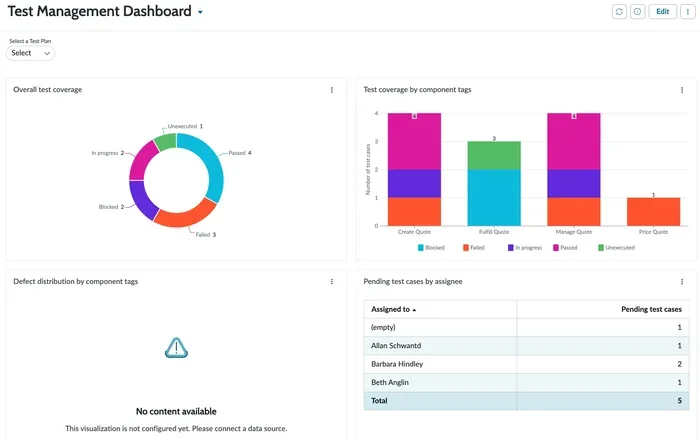
- Reporting and Analytics: Generating dashboards and reports that show test coverage, pass rates, and quality metrics.
These tools are used by QA engineers, developers, project managers, and even business stakeholders. They all play a role in making sure the software works as expected before it reaches users. Without a proper test management system, teams risk missing critical bugs, duplicating work, and losing visibility into the overall quality of the product.
Why Do Teams Need Them?
Small teams might get away with manual processes at first. But as projects grow, things fall apart fast. A test case management tool becomes essential when you have dozens or hundreds of test cases to track. It ensures every test is documented, every result is recorded, and every team member knows what needs to be done next.
Consider a real-world example. Imagine a team releasing a new mobile app. There are hundreds of test scenarios across different devices, operating systems, and screen sizes. Without a centralized platform, coordinating all of that is nearly impossible. A test management tool gives the team a single source of truth for everything related to testing.
Why Test Management Tools Matter for Teams
The value of these tools goes far beyond just organizing test cases. They transform how entire teams approach quality. Here is why they matter so much.
They Improve Collaboration
One of the biggest challenges in software testing is communication. QA testers work with developers. Developers work with product managers. Product managers work with clients. A good QA testing tool bridges all of these gaps. Everyone can see the same test plans, the same results, and the same open issues. This transparency reduces misunderstandings and speeds up problem-solving.
They Save Time
Manual testing is slow. But even the organization behind manual testing takes time. A test management platform automates many of the repetitive tasks. It can schedule test runs, generate reports automatically, and send notifications when tests fail. What used to take hours can now be done in minutes. That time savings adds up quickly over weeks and months.
They Increase Test Coverage
When tests are scattered across different documents and systems, it is easy to miss important scenarios. A centralized test execution platform ensures every test case is accounted for. Teams can track which tests have been run, which have passed, and which need attention. This leads to better test coverage and fewer escaped defects.
They Enable Better Decision-Making
Good decisions need good data. Test reporting tools provide dashboards that show exactly how testing is progressing. Leaders can see pass rates, failure trends, and coverage gaps at a glance. This data-driven approach helps teams prioritize fixes, allocate resources wisely, and decide when a product is truly ready to ship.
Key Features to Look For
Not all test management tools are created equal. Some are packed with features. Others keep things simple. The key is knowing what matters for your team. Here are the most important features to evaluate.
Test Case Management
This is the foundation of any test management software. You need the ability to create, organize, and maintain test cases easily. Look for tools that support reusable test steps, parameterized tests, and hierarchical test organization. The easier it is to manage test cases, the more likely your team will actually use the tool consistently.
Integration Capabilities
Your testing tool should play nicely with the rest of your tech stack. Look for integrations with bug tracking systems like Jira or Bugzilla, CI/CD pipelines like Jenkins or GitHub Actions, and collaboration tools like Slack or Microsoft Teams. Seamless integration testing workflows save time and reduce manual data entry.
Customizable Dashboards and Reports
Every team has different reporting needs. The best tools let you build custom dashboards that show the metrics that matter most to your stakeholders. Whether it is daily progress for a scrum master or weekly summaries for a product owner, flexible reporting is a must-have.
Support for Multiple Testing Types
Modern software requires many types of testing. Your tool should support functional testing, regression testing, performance testing, and even exploratory testing. The more versatile the test lifecycle management platform, the more value it brings across the entire development process.
Role-Based Access Control
Not everyone needs access to everything. Good tools allow administrators to set permissions based on roles. QA engineers can manage test cases. Developers can log defects. Managers can view reports. This keeps sensitive data secure and prevents confusion.
Mobile and Cloud Support
With remote and hybrid work becoming the norm, cloud-based tools are essential. Your team should be able to access the platform from anywhere, on any device. Cloud-based test management also makes it easier to scale as your team grows.
Types of Test Management Tools
The landscape of test management tools is diverse. Different teams have different needs, and the right type depends on your size, methodology, and budget. Let us break down the main categories.
Standalone Test Management Tools
These are dedicated platforms built specifically for managing tests. They offer deep functionality for test planning, execution, and reporting. Examples include tools like TestRail, Zephyr, and qTest. Standalone tools are ideal for teams that want a focused, purpose-built solution for test case management and defect tracking.
All-in-One Project Management Tools
Some project management platforms include testing modules. Tools like Jira and Azure DevOps offer test management features alongside project tracking, bug management, and agile planning. These are great for teams that want everything in one place. The trade-off is that the testing features may not be as deep as a dedicated tool.
Open-Source Test Management Tools
Budget-conscious teams often turn to open-source options. Tools like Kiwi TCMS and TestLink offer free test management solutions with active communities. They may lack the polished user interface of commercial products, but they provide solid core functionality. Open-source tools work well for teams with technical expertise who are comfortable customizing their setup.
Cloud-Based vs. On-Premise Tools
Cloud-based tools are hosted on the provider’s servers and accessed via a browser. They offer flexibility, automatic updates, and lower upfront costs. On-premise tools are installed on your own servers. They give you full control over data and security but require more maintenance and IT resources. Most teams today lean toward cloud-based solutions for their scalability and ease of use.
Agile-Specific Test Management Tools
If your team follows agile or scrum methodologies, you need a tool that fits that workflow. Agile-specific tools support sprint planning, backlog management, and iterative testing cycles. They integrate naturally with agile boards and provide the test metrics that agile teams rely on for continuous improvement.
How to Pick the Best Test Management Tool
Choosing the right tool is not just about features. It is about fit. A tool that works perfectly for a large enterprise might be overkill for a startup. And a lightweight tool might crumble under the demands of a complex enterprise project. Here is a step-by-step approach to finding the best fit.
Step 1: Define Your Team’s Needs
Start by asking the right questions. How many testers are on your team? What types of testing do you do most often? What is your budget? What tools are you already using? Answering these questions gives you a clear picture of what you need. Write down your top three priorities and use them as a filter when evaluating options.
Step 2: Evaluate Ease of Use
The most powerful tool in the world is useless if nobody wants to use it. Look for platforms with intuitive interfaces, clean navigation, and a gentle learning curve. Your QA team should be productive within days, not weeks. Ask for a free trial or demo before committing. Let your team test the tool and give honest feedback.
Step 3: Check Integration Compatibility
Your test management tool should integrate smoothly with your existing workflow. If your team uses Jira for issue tracking, make sure the tool has a native Jira integration. If you run tests in CI/CD pipelines, check for Jenkins or GitHub Actions support. Poor integrations create manual work and data silos that defeat the purpose of the tool.
Step 4: Consider Scalability
Think about where your team will be in six months or a year. Will you need to support more users? More test cases? More complex workflows? Choose a tool that can grow with you. Scalable platforms handle increased load without performance drops or painful migrations.
Step 5: Review Pricing and Value
Pricing models vary widely. Some tools charge per user per month. Others offer flat-rate pricing. Some have free tiers with limited features. When comparing costs, look at the total value. A slightly more expensive tool that saves your team hours every week is a better investment than a cheap tool that creates more work.
Step 6: Look at Support and Community
Good support can make or break your experience with a tool. Check what kind of support the vendor offers. Do they have live chat, email, or phone support? Is there a knowledge base or documentation library? An active user community is also a huge plus. It means you can find answers, tips, and best practices from other users.
Quick Tips for Evaluating Tools
- Always run a pilot with your actual team before making a final decision.
- Ask about data migration support if you are switching from another tool.
- Check if the tool supports API access for custom integrations.
- Read reviews on independent platforms like G2 and Capterra.
- Consider training resources and onboarding support for your team.
Common Mistakes When Choosing Test Management Tools
Even the best-intentioned teams can make poor choices. Here are the most common mistakes to avoid.
Picking Based on Price Alone
The cheapest option is rarely the best option. A low-cost tool that lacks essential features or has poor support will cost you more in frustration and lost productivity. Focus on value, not just price.
Ignoring Team Workflow
Forcing a tool into a workflow it was not designed for creates resistance. If your team follows agile practices, do not pick a tool built for waterfall testing. Match the tool to your methodology, not the other way around.
Overlooking Integration Needs
A standalone tool that does not connect to your CI/CD pipeline or bug tracker creates data silos. Integration is not a nice-to-have. It is a critical requirement for modern development teams.
Choosing Too Many Features
It is tempting to pick the most feature-rich tool on the market. But bloated tools can overwhelm your team and slow adoption. Focus on the features you will actually use every day.
Skipping the Trial Period
Never commit without testing the tool with your real team and real data. A trial period reveals issues that sales demos never show. Use this time to evaluate usability, performance, and support quality.
Conclusion
Test management tools are no longer a luxury. They are a necessity for any team that takes software quality seriously. These platforms bring structure, speed, and visibility to the testing process. They help teams catch bugs earlier, collaborate more effectively, and ship products with confidence.
The right tool depends on your team size, budget, methodology, and specific needs. Take the time to evaluate your options carefully. Run pilots. Get feedback. And do not be afraid to switch if the first choice does not work out. The goal is to find a test management solution that empowers your team to do their best work every single day.
Quality is not an afterthought. It is the foundation of great software. And the right test management tool is the engine that drives it. Start exploring your options today and see the difference a well-chosen platform can make.
Frequently Asked Questions
What is a test management tool used for?
A test management tool is used to plan, organize, execute, and track software tests. It helps QA teams manage test cases, log defects, and generate reports from a single platform. These tools bring structure and visibility to the entire testing lifecycle.
Can small teams benefit from test management tools?
Absolutely. Even small teams benefit from centralized test organization and reporting. Many tools offer affordable plans or free tiers designed specifically for smaller teams. The key is choosing a tool that fits your size and needs without unnecessary complexity.
Are test management tools only for manual testing?
No. Most modern tools support both manual and automated testing. They can integrate with automation frameworks like Selenium or Cypress. This allows teams to manage automated test runs alongside manual tests in one unified platform.
How much do test management tools typically cost?
Pricing varies widely depending on the tool and team size. Some open-source options are free. Cloud-based tools often charge per user per month, ranging from around $10 to $100 or more. Enterprise solutions with advanced features can cost significantly more.
What should I look for when switching test management tools?
Focus on data migration support, integration compatibility, and ease of use. Make sure the new tool supports your existing workflows and tech stack. Run a thorough trial with your actual team before making the switch to ensure a smooth transition.
Can test management tools work with agile methodologies?
Yes, many tools are built specifically for agile teams. They support sprint-based testing, backlog integration, and real-time collaboration. Look for tools that offer agile-friendly features like sprint planning boards and iterative reporting to get the most out of them.