Where Is the Table Tools Layout Tab in Word on Any PC
The table tools layout tab in Word is found by clicking anywhere inside your table, which activates the Table Tools menu at the top of the screen — then simply click the “Layout” tab to access all your row, column, and alignment controls. This hidden gem doesn’t appear unless your cursor is inside a table, which is why many users search for “where is the table tools layout tab in word” and can’t find it. Once you know the trick, you can quickly merge cells, adjust cell size, set text alignment, and rearrange rows and columns with ease on any PC running Microsoft Word.
This is a comprehensive guide about where is the table tools layout tab in word.
Key Takeaways
- The Table Tools Layout tab appears on the Ribbon when you click inside a table.
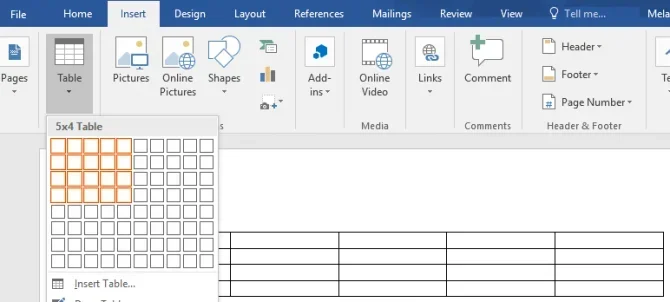
- Navigate to the Insert tab first, then click Table to access layout options.
- Right-click any table and choose Table Properties for quick access to layout settings.
- Switch to Print Layout view to see the Table Tools tab clearly.
- The Layout tab lets you adjust cell size, alignment, and table margins easily.
- If the tab is missing, double-click inside the table to trigger the tools.
- Remember: the Table Tools Layout tab only shows when a table is selected.
Frequently Asked Questions
What is where is the table tools layout tab in word?
where is the table tools layout tab in word is an important topic with many practical applications and benefits.
How can where is the table tools layout tab in word help me?
Understanding where is the table tools layout tab in word can improve your knowledge and provide practical solutions.