Create Stunning QR Codes With an AI QR Code Generator
An AI QR code generator uses smart technology to create beautiful, custom QR codes in seconds. You no longer need to settle for boring black-and-white squares. This guide shows you how AI-powered tools make QR code design easy, fast, and stunning for any purpose.
A AI QR code generator changes the way you think about those little square codes. You have seen them everywhere, on restaurant menus, product labels, and event posters. But most of them look the same, plain and boring. What if you could create QR codes that look amazing and still scan perfectly?
That is exactly what an AI QR code maker does. It uses smart technology to design codes that are not just functional but also visually stunning. Whether you are a small business owner, a marketer, or someone who wants to stand out, this tool is a game changer.
In this guide, we will walk you through everything you need to know. We will explain how these tools work, why they matter, and how you can use them to create codes that look great and perform even better. By the end, you will know exactly how to make QR code design work for you.
Key Takeaways
- AI-powered QR codes combine design and function in ways traditional tools cannot.
- Custom QR code design boosts brand recognition and user engagement.
- Dynamic QR codes let you update content without reprinting.
- AI QR code generators are simple to use, even for beginners.
- QR code analytics give you real-time data on scans and user behavior.
- Smart QR code optimization ensures every code scans perfectly across devices.
- Visual QR codes with logos and colors make a strong marketing impression.
📑 Table of Contents
- What Is an AI QR Code Generator?
- Why AI QR Codes Are Better Than Traditional Codes
- How AI QR Code Generators Work
- Best Uses for AI QR Codes
- Tips for Creating Stunning QR Codes
- How to Choose the Right AI QR Code Generator
- The Future of AI QR Codes
- Common Mistakes to Avoid
- Expert Insights
- Key Takeaways
- Conclusion
What Is an AI QR Code Generator?
A QR code generator is a tool that creates quick response codes. These are the square-shaped barcodes that store information like URLs, text, or contact details. A traditional QR code creator gives you a basic black-and-white square. It gets the job done, but it does not do much else.
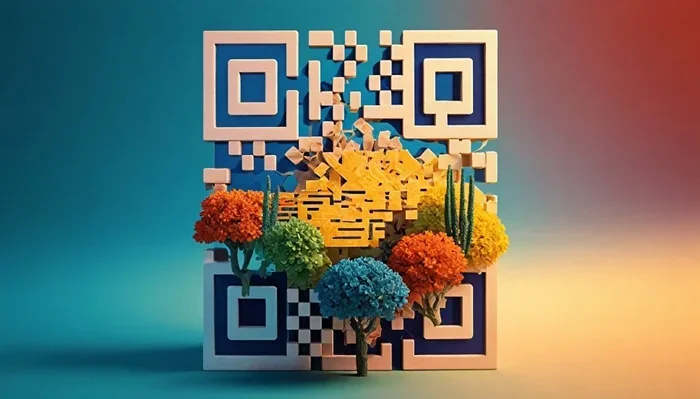
An AI QR code generator takes things much further. It uses artificial intelligence to design codes that are custom, colorful, and branded. The AI adjusts the code so it remains scannable while looking like a piece of art. Think of it as the difference between a plain text document and a beautifully designed brochure.
How Is It Different from a Regular QR Code?
A regular static QR code is fixed. Once you create it, the content cannot change. A dynamic QR code, on the other hand, lets you update the destination link without changing the code itself. AI tools often combine both features, giving you flexibility and style in one package.
AI also helps with QR code customization. You can add your logo, change colors, adjust the shape of the code dots, and pick a unique frame. The AI makes sure all these changes do not break the scannability of the code. This is something that would be very hard to do manually.
Why AI QR Codes Are Better Than Traditional Codes
You might wonder why you need an AI-powered QR code when traditional ones work fine. The answer comes down to three things: design, data, and engagement.
1. Design That Matches Your Brand
Your QR code branding matters more than you think. A plain black-and-white code on a colorful flyer looks out of place. An AI-generated code can match your brand colors, include your logo, and fit your style guide. This makes your materials look professional and cohesive.
2. Built-In Analytics
Most QR code analytics tools powered by AI give you detailed data. You can see how many people scanned your code, where they were located, what device they used, and when they scanned it. This information helps you understand your audience better and improve your campaigns.
3. Higher Engagement Rates
People are more likely to scan a QR code that looks interesting. A visual QR code with a custom design catches the eye. Studies show that branded, well-designed codes get scanned more often than plain ones. This means more traffic, more leads, and more sales for your business.
How AI QR Code Generators Work
The technology behind an AI QR code generator is fascinating but easy to understand. Let us break it down step by step.
Step 1: You Enter Your Data
First, you tell the tool what information the code should hold. This could be a website URL, a phone number, a WiFi password, or a vCard with your contact details. Some advanced tools even let you create a mini landing page inside the code itself.
Step 2: The AI Designs the Code
Next, the AI goes to work. It uses machine learning algorithms to design the code while keeping it scannable. The AI knows exactly how much you can change before the code stops working. It adjusts error correction levels, dot shapes, and color contrasts to keep things functional.
Step 3: You Customize and Preview
After the AI creates a base design, you get full control. You can tweak colors, add a logo, choose a frame, and adjust the pattern. The tool shows you a live preview so you can see exactly how the code will look when printed or displayed on a screen.
Step 4: Download and Track
Once you are happy with the design, you download the code in your preferred format, like PNG, SVG, or PDF. If you are using a dynamic QR code, you can also track its performance over time. The AI updates the analytics dashboard so you always know how your code is performing.
Best Uses for AI QR Codes
AI QR code technology is incredibly versatile. Here are some of the best ways to use it in real life.
Marketing Campaigns
Marketers love AI QR codes because they grab attention. A beautifully designed code on a poster or social media post can drive more clicks than a plain one. You can create seasonal codes, limited-time offers, and event-specific designs that match your campaign theme.
Business Cards
Imagine handing someone a business card with a custom QR code that links to your portfolio or contact page. An AI-generated code on a business card looks modern and memorable. It also makes it easy for people to save your information without typing anything.
Restaurant and Retail Menus
Many restaurants and stores now use QR codes for menus and product information. An AI QR code generator lets you create codes that match your restaurant’s vibe or your store’s branding. You can even change the menu items in the code without printing new ones.
Event Tickets and Invitations
For events, QR codes serve as tickets, check-in tools, and information hubs. A smart QR code with your event logo and brand colors looks polished and professional. Attendees are more likely to scan a code that looks appealing rather than generic.
Product Packaging
Brands use QR codes on packaging to link to product details, tutorials, or warranty pages. An AI-designed code on your packaging adds a premium feel. It shows customers that you care about every detail of their experience.
Tips for Creating Stunning QR Codes
Creating a great QR code design is easier than you think. Here are some practical tips to get the best results.
Keep It Scannable
No matter how creative your design is, the code must scan easily. Do not make the dots too small or too close together. Leave enough white space around the code. The AI handles most of this for you, but it is good to keep these basics in mind.
Use High-Contrast Colors
Make sure there is a clear contrast between the code and the background. Dark codes on light backgrounds work best. Avoid low-contrast combinations like light yellow on white. A good QR code optimization tool will warn you if the contrast is too low.
Add Your Logo Wisely
Placing your logo in the center of the code is a popular move. Just make sure the logo does not cover too much of the code. The AI adjusts the error correction level so the code still works even with a logo in the middle. Keep the logo size to about 20 to 25 percent of the code area.
Test Before You Print
Always test your code with multiple devices before printing it in bulk. Scan it with an iPhone, an Android phone, and a tablet. Make sure it works in different lighting conditions. A quick test saves you from costly reprints.
Think About the Size
The physical size of the code matters. A code that is too small on a billboard will be hard to scan. As a rule of thumb, make the code at least 1 by 1 inch for printed materials and large enough to fill a good portion of a screen for digital displays.
How to Choose the Right AI QR Code Generator
Not all QR code software is created equal. Here is what to look for when picking a tool.
Ease of Use
The best tools are simple enough for anyone to use, even if you have no design experience. Look for a platform with a clear interface, drag-and-drop features, and helpful templates. You should be able to create your first code in under five minutes.
Design Flexibility
Choose a generator that offers plenty of customization options. You should be able to change colors, shapes, frames, and add images. The more control you have, the more unique your codes will look.
Dynamic Capabilities
A good tool lets you create both static and dynamic QR codes. Dynamic codes are especially valuable because you can update the linked content anytime. This saves time and money, especially for long-term campaigns.
Analytics and Tracking
Look for a tool that provides detailed scan data. You want to know how many people scanned your code, where they were, and what they did after scanning. This data helps you measure ROI and improve future campaigns.
Price and Value
Many QR code generator online tools offer free tiers with basic features. Paid plans usually unlock dynamic codes, advanced analytics, and higher download quality. Consider your needs and budget before choosing a plan. You do not always need the most expensive option to get great results.
Integration Options
If you use marketing platforms like Mailchimp, HubSpot, or Google Analytics, check if the QR code tool integrates with them. Seamless integration makes it easier to track campaigns and connect your data across platforms.
The Future of AI QR Codes
The QR code technology landscape is evolving fast. AI is at the center of this evolution. Here is what we can expect in the coming years.
AI will make QR codes even more personalized. Imagine a code that changes its design based on who is looking at it. A code on a billboard might show different colors or patterns depending on the viewer’s preferences or location. This level of personalization is already being explored by leading tech companies.
We can also expect better QR code marketing integration. AI will help businesses create codes that link directly to personalized landing pages, video messages, and interactive experiences. The line between a simple code and a full marketing tool will continue to blur.
Another exciting development is AR-powered QR codes. When scanned, these codes could trigger augmented reality experiences, letting users interact with products in 3D. AI will make these experiences smoother and more realistic than ever before.
For now, the tools we have today are already incredibly powerful. An AI QR code generator gives you the ability to create codes that are beautiful, functional, and data-rich. Whether you are just starting out or looking to level up your existing campaigns, these tools deliver real value.
Common Mistakes to Avoid
Even with an AI QR code creator, some mistakes can hurt your results. Here are a few to watch out for.
- Skipping testing: Never assume a code works without scanning it yourself. Always test on multiple devices.
- Over-customizing: Too many design changes can make a code unscannable. Keep it creative but functional.
- Using low-resolution downloads: Always download the highest quality file for print materials. Low-res codes look blurry and are harder to scan.
- Ignoring analytics: If your tool offers tracking data, use it. The insights can guide your future decisions.
- Forgetting mobile optimization: Most people scan codes with their phones. Make sure the destination page is mobile-friendly.
Expert Insights
Designers and marketers who use AI QR code tools regularly share a few key insights. First, they say that less is often more. A clean, well-branded code outperforms an overly complex one every time. Second, they emphasize the importance of placement. Put your code where it is easy to find and scan, with enough space around it.
Third, they recommend always using dynamic QR codes for campaigns. This gives you the freedom to change the destination URL, update the landing page, or modify the content without creating a new code. It is a small change that saves a lot of time and money in the long run.
Finally, experts suggest treating your QR code as part of your overall brand identity. Use consistent colors, fonts, and styles across all your materials. This builds recognition and trust with your audience over time.
Key Takeaways
- AI-powered QR codes combine design and function in ways traditional tools cannot.
- Custom QR code design boosts brand recognition and user engagement.
- Dynamic QR codes let you update content without reprinting.
- AI QR code generators are simple to use, even for beginners.
- QR code analytics give you real-time data on scans and user behavior.
- Smart QR code optimization ensures every code scans perfectly across devices.
- Visual QR codes with logos and colors make a strong marketing impression.
Conclusion
An AI QR code generator is one of the most practical and creative tools available today. It lets you turn a simple square code into a branded, beautiful, and data-rich marketing asset. Whether you are designing codes for menus, business cards, posters, or product packaging, the right tool makes the process fast and fun.
The beauty of these tools is that you do not need to be a designer or a tech expert. The AI handles the complex parts, so you can focus on making your codes look amazing. With the tips and insights in this guide, you are well on your way to creating QR code design that stands out from the crowd.
Start experimenting today. Pick a tool, create your first AI QR code, and see the difference it makes. You will be surprised at how a small change in design can lead to big results in engagement and brand recognition.
Frequently Asked Questions
What is an AI QR code generator?
An AI QR code generator is a software tool that uses artificial intelligence to create custom, scannable QR codes. Unlike basic generators, it lets you add logos, change colors, and adjust designs while keeping the code fully functional and scannable across all devices.
Are AI QR codes different from regular QR codes?
Yes. A regular static QR code is usually a plain black-and-white square. An AI-generated code can be customized with your brand colors, logo, and unique design elements. The AI ensures the code remains scannable even with these creative changes, which would be very difficult to do manually.
Can I track how many people scan my AI QR code?
Absolutely. Most AI QR code generators offer built-in analytics for dynamic codes. You can track scan counts, locations, device types, and timestamps. This data helps you measure the success of your campaigns and make informed decisions about future marketing efforts.
Do I need design skills to use an AI QR code generator?
Not at all. These tools are designed to be simple and user-friendly. You do not need any graphic design experience. The AI handles the technical parts, and most platforms offer drag-and-drop interfaces with ready-made templates that anyone can use.
What file formats can I download an AI QR code in?
Most QR code software platforms let you download codes in formats like PNG, SVG, PDF, and EPS. SVG and EPS are best for print because they are vector files that stay sharp at any size. PNG works well for digital screens and social media posts.
Is it expensive to use an AI QR code generator?
Many tools offer free plans with basic features. Paid plans usually start at a low monthly cost and unlock advanced features like dynamic codes, detailed analytics, and higher-resolution downloads. The cost is very reasonable compared to the value and professional look these tools provide.