How to Use a Minecraft Dome Generator for Amazing Builds
A Minecraft dome generator is a powerful tool that helps you build perfect domes in Minecraft with minimal effort. Whether you are a beginner or a seasoned builder, this guide shows you how to pick the right tool, set it up, and create jaw-dropping dome structures. You will learn practical tips, common mistakes to avoid, and expert tricks that take your Minecraft builds to the next level.
Key Takeaways
- Easy Setup: A Minecraft dome generator lets you create complex dome shapes quickly without manual block placement.
- Multiple Tools Available: You can choose from web-based generators, mods, and in-game command methods to build domes.
- Saves Time and Effort: These tools eliminate the guesswork and speed up your building process significantly.
- Customizable Results: You can adjust size, material, and design to fit any Minecraft project or theme.
- Great for All Skill Levels: Whether you are new or experienced, a dome generator simplifies even the most complex builds.
- Pair with Real-World Generator Knowledge: Understanding how generators work in real life, such as what kind of generator do I need, can help you appreciate the automation these tools provide in Minecraft.
📑 Table of Contents
What Is a Minecraft Dome Generator?
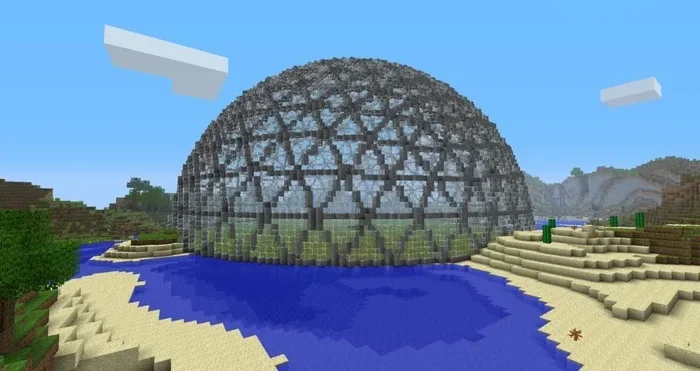
A Minecraft dome generator is a tool or software that helps you create dome-shaped structures in Minecraft automatically. Instead of placing hundreds of blocks by hand, you input a few settings and the tool generates the dome for you. Think of it like a blueprint maker for your Minecraft world.
These generators come in many forms. Some are web-based tools you use in your browser. Others are mods you install in Minecraft. And some rely on command blocks or redstone circuits inside the game itself. No matter which type you choose, the goal is the same: make dome building fast, easy, and fun.
Just like figuring out how to power your house with a generator requires choosing the right setup, picking the right Minecraft dome generator depends on what kind of build you want to create. The right tool can turn a daunting project into something you finish in minutes.
Why Use a Dome Generator?
Building domes by hand in Minecraft is tedious. You have to calculate curves, place blocks one by one, and fix mistakes constantly. A dome generator handles all of that for you. Here are some key reasons to use one:
- Saves hours of building time
- Creates perfect symmetry every time
- Works for any dome size or shape
- Great for large-scale projects like castles and arenas
- Reduces frustration and errors
Types of Minecraft Dome Generators
Not all dome generators are the same. Each type has its own strengths and best use cases. Let us break them down so you can find the one that fits your needs.
Web-Based Generators
Web-based generators are tools you access through your browser. You do not need to install anything. You simply go to a website, enter your dome dimensions, and the tool gives you a blueprint or a list of coordinates. These are great for quick projects and players who do not want to mess with mods.
Some popular web-based options include tools like MCEdit schematics and online dome calculators. They work well for small to medium domes. If you want to build a simple dome shelter or a decorative roof, a web-based generator is your best bet.
Minecraft Mods
Mods are add-ons you install into Minecraft to unlock new features. Dome-building mods give you in-game tools to generate domes directly inside your world. Some mods let you select a radius and material, then press a button to build the entire structure.
Popular mods for dome building include WorldEdit and VoxelSniper. These tools are powerful and widely used in the Minecraft community. They give you precise control over every detail of your dome. If you build often, investing time in learning a dome-building mod is well worth it.
Command Block and Redstone Methods
For advanced players, command blocks and redstone circuits can automate dome generation. This method uses Minecraft’s built-in command system to place blocks in dome patterns. It is the most technical option, but it offers the most control.
This approach is similar to understanding how much gas a generator uses because both require knowing the right inputs to get the best output. You need to understand commands and redstone logic. But once you set it up, your dome builds itself.
How to Choose the Right Minecraft Dome Generator
Picking the right dome generator depends on several factors. Not every tool works for every project. Here is what you should consider before making your choice.
Consider Your Skill Level
If you are new to Minecraft, start with a simple web-based generator. These tools are user-friendly and require no installation. You can learn the basics of dome building without getting overwhelmed by complex mods or commands.
Intermediate players should explore mods like WorldEdit. These tools offer more flexibility and let you customize your builds. Advanced players who enjoy redstone and command blocks can dive into automated generation methods.
Think About Your Project Size
The size of your dome matters a lot. Small domes for garden sheds or lookout towers work great with web-based tools. Large domes for castles, arenas, or stadiums need more powerful tools like mods or command systems.
Also consider how many domes you want to build. If you are planning a whole village of dome houses, a mod or command method will save you the most time. For a single project, a web generator is perfectly fine.
Check Compatibility
Make sure the generator you choose works with your version of Minecraft. Some mods only work with specific game versions. Web-based tools work with any version since they run in your browser. Always double-check before you commit to a tool.
Step-by-Step Guide to Using a Minecraft Dome Generator
Now that you know the types of generators available, let us walk through the process of using one. This guide uses a web-based dome generator as the example, but the steps apply to most tools.
Step 1: Choose Your Dome Type
First, decide what kind of dome you want. Do you want a full sphere, a half-sphere, or a partial dome? Most generators let you select the shape before you start. Think about what fits your build best.
For example, a half-sphere works great for a house roof. A full sphere could make a cool underground room or a lookout tower. A partial dome is perfect for arches and decorative elements.
Step 2: Set Your Dimensions
Next, enter the size of your dome. Most generators ask for the radius or diameter. The radius is the distance from the center to the edge. A larger radius means a bigger dome.
Start small if you are new. A dome with a radius of 10 to 15 blocks is a good size to practice with. You can always go bigger once you get comfortable with the tool.
Step 3: Select Your Materials
Choose the blocks you want to use for your dome. Some generators let you pick a single material. Others let you create layered domes with different materials for a more detailed look.
Popular dome materials include stone bricks, smooth quartz, and deepslate tiles. Each gives your dome a different feel. Stone bricks look rustic and medieval. Smooth quartz looks modern and clean. Deepslate tiles give a dark, dramatic vibe.
Step 4: Generate and Place
Once you have your settings ready, generate the dome. The tool will give you a blueprint or a set of coordinates. Follow the instructions to place the blocks in your Minecraft world.
If you are using a mod like WorldEdit, you can simply paste the schematic into your world. The mod does all the placing for you. This is the fastest and easiest way to bring your dome to life.
Step 5: Customize and Decorate
After your dome is placed, it is time to make it your own. Add windows, doors, torches, and interior details. You can also build structures around the dome, like walls, pathways, or gardens.
Customization is where your dome really comes to life. A plain dome is cool, but a decorated dome with unique details is amazing. Spend time making it look the way you want.
Common Mistakes to Avoid
Even with a dome generator, mistakes can happen. Here are some common pitfalls and how to avoid them.
Skipping the Planning Phase
Some players jump straight into building without a plan. This often leads to domes that look uneven or do not fit the surrounding area. Always take a few minutes to plan your dome before you start generating it.
Choosing the Wrong Size
Too small and your dome feels cramped. Too big and it overwhelms the landscape. Pick a size that matches the scale of your build. A good rule of thumb is to make the dome proportional to the structures around it.
Ignoring the Interior
It is easy to focus only on the outside of the dome and forget about the inside. A dome with a great exterior but an empty interior feels incomplete. Plan your interior layout before you generate the dome.
Using the Wrong Generator for Your Needs
Not every dome generator is right for every project. Using a simple web tool for a massive castle dome will frustrate you. Match the tool to the project for the best results.
Expert Tips for Stunning Minecraft Dome Builds
Take your dome builds from good to amazing with these expert tips. These tricks come from experienced Minecraft builders and will help you stand out.
Layer Your Materials
Instead of using one material for the entire dome, try layering two or three materials. For example, use stone bricks on the bottom, smooth stone in the middle, and glass on top. This creates depth and visual interest.
Add Interior Lighting
Good lighting transforms a dome from flat to stunning. Use glowstone, sea lanterns, or candles inside your dome. Place them strategically to highlight the curves and create interesting shadows.
Build Landscaping Around the Dome
A dome looks best when it blends into its surroundings. Add trees, flowers, paths, and water features around the base. This makes the dome feel like it belongs in the world.
Experiment with Irregular Shapes
Do not limit yourself to perfect spheres. Try elongated domes, split domes, or overlapping domes. These unusual shapes create unique and memorable structures.
Use the Generator as a Starting Point
A dome generator gives you a solid foundation. But do not be afraid to modify the result. Add wings, towers, or extensions to make the dome part of a larger complex. The generator handles the hard part, and you handle the creative part.
Conclusion
A Minecraft dome generator is one of the best tools you can add to your building arsenal. It saves time, reduces frustration, and helps you create structures that look incredible. Whether you are building a cozy dome house, a grand castle, or an epic arena, the right generator makes the process smooth and enjoyable.
Start with a simple web-based tool if you are new. Move to mods like WorldEdit as you grow more confident. And for the ultimate challenge, try command block automation. The key is to have fun and experiment with different approaches.
Remember, every great Minecraft builder started somewhere. Use these tools, learn from your builds, and keep improving. Your dome creations will impress your friends and make your Minecraft world truly special. Happy building!
Frequently Asked Questions
What is a Minecraft dome generator?
A Minecraft dome generator is a tool or software that automatically creates dome-shaped structures in Minecraft. It saves you from placing blocks manually and helps you build perfect domes quickly and easily.
Are Minecraft dome generators free to use?
Many web-based dome generators are free to use. Some mods may require a one-time purchase or are open-source and free. Command block methods are completely free since they use the game’s built-in features.
Do I need experience to use a Minecraft dome generator?
No experience is needed. Most generators are designed to be beginner-friendly. You simply enter your desired size and material, and the tool does the rest. More advanced methods like mods or command blocks have a steeper learning curve.
Can I use a dome generator on any Minecraft version?
It depends on the tool. Web-based generators work with any version since they run in your browser. Mods and command methods may only work with specific Minecraft versions. Always check compatibility before you start.
What is the best dome generator for beginners?
Web-based dome calculators and simple online tools are the best for beginners. They require no installation and are easy to use. Sites like MCEdit or online Minecraft building tools are great starting points for new players.
Can I combine a dome generator with other building tools?
Absolutely. Many players use dome generators alongside tools like WorldEdit or VoxelSniper for more complex builds. Combining tools gives you more flexibility and lets you create truly unique structures. Think of it like understanding how to power your house with a generator as part of a bigger home setup, dome generators work best when integrated into your overall building workflow.