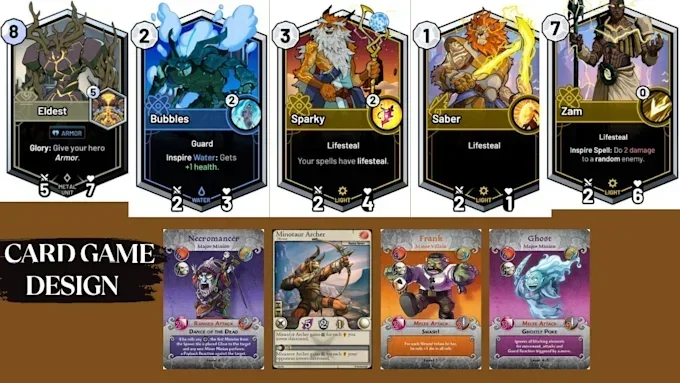
Build Custom Trading Cards Using a Trading Card Generator
A trading card generator lets you create custom collectible cards in minutes. Whether you want personalized cards for games, gifts, or business, these tools make it simple. You do not need design skills or expensive software to get started. Online card generators offer free templates, easy editing, and fast downloads. This guide shows you exactly how to build stunning cards from scratch.
A trading card generator is one of the most fun and useful tools you can find online today. Whether you are building cards for a game, creating gifts for friends, or designing collectibles for a brand, these tools make the process easy and exciting. You do not need to be a graphic designer or own expensive software. With just a few clicks, you can produce professional-looking cards that look great on screen and on paper.
The idea behind a card generator tool is simple. You pick a template, add your own text and images, and then download or print the result. It is like having a mini design studio right in your browser. Custom card design has never been this accessible. In this guide, we will walk you through everything you need to know about using a trading card generator to bring your ideas to life.
So whether you are a hobbyist building a card collection for fun or a creator looking for card game assets, this article has you covered. We will explore the best tools, share practical tips, and answer common questions. By the end, you will feel confident enough to start creating your very own cards today.
Key Takeaways
- Easy to Use: A trading card generator makes design simple for beginners and pros alike.
- Free and Paid Options: Many tools let you create cards at no cost, while others offer premium features.
- Customizable Templates: You can change colors, text, images, and layouts to match your vision.
- Print or Digital: Generate cards you can print at home or share digitally online.
- No Design Experience Needed: Drag-and-drop tools make card creation accessible to everyone.
- Great for Many Uses: Use card generators for games, collections, marketing, and gifts.
📑 Table of Contents
- What Is a Trading Card Generator?
- Why Use a Trading Card Generator?
- Best Trading Card Generators to Try
- How to Create Your Own Trading Cards Step by Step
- Uses for a Trading Card Generator
- Common Mistakes to Avoid When Using a Trading Card Generator
- Expert Tips for Stunning Trading Cards
- Frequently Asked Questions
- Conclusion
What Is a Trading Card Generator?
A trading card generator is a software tool or online platform that helps you design and produce trading cards. These cards can feature characters, stats, artwork, logos, or any custom content you want. Digital trading cards have become hugely popular in recent years, and a card creator software makes it easy to join the trend.
Think of it like a fill-in-the-blank template system. The generator provides a structure, and you fill in the details. You choose the layout, upload images, type in text, and pick colors. The tool handles the rest. Some generators are built for collectible cards, while others focus on personalized trading cards for events or marketing.
How Does a Card Generator Work?
Most card generator tools follow a simple workflow. First, you select a base template. Then you customize every element on the card. This includes the front design, the back design, and any special features like borders or symbols. Once you are happy with the result, you export the card as an image file or a printable PDF.
The process is fast and intuitive. Many platforms use drag-and-drop editors, so you do not need to learn complex software. Card layout designer features let you move text boxes, resize images, and adjust spacing with ease. This is why so many people love using these tools for create trading cards online projects.
Why Use a Trading Card Generator?
There are many reasons to use a trading card generator instead of hiring a designer or learning complex software. Let us look at the biggest benefits that make these tools so popular.
Saves Time and Money
Hiring a professional designer can be expensive. A card creator software gives you professional results at a fraction of the cost. Many card generator tools are completely free to use. Even paid plans are usually very affordable compared to design services. You save both time and money while still getting high-quality results.
No Design Skills Required
One of the best things about a trading card maker is that anyone can use it. The templates do all the heavy lifting. You just add your own content and preferences. Printable trading cards come out looking polished and professional, even if you have never designed anything before. The intuitive editors guide you through every step.
Endless Creative Freedom
With a card generator tool, you are only limited by your imagination. You can create cards for any theme, any game, any occasion. Want to design fantasy card creator artwork for a homebrew game? You can do that. Need personalized trading cards for a birthday party? That works too. The flexibility is one of the biggest draws of these platforms.
Best Trading Card Generators to Try
Not all card generator tools are created equal. Some are better for certain tasks than others. Here are some of the top options you should consider when looking for a trading card generator.
Canva
Canva is one of the most popular design platforms online, and for good reason. It offers a huge library of card template options that you can customize. The drag-and-drop editor is beginner-friendly, and the free plan gives you plenty of features. Many people use Canva for custom card design projects because of its simplicity and power.
Magic Card Maker
Magic Card Maker is a dedicated tool built specifically for creating trading cards. It offers templates for different card sizes and styles. This tool is great for people who want a focused card creator software experience without extra design features they do not need. It is perfect for sports card generator projects and fantasy card games.
Adobe Express
Adobe Express combines professional-grade design with ease of use. It is a step up from basic tools but still very accessible. If you want more control over your trading card artwork, Adobe Express is a strong choice. The platform offers templates, fonts, and graphics that help you build standout cards.
When Choosing a Generator, Consider This
Before picking a card generator tool, think about what you need most. Do you want free access or premium features? Are you creating cards for print or digital use? Do you need support for specific card sizes? Answering these questions will help you find the right fit. You can also explore what kind of generator do I need if you are comparing different types of generator tools for your project.
How to Create Your Own Trading Cards Step by Step
Now that you know what a trading card generator is and why it is useful, let us walk through the actual process. Follow these steps to create your first set of custom cards.
Step 1: Choose Your Platform
Start by picking a card creator software that fits your needs. Sign up for a free account if the platform offers one. Take a few minutes to explore the interface and see what templates are available. This first step sets the foundation for everything else.
Step 2: Pick a Template
Browse through the template library and choose a style that matches your vision. Most platforms organize templates by category, so finding the right one is easy. You can always adjust the layout later, so do not worry about being perfect at this stage. The goal is to find a starting point that inspires you.
Step 3: Customize Your Card
This is where the fun begins. Upload your images, change the text, adjust colors, and tweak the layout. Pay attention to details like font size, spacing, and alignment. A well-designed card layout designer setup makes a big difference in the final result. Take your time and experiment with different options.
Step 4: Add the Back Design
Do not forget about the back of the card! A matching back design gives your cards a polished, professional look. Many templates include a back design automatically, but you can customize it too. Consistent styling across the front and back makes your card collection look cohesive.
Step 5: Export and Print
Once your card is ready, export it as a high-resolution image or PDF. For printing, use a quality paper stock and a good printer. Printable trading cards look best on glossy or matte cardstock. If you are sharing digitally, save the file as a PNG or JPEG for easy uploading and sharing.
Uses for a Trading Card Generator
A trading card generator is not just for hobbyists. These tools serve a wide range of purposes across different fields. Here are some of the most common and creative ways people use them.
Board Games and Card Games
Game designers use card generator tools to create assets for new board games and card games. Deck building becomes much easier when you can generate all your cards quickly. You can create stats, abilities, and artwork for every card in your game. This is a huge time-saver for independent game creators.
Sports and Fantasy Leagues
Sports card generator tools are popular among fantasy league managers and collectors. You can create player cards with stats, photos, and team logos. These cards work great for league drafts, collections, and fan engagement. A fantasy card creator makes it easy to produce cards that look like professional sports trading cards.
Marketing and Branding
Businesses use custom card design tools for marketing purposes. Think about branded cards for customer loyalty programs, promotional giveaways, or event handouts. A personalized trading card with your logo and brand colors makes a memorable impression. It is a creative way to stand out from the competition.
Gifts and Personal Projects
Making personalized trading cards for birthdays, weddings, or holidays is a wonderful idea. You can create cards featuring photos and messages for loved ones. Kids love making cards with their favorite characters or artwork. These make thoughtful and unique gifts that people truly appreciate.
Common Mistakes to Avoid When Using a Trading Card Generator
Using a trading card generator is straightforward, but there are some common pitfalls you should watch out for. Avoiding these mistakes will help you create better cards faster.
- Using low-resolution images: Always upload high-quality images. Low-res photos look blurry and unprofessional on cards.
- Overcrowding the design: Leave enough white space. Too much text or too many images make cards hard to read.
- Ignoring the back design: The back of the card matters. A consistent back design ties the whole set together.
- Skipping the proofread step: Always check spelling and stats before exporting. Errors are hard to fix once cards are printed.
- Choosing the wrong card size: Make sure your template matches the print size you want. Mismatched sizes lead to wasted paper and ink.
Taking a few extra minutes to review your work can save you a lot of frustration later. Good card game design habits start with attention to detail.
Expert Tips for Stunning Trading Cards
Want your cards to really stand out? Here are some expert tips from experienced designers who use card generator tools every day.
- Use bold, readable fonts: Fancy fonts look nice but can be hard to read at small sizes. Stick to clean, legible typefaces for important text.
- Keep a consistent color palette: Choose two to three colors and stick with them across all cards in a set.
- Add a foil or border effect: Even simple digital effects can make a card look premium and eye-catching.
- Test print before bulk printing: Print one card first to check colors, sizing, and quality before printing the whole set.
- Save your templates: Once you find a layout you love, save it as a reusable template for future projects.
These small tips can make a big difference in the final quality of your trading card artwork. Practice makes perfect, so keep experimenting with new ideas and styles.
Frequently Asked Questions
Can I use a trading card generator for free?
Yes, many platforms offer free plans that let you create and download cards at no cost. Free plans usually include a set number of templates and export options. If you need more features, paid plans are often available for a small monthly fee. The best part is that you can start creating right away without spending a dime.
Do I need a computer to use a card generator tool?
Most card generator tools work in your web browser, so you can use them on any computer or tablet. Some platforms also offer mobile apps for on-the-go design. You do not need a powerful computer or special hardware. As long as you have a stable internet connection, you are good to go.
Can I sell cards I create with a trading card generator?
This depends on the platform you use. Some tools allow commercial use of their templates and designs, while others restrict usage to personal projects only. Always check the licensing terms before selling any cards you create. Understanding the terms helps you avoid copyright issues down the road.
What file format should I export my cards in?
PNG and PDF are the most popular formats for exporting printable trading cards. PNG files work great for digital sharing, while PDFs are ideal for printing. For the best print quality, use PDF format with high resolution settings. This ensures your cards look sharp and professional every time.
How do I make my cards look professional?
Use high-quality images, keep your design clean and uncluttered, and maintain a consistent style across all cards. Pay attention to alignment and spacing. A well-structured card layout designer approach goes a long way. Even simple designs look professional when they are organized and visually balanced.
Are trading card generators safe to use?
Yes, reputable platforms are safe and secure. They use encryption and follow privacy standards to protect your data. Always use well-known tools and read their privacy policies before uploading personal images or information. Sticking to trusted platforms keeps your creative work and personal data safe.
Conclusion
A trading card generator is one of the most versatile and fun tools you can use for creative projects. Whether you are building a card collection, designing assets for a game, or creating personalized gifts, these tools make it all possible. The process is simple, affordable, and incredibly rewarding. You do not need any special skills or expensive software to get started.
Now that you know how these tools work and what they can do, it is time to take action. Pick a platform, choose a template, and start creating your first custom card today. The world of custom card design is waiting for you. With a trading card generator in hand, there is no limit to what you can create. So go ahead, explore your creativity, and share your amazing cards with the world.
Remember, the best part about these tools is that they grow with you. As your skills improve, you can tackle more complex projects and push your creative boundaries. Start simple, stay curious, and enjoy the journey of bringing your ideas to life through digital trading cards and beyond.