What Are Task Management Tools and Why You Need Them
Task management tools are digital apps that help you organize, track, and complete tasks efficiently. They keep your projects on schedule, improve team collaboration, and reduce the stress of juggling multiple responsibilities. Whether you work solo or lead a team, the right productivity software can transform how you get things done.
Have you ever felt buried under a mountain of tasks? You have a hundred things to do, and no clear idea where to start. That is where task management tools come in. These apps are designed to help you organize your work, track progress, and actually finish what you start. In this guide, we will break down exactly what they are, how they work, and why you need one in your life.
The truth is, most people already use some form of task management. A simple notebook, a sticky note on your monitor, or a basic list on your phone — these are all informal versions of the same idea. But a proper digital task manager takes it much further. It gives you structure, automation, and visibility into your work that a scribbled note simply cannot match. Let us dive in and explore the world of work management in detail.
Key Takeaways
- Task management tools centralize your work: They give you one place to view all your tasks, deadlines, and project details.
- They boost team collaboration: Team members can assign tasks, share updates, and communicate in real time.
- You save time with automation: Many tools automate repetitive steps like reminders and status updates.
- They improve accountability: Everyone knows who is responsible for what and when it is due.
- They scale with your needs: From simple to-do lists to complex project plans, there is a tool for every workflow.
- They reduce missed deadlines: Visual timelines and alerts keep you on track and organized.
📑 Table of Contents
What Are Task Management Tools?
A task management tool is a software application that helps you create, organize, and track tasks from start to finish. Think of it as a smart to-do list on steroids. It lets you break big projects into smaller steps, set deadlines, assign work to others, and monitor progress in real time.
At its core, task organization is about knowing what needs to be done, who is doing it, and when it is due. A good productivity tool handles all three of those things seamlessly. Some tools are built for individuals managing personal goals. Others are designed for teams and entire organizations handling complex project planning.
How Do They Work?
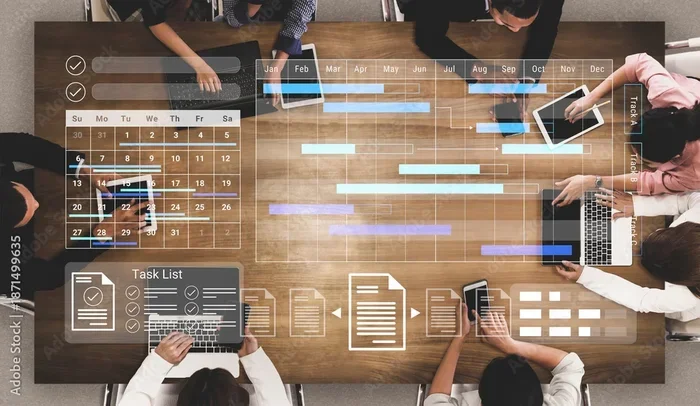
Most task tracking platforms work in a similar way. You create a task, add details like a due date and priority level, and then move it through stages. Common stages include “To Do,” “In Progress,” and “Done.” Some tools use boards, lists, or calendars to display your tasks visually.
Many platforms also let you:
- Set recurring tasks that repeat daily, weekly, or monthly
- Attach files and documents directly to a task
- Add comments so team members can discuss work in context
- Create subtasks to break large items into manageable pieces
- Set reminders so nothing slips through the cracks
The goal is simple: make your workflow clearer and your day more productive. When everything has a place and a deadline, you spend less time figuring out what to do next and more time actually doing it.
Why You Need Task Management Tools
You might wonder, “Do I really need one of these?” If you manage just a few tasks a day, maybe you do not. But as your workload grows, keeping track of everything in your head becomes nearly impossible. Here is why task management software is worth your time.
They Keep You Organized
One of the biggest benefits of a digital task manager is that it centralizes everything. Instead of scattering notes across different apps, notebooks, and sticky notes, you put it all in one place. You can see every task, every deadline, and every project status at a glance. This kind of task organization saves hours of mental energy each week.
They Improve Team Collaboration
If you work with a team, team collaboration is essential. A shared work management platform means everyone sees the same information. You know who is handling which task, what is behind schedule, and what needs your attention. This transparency reduces confusion and keeps everyone aligned toward the same goals.
They Help You Prioritize
Not all tasks are equally important. A good productivity tool lets you rank tasks by urgency and importance. You can focus on what truly matters instead of getting lost in a sea of small, low-value items. Task prioritization features like color coding, flags, or priority labels make this process effortless.
They Reduce Stress
There is real peace of mind in knowing nothing is forgotten. When your task tracking system handles the remembering, you free up mental space. This reduces the anxiety of missed deadlines and forgotten commitments. Less stress means better focus and better results.
Types of Task Management Tools
Not all productivity software is the same. Different tools serve different needs. Here is a look at the main types you will encounter.
Personal Task Managers
These are built for individuals. They are simple, clean, and easy to use. A to-do list app in this category is perfect for managing your daily errands, personal goals, or side projects. They usually focus on quick task entry and gentle reminders.
Team and Project Management Platforms
These tools are built for groups. They include features like task assignment, project scheduling, and shared dashboards. Popular examples include platforms used by project management teams to plan sprints, track milestones, and manage resources across multiple projects.
Kanban Board Tools
Kanban boards use visual columns to represent workflow stages. You move task cards from left to right as work progresses. This style of workflow management is incredibly popular because it is visual, intuitive, and easy to understand at a glance.
All-in-One Work Platforms
Some tools combine task management with other features like document sharing, time tracking, and communication. These all-in-one platforms are ideal for teams that want to reduce the number of apps they use daily. They create a single hub for everything work-related.
Key Features to Look For
When choosing a task management tool, not every feature will matter to you. But here are the ones that make the biggest difference.
Ease of Use
The best productivity tool is one you will actually use. If the interface is confusing, you will abandon it within days. Look for clean design, simple navigation, and a short learning curve.
Customization
Every workflow is different. A flexible tool lets you create custom fields, tags, and views. You should be able to set up workflow automation that matches how your team actually works, not the other way around.
Integration Capabilities
Your digital task manager should play well with other apps you already use. Look for integrations with email, calendars, file storage, and communication platforms like Slack or Microsoft Teams. This keeps everything connected and avoids duplicate work.
Mobile Access
You are not always at your desk. A good task tracking app should have a solid mobile version. This way, you can update tasks, check deadlines, and review progress from your phone or tablet on the go.
Reporting and Analytics
For teams, data matters. The ability to see how many tasks are completed, how long projects take, and where bottlenecks occur helps you improve over time. Look for tools with built-in project tracking reports and dashboards.
How to Choose the Right Tool for You
With so many options available, picking the right one can feel overwhelming. Here is a simple approach to finding the best fit.
Start with your needs. Are you managing personal tasks or leading a team? Do you need simple list views or complex project scheduling? Write down your top three must-have features before you start shopping.
Consider your budget. Many task management tools offer free plans for individuals or small teams. These are a great place to start. As your needs grow, you can always upgrade to a paid plan with more features.
Try before you commit. Almost every platform offers a free trial. Use it. Test how the tool handles your daily workflow. Check if the mobile app works well. See if the interface feels intuitive. A couple of weeks of testing saves you from a costly mistake later.
Think about scalability. Choose a tool that can grow with you. If your team expands or your projects become more complex, you want a platform that can handle that without a steep learning curve.
Quick Tips for Getting Started
- Start small. Do not try to set up a complex system on day one.
- Add your most important tasks first and build from there.
- Set a daily habit of checking your task management app each morning.
- Review your completed tasks weekly to celebrate progress and stay motivated.
- Invite your team early so everyone learns the tool together.
Common Mistakes to Avoid
Even with the best work management tool, people make avoidable mistakes. Here are a few to watch out for.
- Overcomplicating your setup. Too many columns, tags, and custom fields create confusion. Keep it simple.
- Ignoring the tool after setup. A task management tool only works if you use it consistently. Make it part of your daily routine.
- Not updating task statuses. If tasks stay stuck in “In Progress” forever, the tool loses its value. Keep statuses current.
- Skipping regular reviews. Set aside time each week to review your tasks, adjust priorities, and plan the week ahead.
- Using too many tools at once. Switching between multiple apps fragments your attention. Stick with one strong productivity tool.
Avoiding these pitfalls ensures your task organization system actually delivers results. A tool is only as good as the habits you build around it.
Expert Insights on Task Management
Productivity experts agree on one core principle: the best task management tool is the one you will use consistently. Complex systems with every feature imaginable often fail because people find them too hard to maintain.
Start simple and scale up. Begin with basic lists and deadlines. As you get comfortable, add features like task delegation, workflow automation, and advanced reporting. This gradual approach builds lasting habits instead of overwhelming you with options on day one.
Another expert tip: batch your task updates. Instead of checking and updating your task tracking app every five minutes, set two or three specific times each day for updates. This keeps you focused on actual work while still staying organized.
Finally, remember that task management tools are just that — tools. They do not do the work for you. They give you the structure and visibility to do your best work. The real magic happens when you combine a great tool with disciplined habits.
Conclusion
Task management tools are more than just fancy to-do lists. They are powerful productivity software that transforms how you organize, prioritize, and complete your work. Whether you are a solo freelancer juggling multiple clients or a team leader coordinating a large project, the right digital task manager can make a dramatic difference.
The key is finding a tool that fits your workflow, keeping your setup simple, and using it consistently. With the right work management platform, you will spend less time worrying about what to do next and more time actually getting it done. Start small, stay consistent, and watch your productivity grow.
Frequently Asked Questions
What exactly is a task management tool?
A task management tool is a software application that helps you create, organize, track, and complete tasks. It gives you a central place to manage your to-do list, set deadlines, assign work, and monitor progress on projects.
Are task management tools only for teams?
Not at all. While many tools shine in team settings, plenty are designed for individuals. A simple to-do list app works great for personal goals, daily errands, and solo projects. You can always upgrade to a team platform if your needs grow.
How do I know which task management tool is right for me?
Start by identifying your top needs. Consider whether you need personal or team features, your budget, and how complex your workflow is. Most platforms offer free trials, so test a few before committing to one.
Can task management tools really improve productivity?
Yes. A good productivity tool reduces mental clutter by keeping everything organized in one place. It helps you prioritize tasks, avoid missed deadlines, and focus on what matters most each day.
Do task management tools support automation?
Many modern platforms include workflow automation features. These can automatically assign tasks, send reminders, update statuses, and trigger actions based on rules you set. Automation saves time and keeps your work moving smoothly.
Is it hard to switch to a new task management tool?
It does not have to be. Start with a simple setup and learn the basics first. Most tools have intuitive interfaces and helpful tutorials. Give yourself a couple of weeks to adjust, and you will wonder how you ever managed without one.