The Best Business Process Analysis Tools for Growth
Business process analysis tools help companies map, measure, and improve their workflows with precision. Whether you are a small startup or a growing enterprise, the right platform can save time, cut costs, and reveal hidden bottlenecks. This guide covers the top tools, key features, and practical tips to help you choose wisely.
Running a business means juggling a lot of moving parts. Tasks pile up. Processes overlap. And before you know it, things slow down. That is where business process analysis tools come in. These platforms help you map out how work actually gets done, spot inefficiencies, and fix problems before they snowball.
If you have ever felt like your team is working hard but not getting ahead, you are not alone. Many growing businesses face the same struggle. The good news is that the right business process analysis tools can make a real difference. They bring clarity, speed, and structure to even the messiest workflows. In this guide, we will walk you through the best options available and help you pick the one that fits your needs.
Key Takeaways
- Process mapping and automation are essential: The best tools let you visualize workflows and eliminate repetitive tasks.
- Scalability matters: Choose a platform that grows with your business and adapts to new challenges.
- Integration capabilities are key: Top tools connect seamlessly with your existing software stack.
- Real-time analytics drive better decisions: Look for dashboards that provide actionable insights on the fly.
- Ease of use wins: A steep learning curve kills adoption, so prioritize intuitive design.
- Cost varies widely: Free options exist for small teams, while enterprise plans offer advanced features.
📑 Table of Contents
- What Is Business Process Analysis?
- Top Business Process Analysis Tools on the Market
- Key Features to Look For
- How to Choose the Right Tool for Your Business
- Common Mistakes to Avoid
- Expert Tips for Getting the Most Out of Your Tool
- Comparison Table: Top Business Process Analysis Tools
- Final Thoughts
What Is Business Process Analysis?
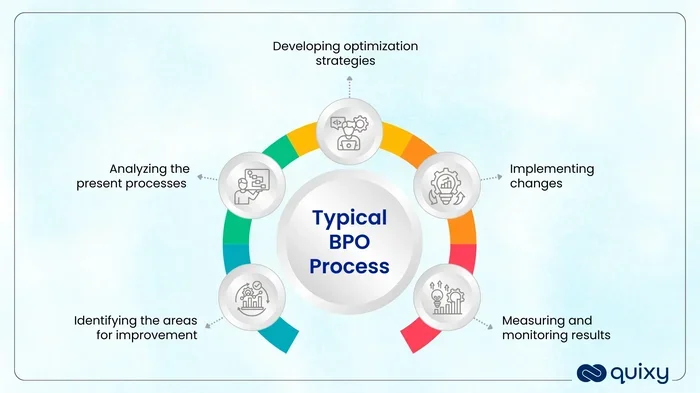
Business process analysis is the practice of studying how work flows through your organization. It looks at every step, from start to finish, and asks simple but powerful questions. Is this step necessary? Does it add value? Could it be faster or cheaper?
The goal is straightforward. You want to find wasted time, remove bottlenecks, and make your operations run smoother. Think of it like tuning up a car engine. You check each part, replace what is worn out, and keep everything running at peak performance.
Why Process Analysis Matters for Growing Businesses
When a business is small, things are simple. Everyone knows what to do. But as you grow, complexity increases fast. New employees join. New clients arrive. New systems get added. Without a clear picture of your processes, things start slipping through the cracks.
Process analysis helps you stay on top of that complexity. It gives you a bird’s-eye view of your entire operation. You can see where delays happen, where money gets wasted, and where your team feels frustrated. And once you see those problems, you can fix them.
Top Business Process Analysis Tools on the Market
Not all tools are created equal. Some focus on visual mapping. Others dig deep into data and automation. Here are some of the best business process analysis tools worth looking at right now.
Lucidchart
Lucidchart is one of the most popular tools for process mapping. It offers a drag-and-drop editor that makes building flowcharts easy. You can collaborate with your team in real time, which is a big plus for remote or hybrid teams.
It connects with tools like Slack, Google Workspace, and Microsoft Office. This means you can embed diagrams right into the apps your team already uses. Lucidchart also offers templates for common workflows, so you do not have to start from scratch every time.
Bizagi
Bizagi is a more robust platform built for medium to large businesses. It combines process modeling, automation, and analytics in one place. If you want to not just map your processes but actually automate them, Bizagi is a strong contender.
The platform uses a low-code approach, which means non-technical users can build automated workflows without needing to write code. It also has strong integration capabilities with enterprise systems like SAP and Salesforce. For businesses looking to scale, Bizagi delivers real value.
Process Street
Process Street focuses on checklists and recurring workflows. It is perfect for teams that need to standardize repetitive tasks. Think of it as a smart checklist tool that keeps everyone accountable.
You can build conditional logic into your checklists, so steps change based on previous answers. It also offers approval workflows and audit trails, which are great for compliance-heavy industries. If your business relies on consistent daily processes, Process Street is worth a serious look.
Camunda
Camunda is a powerful open-source platform for workflow automation. It is ideal for technical teams that want full control over their process engines. The platform supports BPMN 2.0, which is the industry standard for process modeling.
Because it is open-source, you can customize it to fit your exact needs. It also integrates well with Kubernetes and cloud-native environments. If you have a developer team and want a flexible, scalable solution, Camunda is a great fit.
iAuditor by SafetyCulture
While iAuditor is often associated with safety inspections, it is also a solid tool for process analysis. It lets you create digital audits that double as process checklists. You can track completion rates, identify gaps, and generate reports with ease.
The mobile app works offline, which is a huge advantage for field teams. It is especially useful for businesses in manufacturing, construction, or facilities management where physical workflows need close monitoring.
Key Features to Look For
When shopping for business process analysis tools, not every feature matters equally. Here are the ones that truly make a difference.
Process Mapping and Visualization
The foundation of any good tool is its ability to map processes visually. You should be able to build flowcharts, swimlane diagrams, and value stream maps with ease. The better the visualization, the easier it is to spot problems and share insights with your team.
Automation Capabilities
Mapping is only half the battle. The best platforms also let you automate repetitive tasks. This saves time and reduces human error. Look for tools that support conditional logic, triggers, and multi-step workflows without requiring heavy technical knowledge.
Real-Time Analytics and Dashboards
Data is at the heart of process analysis. You need dashboards that show key metrics like cycle time, throughput, and error rates. Real-time analytics help you make quick decisions and catch problems early before they grow into bigger issues.
Integration and Compatibility
Your process analysis tool should play nicely with your existing software. Whether you use CRM platforms, project management apps, or ERP systems, integration support saves you from duplicating work. Check for API access, pre-built connectors, and easy setup.
Collaboration and Sharing
Process analysis is a team effort. Your tool should allow multiple users to collaborate on diagrams, leave comments, and assign tasks. Look for role-based access controls so you can manage who sees what.
How to Choose the Right Tool for Your Business
With so many options out there, picking the right tool can feel overwhelming. Here is a simple framework to help you decide.
Step 1: Define Your Goals
Before you look at any software, get clear on what you want to achieve. Do you want to reduce process time? Improve compliance? Automate manual tasks? Your goals will narrow down your choices fast.
Step 2: Assess Your Team’s Technical Skills
Some tools are built for power users. Others are designed for beginners. Be honest about your team’s comfort level with technology. If most of your staff are not tech-savvy, prioritize ease of use over advanced features.
Step 3: Consider Your Budget
Budget plays a big role in your decision. Many platforms offer free tiers or trials. Start there. You can always upgrade as your needs grow. Remember that the cheapest option is not always the best value. Focus on the features that matter most to your team.
Step 4: Test Before You Commit
Almost every tool on this list offers a free trial or demo. Take advantage of that. Build a real process in the tool. Invite a few team members to try it out. Get their feedback before making a final decision.
Common Mistakes to Avoid
Even with the best tools, mistakes happen. Here are a few pitfalls to watch out for when using business process analysis tools.
Overcomplicating Your Maps
It is tempting to map every single detail of a process. But overly complex diagrams become hard to read and maintain. Keep your maps simple and focused. You can always drill down into sub-processes later.
Ignoring Employee Input
Your team members know the processes better than anyone. If you build maps without their input, you will miss important details. Involve your people early and often. Their insights will make your analysis far more accurate.
Skipping the Automation Step
Mapping without automating is like having a blueprint but never building the house. If your tool supports automation, use it. The real value comes from turning insights into action.
Choosing Based on Price Alone
Free tools can work for small teams, but they often lack key features. Do not let price be your only deciding factor. Think about the long-term value and the problems the tool will actually solve for you.
Forgetting to Update Regularly
Processes change over time. What worked six months ago may no longer be relevant. Make it a habit to review and update your process maps regularly. Set a monthly or quarterly review cadence to keep everything current.
Expert Tips for Getting the Most Out of Your Tool
Once you have chosen your business process analysis tools, follow these tips to maximize the return on your investment.
Start Small and Expand
Do not try to map your entire organization on day one. Pick one department or one workflow and start there. Once your team gets comfortable, expand to other areas. This approach keeps things manageable and builds momentum.
Use Templates to Save Time
Most platforms offer pre-built templates for common processes like onboarding, invoicing, or quality checks. Start with these templates and customize them to fit your needs. It is a great way to get up and running quickly.
Share Your Findings Widely
Process analysis is only useful if the insights reach the right people. Share your maps and reports with managers, team leads, and executives. The more people understand your workflows, the more they can contribute to improvement.
Combine Digital and Physical Process Insights
Do not forget that many businesses rely on physical equipment and hands-on workflows alongside digital tools. For example, if your company operates workshops or field sites, you need to ensure your physical setup supports your digital processes. This includes making sure your equipment runs reliably. If your team uses power tools or heavy machinery, understanding what size generator do i need to run power tools is just as important as optimizing your software workflows. A solid power setup keeps operations running and prevents downtime that can derail even the best process maps.
Track Metrics That Matter
Not every metric is worth tracking. Focus on the ones that directly impact your goals. Cycle time, error rates, and task completion rates are good starting points. Use these numbers to measure progress and justify process changes to leadership.
Comparison Table: Top Business Process Analysis Tools
Here is a quick comparison of the tools we covered to help you narrow down your options.
| Tool | Best For | Pricing | Ease of Use |
|---|---|---|---|
| Lucidchart | Visual process mapping and collaboration | Free tier available; paid from $7.95/mo | Very Easy |
| Bizagi | Process automation and enterprise workflows | Custom pricing | Moderate |
| Process Street | Checklists, SOPs, and recurring tasks | Free tier available; paid from $25/mo | Very Easy |
| Camunda | Developer teams and custom automation | Open-source (free); enterprise pricing available | Advanced |
| iAuditor | Field teams, safety audits, and inspections | Free tier available; paid from $15/mo | Easy |
Final Thoughts
Choosing the right business process analysis tools is one of the smartest investments you can make for your company. These platforms give you the visibility and control you need to run leaner, faster, and smarter operations. Whether you are mapping simple workflows or building complex automation, the right tool makes all the difference.
Start by identifying your biggest pain points. Pick a tool that matches your goals and your team’s skills. And remember that process analysis is not a one-time project. It is an ongoing practice. The businesses that review and refine their processes regularly are the ones that stay ahead of the competition.
Take action today. Pick one process, map it out, and look for ways to improve it. You will be surprised at how quickly small changes add up to big results. Your future self and your team will thank you for it.
Frequently Asked Questions
What are business process analysis tools used for?
Business process analysis tools are used to map, measure, and improve workflows within an organization. They help teams visualize how work gets done, identify bottlenecks, and automate repetitive tasks. These tools bring clarity and efficiency to operations of all sizes.
Which business process analysis tool is best for small teams?
Process Street and Lucidchart are excellent choices for small teams. Both offer free tiers, intuitive interfaces, and quick setup. They are perfect for businesses that need to standardize workflows without a steep learning curve or large budget commitment.
Do business process analysis tools require technical skills?
It depends on the tool. Platforms like Lucidchart and Process Street are designed for non-technical users. Others like Camunda are better suited for teams with developer experience. Most modern tools prioritize ease of use, so you can find one that matches your team’s skill level.
Can business process analysis tools integrate with other software?
Yes, most of the top tools offer integration with popular platforms like Slack, Google Workspace, Microsoft Office, Salesforce, and SAP. Check the specific integrations before you commit to ensure the tool fits your existing software stack.
How much do business process analysis tools cost?
Pricing varies widely. Some tools offer free plans for small teams, while enterprise solutions can cost hundreds or thousands of dollars per month. The key is to match the tool’s features to your actual needs rather than paying for capabilities you will not use.
How often should I review my business processes?
Experts recommend reviewing your processes at least quarterly. Business needs change over time, and your process maps should reflect those changes. Regular reviews help you catch inefficiencies early and keep your workflows aligned with your goals.