Undertale Font Generator Design Unique Text Instantly
The Undertale font generator lets you create unique, stylized text inspired by the iconic game’s typography in seconds. Whether you want pixel-perfect fonts for gaming profiles, social media bios, or creative projects, these free online tools make it simple. You just type your text, pick a style, and copy the result. This guide covers the top Undertale font generators, how they work, and tips for getting the best results every time.
This is a comprehensive guide about undertale font generator.
Key Takeaways
- Easy to Use: Most Undertale font generators are free, browser-based, and require no downloads or technical skills.
- Multiple Styles Available: You can choose from pixel fonts, wavy text, bold outlines, and other Undertale-inspired designs.
- Great for Social Media: These tools help you stand out on platforms like Twitter, Discord, and Instagram with unique typography.
- Instant Results: Generate custom text in seconds and copy it directly to your clipboard.
- Works Across Platforms: The generated fonts usually support Unicode, making them compatible with most apps and websites.
- No Design Experience Needed: Anyone can create professional-looking stylized text with just a few clicks.
[FEATURED_IMAGE_PLACEHOLDER]
What Is an Undertale Font Generator?
An Undertale font generator is a free online tool that lets you transform regular text into stylized fonts inspired by the beloved indie game Undertale. The game is famous for its unique pixel-art aesthetic, and its typography plays a big part in that charm. With a font generator, you can recreate that look for your own projects.
These tools use special Unicode characters and custom font mappings to turn plain letters into something eye-catching. You type in a sentence, and the generator converts each character into a decorated version. The result looks like it belongs in the game itself.
The best part? You do not need any design software or skills. Everything happens in your browser. Just visit a generator site, type your text, and pick a style. That is really all there is to it.
Undertale font generators have become popular among gamers, content creators, and anyone who wants to add a personal touch to their online presence. They are quick, fun, and totally free to use.
Why Use an Undertale Font Generator?
You might wonder why people go through the trouble of using a font generator. The answer is simple: unique text stands out. In a world full of generic fonts and boring captions, a stylized Undertale-style font grabs attention immediately.
Here are some of the main reasons people use these tools:
- Gaming Profiles: Make your gamer tag or Steam profile look like it belongs in the Underground.
- Social Media Bios: Stand out on Twitter, Instagram, or TikTok with eye-catching usernames and bios.
- Fan Art and Memes: Add authentic Undertale-style text to your artwork or meme posts.
- Discord Servers: Spice up server names, channel descriptions, and bot messages.
- Creative Projects: Use the fonts for posters, flyers, or digital art inspired by the game.
These generators also work great for people who want to experiment with typography without learning complex design software. They lower the barrier to entry and let anyone create something cool.
How Does an Undertale Font Generator Work?
Under the hood, an Undertale font generator uses a simple but clever trick. It maps each standard letter to a special Unicode character that looks similar but has a different visual style. Some characters come from decorative Unicode blocks, while others are custom-designed symbols that mimic the pixel look of the game.
Unicode Magic
The generator takes your plain text and replaces each letter with a corresponding stylized version from the Unicode standard. This means the output text is still readable by computers and displays correctly on most platforms. It is not an image or a special file, just regular text with fancy characters.
Style Options
Most generators offer several style options:
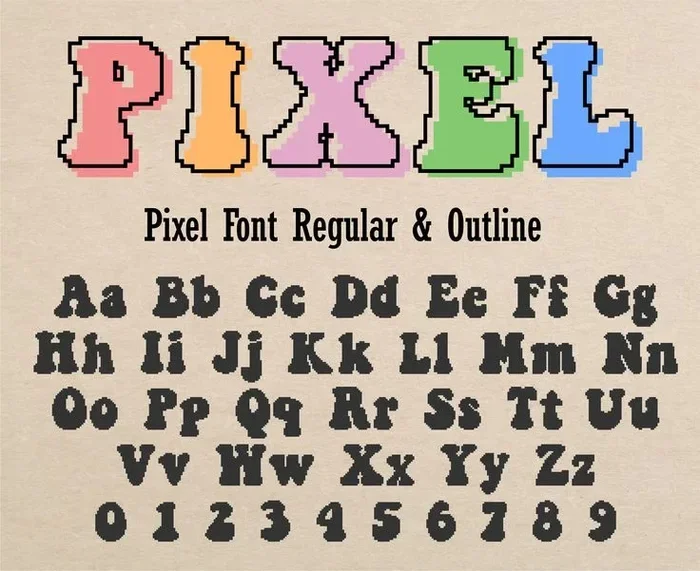
- Pixel Font: Mimics the blocky, retro look of the game’s UI.
- Wavy Text: Adds a flowing, dynamic feel to your words.
- Bold Outline: Creates thick, outlined letters for maximum impact.
- Shadowed Text: Adds depth with a shadow effect behind each letter.
- Italic and Slanted: Gives text a tilted, dramatic appearance.
You pick a style, type your message, and the generator does the rest. Then you simply copy the result and paste it wherever you want.
Choosing the Right Tool for Your Needs
Not all font generators are created equal. Some focus on speed, others on variety, and some on quality. When picking an Undertale font generator, consider what matters most to you.
Think about what kind of generator you need. Just like choosing a power generator for your home depends on your specific energy needs, picking the right font generator depends on your creative goals. Do you need something quick and simple, or do you want advanced customization options?
Here are a few things to keep in mind:
- Ease of Use: The tool should be straightforward with no confusing menus.
- Style Variety: More options mean more creative freedom.
- Copy-Paste Function: You want one-click copying to save time.
- Platform Compatibility: Make sure the generated text works on Discord, Twitter, and other platforms.
- No Sign-Up Required: The best tools let you start generating right away without creating an account.
A good generator also produces consistent results. You do not want your text to look different every time you use it. Look for tools that have been around for a while and have positive user reviews.
Tips for Getting the Best Results
Using an Undertale font generator is easy, but a few tips can help you get even better results. Here is what works best:
- Keep It Short: Stylized fonts look best in short bursts. Long paragraphs can become hard to read.
- Use It for Headers: These fonts work great for titles, usernames, and headings rather than body text.
- Test on Your Platform: Paste the text into your target platform first to make sure it displays correctly.
- Mix and Match: Try different styles to find the perfect look for your project.
- Stay Consistent: Pick one style and stick with it across your profile or project for a cohesive look.
Also, keep in mind that some platforms may not support all Unicode characters. If a character shows up as a box or question mark, try a different style from the same generator. The issue is usually with the platform, not the tool itself.
One thing to note is that these font tools are designed for continuous creative use, much like how a reliable generator is built for continuous runtime. Good font generators handle heavy use without slowing down or breaking.
Common Mistakes to Avoid
Even though these tools are simple, people sometimes make avoidable mistakes. Here is what to watch out for:
- Using Too Many Styles at Once: Mixing five different font styles in one post looks messy. Stick to one or two.
- Ignoring Readability: If people cannot read your text, the style does not matter. Prioritize clarity.
- Not Checking Compatibility: Always test your generated text on the platform where you plan to use it.
- Copying From Untrusted Sites: Stick to well-known generators to avoid sketchy ads or malware.
- Overusing the Tool: Using stylized fonts everywhere can get tiring. Save them for special moments.
Another thing to keep in mind is that some generators may not work well in all environments. Just as a power generator needs protection from the elements, your font generator tool should be a reputable site that keeps your data safe and private.
Also, be careful about generators that ask you to download software. The best Undertale font generators work entirely in your browser with no downloads needed. If a site asks you to install something, that is a red flag.
Undertale Font Generators vs Other Text Tools
There are many text styling tools out there. How do Undertale font generators compare? Here is a quick look at the differences:
Standard text generators give you basic bold, italic, or cursive options. They are fine for everyday use but lack the unique gaming flair that Undertale fans love. Undertale font generators go beyond the basics with pixel art styles, game-inspired characters, and creative Unicode mappings.
Design software like Photoshop or Canva gives you full control over fonts but requires time and skill to master. An Undertale font generator skips all that complexity and gives you instant results. You trade control for convenience, which is perfect for quick projects.
Some people also use power generators as an analogy here. A power generator converts fuel into electricity, while a font generator converts plain text into stylized art. Both serve a specific purpose, and both come in different sizes and quality levels.
The key takeaway is that Undertale font generators fill a niche that other tools do not. They are fast, free, and purpose-built for fans of the game and gaming culture in general.
Final Thoughts
An Undertale font generator is one of the simplest and most fun tools you can use to personalize your online presence. Whether you are a fan of the game, a content creator, or just someone who loves unique text, these tools deliver instant results with zero effort.
The process is straightforward. Pick a generator, choose your style, type your text, and copy the result. You can use it for bios, profiles, fan art, or anything else you can think of. The best part is that most of these tools are completely free and work right in your browser.
Remember to keep your text readable, stay consistent with your style choices, and always test on your target platform before posting. With these tips in mind, you will be creating stunning Undertale-style text in no time.
So go ahead and give it a try. Your followers, friends, and fellow fans are going to notice the difference. Undertale font generators are a small tool that makes a big impact, and they are always there whenever you need them.
Frequently Asked Questions
Is an Undertale font generator free to use?
Yes, almost all Undertale font generators are completely free. You do not need to pay, sign up, or download anything. Just visit the site, type your text, and generate your stylized font instantly.
Can I use Undertale font generators on mobile devices?
Absolutely. These tools work in your mobile browser just as well as on a desktop. The interface is simple and responsive, so you can generate text on the go without any issues.
Will the generated text work on all social media platforms?
Most platforms support Unicode characters, so the generated text should display correctly. However, some platforms may restrict certain characters. It is always a good idea to test your text before posting.
Do I need any design skills to use an Undertale font generator?
Not at all. These tools are designed for everyone, regardless of skill level. You just type your text, pick a style, and copy the result. No design experience is required.
Are Undertale font generators safe to use?
Reputable generators are completely safe. They run in your browser and do not require any downloads or personal information. Stick to well-known sites and avoid anything that asks you to install software.
Can I use Undertale font generators for commercial projects?
Most generators allow free use for both personal and commercial projects. However, always check the terms of use on the specific site you are using to be sure. The fonts are typically generated using Unicode characters, which are generally free to use.