What Are Server Monitoring Tools and Why You Need Them
Server monitoring tools are software solutions that track the health, performance, and availability of your servers in real time. They help IT teams detect issues early, prevent costly downtime, and keep systems running smoothly. If you manage servers, these tools are essential for maintaining reliability and performance.
Running a server is a lot like driving a car. You need to keep an eye on the engine temperature, fuel levels, and warning lights. If you ignore those signals, things can go wrong fast. That is exactly where server monitoring tools come in.
These tools watch your servers around the clock. They track performance, spot problems early, and send alerts when something is off. Whether you run a small business website or a large enterprise platform, server monitoring tools help you stay ahead of issues. In this article, we will break down everything you need to know about these tools, how they work, and why they matter so much.
If you have ever dealt with a website going down at the worst possible time, you know how stressful it can be. Server monitoring tools are designed to prevent those nightmares. They give you a clear picture of what is happening inside your servers, so you can act fast and keep things running smoothly.
Key Takeaways
- Real-time visibility: Server monitoring tools give you instant insight into server health and performance.
- Proactive issue detection: They alert you to problems before they cause downtime or outages.
- Performance optimization: You can track resource usage and identify bottlenecks quickly.
- Cost savings: Preventing outages saves money and protects your business reputation.
- Scalability: Good monitoring tools grow with your infrastructure and support complex environments.
- Compliance and reporting: Many tools help you meet regulatory requirements with detailed logs and reports.
📑 Table of Contents
What Are Server Monitoring Tools?
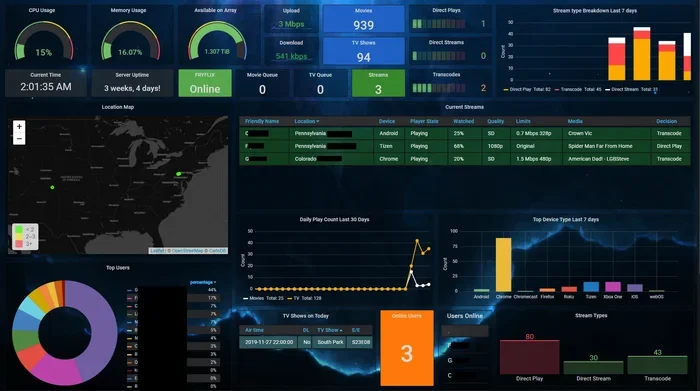
Server monitoring tools are software applications that watch over your servers and track their performance. They collect data on things like CPU usage, memory, disk space, network traffic, and application response times. This data helps you understand how your servers are performing at any given moment.
Think of these tools as a health checkup for your servers. Just like you go to the doctor for regular checkups, your servers need constant monitoring to stay healthy. Without proper monitoring, small problems can snowball into big disasters before you even know something is wrong.
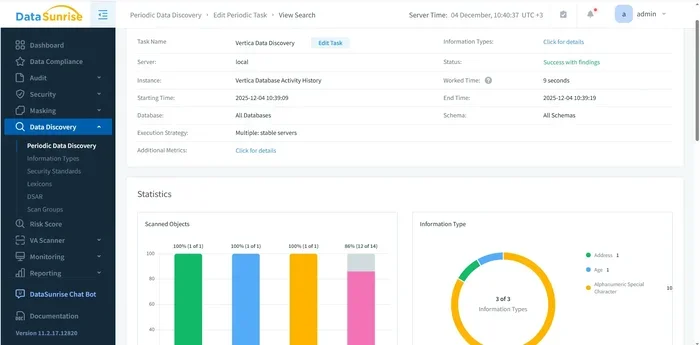
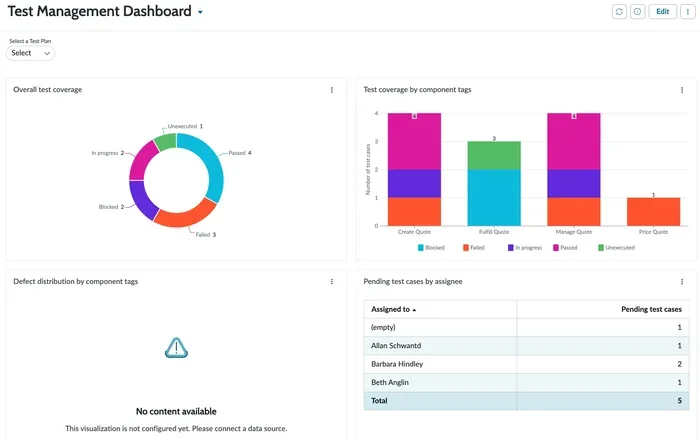
The main goal of server monitoring tools is to give you visibility. You need to know what is happening inside your servers at all times. These tools provide dashboards, alerts, and reports that make it easy to understand server health. They are a must-have for any IT team that wants to keep systems running without interruptions.
Why Do Servers Need Monitoring?
Servers handle critical tasks every day. They host websites, store data, run applications, and manage user requests. When a server goes down, it can affect thousands or even millions of people. That is why monitoring is not optional. It is a necessity.
Servers can fail for many reasons. Hardware can wear out. Software can have bugs. Traffic can spike unexpectedly. Server monitoring tools help you catch these issues early, often before users even notice something is wrong. They give you the time you need to fix problems before they cause serious damage.
How Do Server Monitoring Tools Work?
Understanding how server monitoring tools work is simpler than you might think. These tools use agents or scripts installed on your servers. The agents collect data about system performance and send it back to a central dashboard. From there, you can view real-time metrics and historical trends.
Most monitoring tools use a pull or push model. In a pull model, the tool asks the server for data at regular intervals. In a push model, the server sends data to the tool automatically. Both methods have their benefits, and many modern tools use a combination of the two.
Key Metrics Tracked by Server Monitoring Tools
Server monitoring tools track a wide range of metrics. Here are the most important ones:
- CPU usage: Shows how much processing power your server is using.
- Memory consumption: Tracks how much RAM is being used at any time.
- Disk usage: Monitors how much storage space is available and being used.
- Network traffic: Measures data flowing in and out of the server.
- Application response time: Tracks how quickly your apps respond to user requests.
- Uptime and downtime: Records when the server is available and when it is not.
- Error rates: Monitors the number of errors or failed requests.
By tracking these metrics, server monitoring tools give you a complete picture of server health. You can spot trends, identify anomalies, and take action before small issues become big problems.
Key Features to Look For
Not all server monitoring tools are created equal. When you are shopping for a tool, look for these essential features:
Real-Time Monitoring
Real-time monitoring is a must. You want to see what is happening on your servers right now, not five minutes ago. Server monitoring tools with real-time dashboards let you spot issues the moment they appear. This speed can make all the difference when every second counts.
Alerting and Notifications
Good alerting is one of the most important features of any monitoring tool. When something goes wrong, you need to know immediately. Look for tools that send alerts through email, SMS, Slack, or other channels. Customizable thresholds let you set what triggers an alert, so you are not flooded with noise.
Historical Data and Reporting
You need to see trends over time, not just right now. Server monitoring tools that store historical data let you analyze patterns and plan for the future. Reports help you share findings with your team or management. They also make it easier to troubleshoot recurring issues.
Scalability
If your business grows, your monitoring tools need to grow with you. Choose server monitoring tools that can handle more servers, more applications, and more data as your infrastructure expands. Scalability ensures you do not outgrow your monitoring solution.
Integration Capabilities
The best monitoring tools play well with other software. Look for tools that integrate with your existing stack, including CI/CD pipelines, ticketing systems, and cloud platforms. Good integration saves time and reduces manual work for your team.
Benefits of Using Server Monitoring Tools
Using server monitoring tools brings many advantages. Let us look at the biggest benefits that make these tools worth the investment.
Prevent Downtime
Downtime is every IT team’s worst nightmare. It costs money, frustrates users, and damages your reputation. Server monitoring tools help you prevent downtime by catching issues early. When a server starts struggling, the tool alerts you before it goes completely offline. This proactive approach keeps your services available and your users happy.
Improve Performance
Monitoring tools show you where your servers are underperforming. Maybe your CPU is maxing out during peak hours. Perhaps your memory is running low. With this information, you can optimize your servers for better performance. The result is faster load times and a smoother experience for your users.
Save Money
Preventing downtime and optimizing performance both save money. Outages can cost thousands of dollars per hour. By avoiding them, server monitoring tools pay for themselves many times over. You also save on hardware costs by identifying underutilized servers that can be consolidated or repurposed.
Better Team Collaboration
Monitoring tools give your entire IT team a single source of truth. Everyone can see the same dashboards and data. This transparency improves communication and helps teams work together more effectively. When an alert fires, the right person can jump in and fix the issue quickly.
Compliance and Security
Many industries have strict rules about system availability and data security. Server monitoring tools help you meet these requirements by providing detailed logs and audit trails. You can demonstrate to regulators that your systems are monitored and maintained properly.
Types of Server Monitoring Tools
Server monitoring tools come in several different shapes and sizes. Each type serves a specific purpose. Here are the main categories you should know about.
Infrastructure Monitoring Tools
Infrastructure monitoring tools focus on the hardware and operating system level. They track CPU, memory, disk, and network metrics. These tools are great for keeping an eye on the physical health of your servers. Popular examples include tools that monitor bare-metal servers, virtual machines, and cloud instances.
Application Performance Monitoring (APM) Tools
APM tools go deeper than infrastructure monitoring. They track how your applications perform from end to end. They show you response times, error rates, and transaction traces. If your users are complaining about slow load times, an APM tool can help you find the root cause.
Network Monitoring Tools
Network monitoring tools watch the traffic flowing between servers and users. They track bandwidth usage, latency, and packet loss. These tools are essential for identifying network bottlenecks and connectivity issues that can affect server performance.
Cloud Monitoring Tools
If you run your servers in the cloud, you need cloud-specific monitoring tools. These tools are designed to work with cloud platforms like AWS, Azure, and Google Cloud. They track cloud-specific metrics like instance utilization, storage costs, and service health. Many cloud providers offer built-in monitoring, but third-party tools often provide deeper insights.
Log Management Tools
Log management tools collect and analyze server logs. Logs contain valuable information about errors, warnings, and system events. By analyzing logs, you can find the root cause of issues and spot security threats. These tools are often used alongside other monitoring solutions for a complete picture.
| Type | Focus Area | Best For |
|---|---|---|
| Infrastructure Monitoring | Hardware and OS metrics | Basic server health tracking |
| APM Tools | Application performance | Troubleshooting app slowdowns |
| Network Monitoring | Traffic and connectivity | Identifying network issues |
| Cloud Monitoring | Cloud-specific metrics | Cloud-based server environments |
| Log Management | Log analysis and storage | Root cause analysis and security |
How to Choose the Right Server Monitoring Tool
Choosing the right server monitoring tools can feel overwhelming. There are so many options out there. But if you focus on what matters most for your setup, the decision becomes much easier.
Assess Your Needs
Start by asking yourself what you need to monitor. Do you have a few physical servers or hundreds of cloud instances? Are you running simple websites or complex microservices? Your infrastructure size and complexity should guide your choice.
Consider Your Budget
Monitoring tools range from free open-source options to enterprise-grade solutions that cost thousands per month. Set a realistic budget before you start comparing tools. Remember that the cheapest option is not always the best. Look for value and features that match your needs.
Evaluate Ease of Use
A powerful tool is useless if your team cannot use it. Look for monitoring solutions with intuitive dashboards and easy setup. Your team should be able to get up and running quickly without extensive training. A tool that is too complex will just create more work.
Check for Scalability
Your monitoring needs will grow over time. Choose server monitoring tools that can scale with your business. A tool that works well for five servers might struggle with fifty. Make sure the tool you pick can handle your future growth without missing a beat.
Read Reviews and Ask for Recommendations
Before you commit, read reviews from other users. Ask colleagues in your industry what they use and recommend. Real-world feedback gives you insights that marketing pages cannot provide. Pay attention to comments about reliability, support, and ease of use.
Best Practices for Using Server Monitoring Tools
Setting up server monitoring tools is only half the battle. To get the most out of them, follow these best practices.
Set Meaningful Alert Thresholds
Do not set alerts for every minor fluctuation. That will lead to alert fatigue, and your team will start ignoring them. Instead, set thresholds that truly matter. For example, alert when CPU usage stays above 90% for more than five minutes. This way, your team only responds to genuine issues.
Monitor Everything That Matters
Do not just monitor your servers. Monitor your applications, databases, networks, and external services too. A problem with a third-party API can cause your own application to slow down. Full-stack monitoring gives you the complete picture.
Review Dashboards Regularly
Set aside time each week to review your monitoring dashboards. Look for trends, anomalies, and patterns. Regular reviews help you spot issues early and make informed decisions about capacity planning and optimization.
Document Your Monitoring Setup
Create documentation for your monitoring configuration. Include which metrics you track, what each alert threshold means, and who is responsible for responding to each type of alert. Good documentation ensures that knowledge does not leave when team members move on.
Test Your Alerts
Do not wait for a real emergency to find out your alerts are not working. Test them regularly. Make sure notifications reach the right people and that escalation paths are clear. A tested alert system is a reliable alert system.
Use Monitoring Data for Capacity Planning
Historical monitoring data is a goldmine for planning. Use it to predict when you will need more resources. If your traffic grows by 10% each month, you can plan your infrastructure upgrades accordingly. This proactive approach prevents surprises and keeps your servers running smoothly.
Conclusion
Server monitoring tools are essential for anyone who manages servers. They give you real-time visibility, early warnings, and actionable insights. Without them, you are flying blind. With them, you can prevent downtime, optimize performance, and save money.
The right monitoring tool depends on your specific needs. Consider your infrastructure size, budget, and team expertise when making your choice. Follow best practices like setting meaningful alerts and reviewing dashboards regularly. Over time, you will see the value these tools bring to your operations.
If you have not yet invested in server monitoring tools, now is the time to start. The cost of not monitoring is far greater than the cost of a monitoring solution. Protect your servers, your users, and your business. Start monitoring today.
Frequently Asked Questions
What is the main purpose of server monitoring tools?
The main purpose of server monitoring tools is to track server health, performance, and availability in real time. They help IT teams detect issues early, prevent downtime, and optimize server performance. These tools provide visibility into what is happening inside your servers at all times.
Are server monitoring tools expensive?
The cost varies widely. There are free open-source options available for small setups. Enterprise-grade tools can cost hundreds or thousands of dollars per month. The key is to find a tool that fits your budget and meets your monitoring needs. Many affordable options offer excellent features for small and medium businesses.
Can server monitoring tools prevent all outages?
While server monitoring tools greatly reduce the risk of outages, they cannot prevent every single one. Hardware failures, natural disasters, and unexpected events can still cause downtime. However, monitoring tools help you respond faster and minimize the impact of any outage that does occur.
Do I need separate tools for application and infrastructure monitoring?
It depends on your setup. Some all-in-one tools cover both application and infrastructure monitoring. Others specialize in one area. If you run complex applications, you may benefit from dedicated APM tools alongside infrastructure monitoring. Evaluate your needs and choose tools that give you the coverage you require.
How do I know which metrics to monitor?
Start with the basics: CPU usage, memory, disk space, and network traffic. Add application-specific metrics like response times and error rates. Your monitoring strategy should align with your business goals. Focus on the metrics that directly impact your users and your bottom line.
Can small businesses benefit from server monitoring tools?
Absolutely. In fact, small businesses often benefit the most because a single outage can have a big impact. Server monitoring tools help small businesses stay reliable and professional. Many affordable tools are designed specifically for smaller setups and provide excellent value for the price.