What Are APM Tools and Why They Matter for Your Teams
APM tools are software solutions that monitor, manage, and optimize application performance in real time. They help teams detect issues fast, reduce downtime, and deliver a better user experience. APM tools give developers and IT teams deep visibility into every layer of an application, from code to infrastructure.
Have you ever opened an app on your phone and it just froze? Or visited a website and it took forever to load? That frustration is something every team wants to avoid. APM tools exist to make sure that never happens to your applications.
APM tools stands for Application Performance Management tools. They are software platforms that help teams keep their applications running smoothly. These tools watch everything that happens inside an app, from the moment a user clicks a button to the moment data comes back. They track speed, find errors, and alert teams when something goes wrong.
If you build software or run IT operations, APM tools should be on your radar. They are not just nice-to-have anymore. They are essential. In this article, we will break down exactly what APM tools are, how they work, what features to look for, and why they matter for your team. Let us dive in.
Key Takeaways
- APM tools track everything: They monitor application health, speed, errors, and user experience in real time.
- They prevent problems before users notice: With alerting and root cause analysis, teams fix issues fast.
- APM tools save money: Less downtime means more revenue and happier customers.
- They work for all team sizes: From startups to large enterprises, APM tools fit different budgets and needs.
- Integration is key: The best APM tools connect with your existing DevOps and CI/CD pipelines.
- Choosing the right tool matters: Look for features like transaction tracing, error tracking, and customizable dashboards.
📑 Table of Contents
- What Are APM Tools?
- How Do APM Tools Work?
- Key Features of APM Tools
- Benefits of Using APM Tools
- Popular APM Tools in the Market
- How to Choose the Right APM Tool for Your Team
- Common Mistakes Teams Make With APM Tools
- Expert Insights on APM Tools
- The Future of APM Tools
- Quick Tips for Getting Started With APM Tools
- Conclusion
What Are APM Tools?
APM tools are monitoring platforms designed to track the performance and health of software applications. They give teams a full picture of what is happening inside an app at any given moment. Think of them as a health monitor for your software.
Traditional monitoring tools might only check if a server is up or down. APM tools go much deeper. They look at the application layer, the code level, and the user experience. They answer questions like:
- How fast does the app load?
- Where are the slowdowns happening?
- Which users are affected by errors?
- What caused the last crash?
- How is the app performing right now?
These tools collect data from many sources. They gather performance metrics, trace transactions, log errors, and measure how real users experience the app. All of this data comes together in one place, usually a dashboard that teams can check at any time.
Why the Name “Application Performance Management”?
The word “management” is important here. APM tools do not just passively watch. They help teams actively manage performance. They set baselines, define what “normal” looks like, and flag when things drift from that baseline. This proactive approach is a big reason why APM tools are so valuable.
APM Tools vs. Basic Monitoring
There is a big difference between basic monitoring and APM tools. Basic monitoring might tell you a server is down. APM tools tell you why the server is down and which part of the application caused the problem. This distinction matters a lot when you are trying to fix issues quickly.
Here is a simple comparison:
- Basic monitoring: “The server is not responding.”
- APM tools: “The server is slow because a database query in the checkout module is timing out after 12 seconds.”
See the difference? APM tools give you the detail you need to act fast.
How Do APM Tools Work?
Understanding how APM tools work helps you appreciate what they can do for your team. The process involves several layers of data collection and analysis.
Data Collection
APM tools start by collecting data. They use agents or instrumentation placed inside the application code. These agents capture information about every request, every transaction, and every interaction. They also pull data from servers, databases, and network components.
The data collection happens continuously. It does not stop when the sun goes down or on weekends. Application performance needs watching 24 hours a day, 7 days a week. That is exactly what these tools do.
Transaction Tracing
One of the most powerful features of APM tools is transaction tracing. When a user performs an action, like clicking “Submit” on a form, the tool follows that request through every layer of the system.
It tracks the journey from the front end, through the API, to the database, and back. If any step is slow, the tool highlights it. This is called distributed tracing, and it is a game-changer for debugging complex applications.
Analysis and Alerting
Once data is collected, APM tools analyze it. They compare current performance against historical baselines. If something looks off, they trigger alerts. These alerts can go to Slack, email, PagerDuty, or any other tool your team uses.
The alerting system is customizable. You can set thresholds for response time, error rates, and throughput. When those thresholds are crossed, the team knows immediately. This real-time monitoring capability helps teams respond to problems before users even notice them.
Dashboards and Reporting
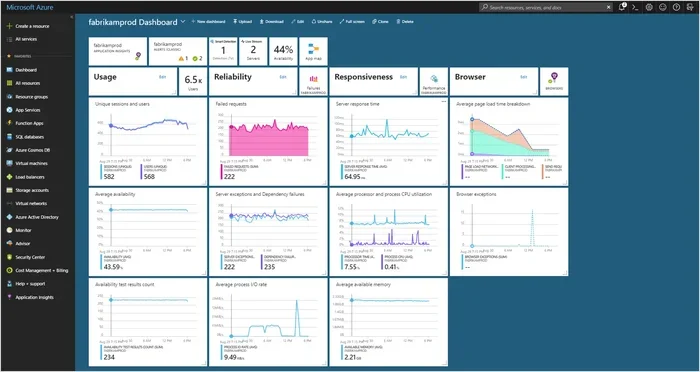
All the collected data gets visualized in dashboards. Teams can see charts, graphs, and tables that show how the application is performing. These dashboards make it easy to spot trends, identify patterns, and share insights with stakeholders.
Good APM tools also generate reports. These reports can show weekly performance summaries, monthly uptime statistics, or quarterly trend analysis. They are useful for both technical teams and business leaders.
Key Features of APM Tools
Not all APM tools are the same. But the best ones share a set of core features that make them effective. Here is what you should look for.
Real-Time Monitoring
Real-time monitoring is the backbone of any good APM tool. It gives teams a live view of application health. When something goes wrong, the team sees it instantly. This speed matters because every second of downtime costs money.
Error Tracking and Diagnostics
APM tools track every error that occurs in the application. They capture stack traces, error messages, and the exact line of code where the error happened. This makes root cause analysis much faster. Instead of guessing what went wrong, developers can see exactly where the problem is.
User Experience Monitoring
Some APM tools include real user monitoring, or RUM. This feature tracks how actual end users experience the application. It measures page load times, interaction delays, and user satisfaction scores. This data is incredibly valuable because it reflects what people actually see, not just what the server reports.
Infrastructure Monitoring
Many APM tools also monitor the underlying infrastructure. They watch CPU usage, memory consumption, disk I/O, and network latency. This gives teams a complete picture of the entire stack, from code to servers.
Customizable Dashboards
Every team cares about different metrics. APM tools let you build custom dashboards that show the data your team needs. You can create views for developers, for operations, and for management. Each view highlights the metrics that matter most to that group.
Integration Capabilities
The best APM tools play well with other software. They integrate with CI/CD pipelines, incident management platforms, communication tools, and cloud services. This integration creates a seamless workflow where monitoring fits naturally into the development process.
Benefits of Using APM Tools
Now that you know what APM tools do and how they work, let us talk about why they matter. The benefits go far beyond just watching numbers on a screen.
Faster Issue Resolution
When something breaks, time is of the essence. APM tools dramatically reduce the time it takes to find and fix problems. With detailed tracing and diagnostics, developers can pinpoint the root cause in minutes instead of hours. This leads to a lower mean time to resolution, which is a key metric for any operations team.
Improved User Experience
Users expect fast, reliable software. When an app is slow or buggy, people get frustrated and leave. APM tools help teams deliver a smooth, consistent experience. By catching performance issues early, teams can fix them before users are affected.
Better Planning and Scaling
APM tools collect historical data. This data reveals trends over time. Teams can use these trends to plan for growth. If traffic is increasing every month, the data shows when the application will need more resources. This proactive planning prevents surprises.
Cost Savings
Downtime is expensive. Every minute an app is down can mean lost sales, unhappy customers, and damaged reputation. APM tools help prevent downtime by catching issues early. They also help teams use resources more efficiently, which can lower infrastructure costs.
Stronger Collaboration
APM tools give developers, operations teams, and business stakeholders a shared view of application health. This shared visibility improves communication and collaboration. Everyone is working from the same data, which reduces confusion and speeds up decision-making.
Popular APM Tools in the Market
The APM tools market has grown a lot in recent years. There are many options to choose from, each with its own strengths. Here are some of the most well-known ones.
New Relic
New Relic is one of the most popular application monitoring platforms. It offers full-stack visibility, from the browser to the database. New Relic is known for its user-friendly dashboards and strong transaction tracing capabilities.
Datadog
Datadog is a cloud-scale monitoring platform that includes APM as a core feature. It is widely used in DevOps environments. Datadog excels at integrating with a huge ecosystem of tools and services. Its dashboards are highly customizable and visually rich.
Dynatrace
Dynatrace is a powerful enterprise-grade APM tool. It uses AI to automate root cause analysis, which saves teams a lot of time. Dynatrace is especially strong in complex, multi-cloud environments where visibility can be challenging.
AppDynamics
AppDynamics focuses heavily on business transaction monitoring. It connects technical performance metrics to business outcomes. This makes it a great choice for teams that need to show the impact of performance on revenue and user engagement.
Elastic APM
Elastic APM is part of the Elastic Stack, which also includes Elasticsearch and Kibana. It is an open-source option that works well for teams already using the Elastic ecosystem. It offers flexible deployment and strong search capabilities.
How to Choose the Right APM Tool for Your Team
Choosing the right APM tool can feel overwhelming. There are so many options, and each team has different needs. Here are some factors to consider.
Consider Your Team Size
Small teams may not need the full power of an enterprise tool. They might prefer something simpler and more affordable. Larger teams with complex infrastructure will benefit from advanced features like AI-driven analytics and distributed tracing.
Think About Your Stack
Make sure the APM tool you choose supports your technology stack. Some tools work better with certain languages, frameworks, or cloud providers. Check compatibility before you commit.
Evaluate Pricing Models
APM tools come with different pricing models. Some charge per host, others per metric, and some offer flat-rate plans. Consider your budget and choose a model that scales with your needs. Watch out for hidden costs like data ingestion fees.
Look for Ease of Use
Even the most powerful tool is not useful if your team cannot use it. Look for APM tools with intuitive interfaces, clear documentation, and good onboarding support. The faster your team can get up to speed, the sooner you will see value.
Check Integration Options
The best APM tools integrate with the tools you already use. Check if the tool connects to your communication platforms, incident management systems, and deployment pipelines. Good integrations make monitoring part of your daily workflow.
Prioritize Support and Community
When something goes wrong, you want help fast. Choose a vendor that offers responsive support. Also look for tools with active communities and rich documentation. These resources can save you hours of troubleshooting time.
Common Mistakes Teams Make With APM Tools
Even with the best APM tools, teams can make mistakes that reduce their value. Here are some common pitfalls to avoid.
Setting and Forgetting
One of the biggest mistakes is setting up an APM tool and then ignoring it. Monitoring is not a set-it-and-forget-it activity. You need to review dashboards regularly, adjust alerts, and refine your dashboards as your application evolves.
Over-Monitoring
It is possible to monitor too much. If you track every single metric, your team will get overwhelmed with alerts. Focus on the metrics that truly matter. Start with key performance indicators and add more as you go.
Ignoring Alert Fatigue
If your team gets too many alerts, they will start to ignore them. This is called alert fatigue. It is dangerous because real issues can get buried in the noise. Keep your alert thresholds tight and relevant. Only alert on things that need action.
Not Involving the Whole Team
APM tools are not just for developers or just for operations. Everyone on the team benefits from understanding application performance. Make sure you share dashboards and insights across the entire team.
Choosing Based on Price Alone
The cheapest option is not always the best. When choosing APM tools, focus on features, ease of use, and support. A tool that saves you even one hour of debugging per week is worth the investment.
Expert Insights on APM Tools
We spoke with several DevOps and engineering leaders about their experience with APM tools. Here is what they had to say.
“APM tools transformed how we handle incidents,” says a senior engineering manager at a mid-size SaaS company. “Before, we would spend hours trying to figure out what went wrong. Now, the tool tells us exactly where the problem is within minutes.”
“The biggest value is not just finding bugs,” adds a DevOps lead at a fintech startup. “It is about building confidence. When you know your application is healthy, you can ship faster and sleep better at night.”
These insights highlight a key truth: APM tools are not just about fixing problems. They are about enabling teams to move faster and build better software with confidence.
The Future of APM Tools
The world of application performance management is evolving fast. Here are some trends to watch.
AI and Machine Learning
More APM tools are using artificial intelligence to analyze data. AI can detect anomalies, predict problems before they happen, and suggest fixes. This makes monitoring smarter and more proactive.
Observability
The concept of observability is becoming central to how teams think about monitoring. Observability goes beyond traditional monitoring. It asks not just “is the app working?” but “can we understand why it is working or not working?” APM tools are evolving to support this broader observability model.
Cloud-Native and Microservices Support
As more applications move to the cloud and adopt microservices architectures, APM tools are adapting. They are building better support for containerized environments, serverless functions, and distributed systems. This trend will only continue as cloud-native development grows.
Quick Tips for Getting Started With APM Tools
- Start small: Pick one critical application and monitor it first. Expand from there.
- Set clear goals: Decide what you want to achieve with monitoring. Faster resolution? Better uptime? Happier users?
- Involve the whole team: Make sure developers, operations, and management all have access to the data they need.
- Review regularly: Schedule weekly or biweekly reviews of your monitoring setup and dashboards.
- Iterate and improve: Your monitoring needs will change as your application grows. Keep refining your approach.
Conclusion
APM tools are essential for any team that builds or runs software applications. They provide the visibility, speed, and insights needed to keep applications performing at their best. From real-time monitoring to error tracking to user experience analysis, these tools cover every aspect of application performance.
The benefits are clear. Faster issue resolution. Better user experiences. Lower costs. Stronger team collaboration. Whether you are a small startup or a large enterprise, APM tools can make a real difference.
If you have not yet explored what APM tools can do for your team, now is the time to start. The right tool will not only help you catch problems faster but also give your team the confidence to build and ship better software every day.
Take the time to evaluate your options. Consider your team size, your technology stack, and your budget. The right APM tool will pay for itself many times over in saved time, reduced downtime, and happier users.
Frequently Asked Questions
What is the main purpose of APM tools?
APM tools are designed to monitor, manage, and optimize the performance of software applications. They track everything from response times and error rates to user experience and infrastructure health. The main goal is to help teams detect and fix issues quickly before they impact users.
How are APM tools different from regular monitoring tools?
Regular monitoring tools typically check if servers and systems are up and running. APM tools go much deeper by monitoring the application layer itself. They provide code-level insights, transaction tracing, and end-user experience data. This deeper visibility helps teams understand not just that something is wrong, but exactly why.
Are APM tools only for large enterprises?
No, APM tools are valuable for teams of all sizes. Small startups benefit from catching performance issues early, and large enterprises rely on them to manage complex, distributed systems. Many APM tools offer pricing plans that scale with team size and usage, making them accessible to businesses at every stage.
What metrics should I focus on with APM tools?
Key metrics to watch include response time, error rate, throughput, and mean time to resolution. You should also track user satisfaction scores and infrastructure resource usage. The most important metrics depend on your application type and business goals. Start with the basics and expand as you get more comfortable.
Do APM tools work with cloud-based applications?
Yes, most modern APM tools are built to work seamlessly with cloud-based applications. They support major cloud platforms like AWS, Azure, and Google Cloud. Many also handle containerized and serverless environments, making them ideal for teams running cloud-native architectures.
How long does it take to set up APM tools?
Setup time varies depending on the tool and the complexity of your application. Simple integrations can be done in a few hours. More complex setups with distributed systems may take a few days or weeks. Most APM tools offer detailed documentation and onboarding support to speed up the process.