What Is Webmaster Tools A Complete Guide for Beginners
Webmaster tools is a free platform offered by search engines that helps website owners track, analyze, and improve their site’s presence in search results. It provides essential data on indexing, crawl errors, and search performance so you can make informed decisions. Whether you are new to website ownership or looking to sharpen your SEO strategy, this guide covers everything you need to know.
If you own a website or are thinking about starting one, you have probably heard the term webmaster tools thrown around. But what exactly is it, and why should you care? In simple terms, webmaster tools is a free service provided by search engines like Google that helps you understand how your website is performing in search results. It is one of the most important free SEO tools available, and it is designed for everyone from complete beginners to seasoned website owners.
Think of webmaster tools as a health checkup for your website. Just like you visit a doctor to find out what is going on inside your body, you use webmaster tools to find out what is going on inside your site. It tells you if search engines can read your pages, what keywords bring people to your site, and whether there are any errors that need fixing. If you want to grow your online presence, understanding this platform is a must.
In this complete guide, we will walk you through everything you need to know. We will cover what webmaster tools does, why it matters for your website performance, and how to use it even if you have zero technical experience. By the end, you will see why this free tool is a game-changer for anyone serious about search engine optimization.
Key Takeaways
- What It Is: Webmaster tools is a free service from search engines that gives website owners detailed insights into how their site performs in search.
- Why It Matters: It helps you find and fix crawl errors, monitor organic traffic, and improve your site’s overall health.
- Key Features: You get access to search analytics, coverage reports, sitemap submission, and mobile usability data.
- Who Needs It: Any website owner, from beginners to advanced SEO practitioners, benefits from using webmaster tools regularly.
- Easy to Use: The platform is free and designed to be beginner-friendly with clear reports and actionable recommendations.
- Technical SEO Helper: It highlights structured data issues, page speed concerns, and security problems.
📑 Table of Contents
What Is Webmaster Tools?
Webmaster tools, officially known as Google Search Console, is a free platform that lets you monitor and maintain your site’s presence in Google search results. It was originally called “Google Webmaster Tools” and later rebranded to “Google Search Console.” However, many people still refer to it as webmaster tools, and that name stuck because it describes exactly what the tool does.
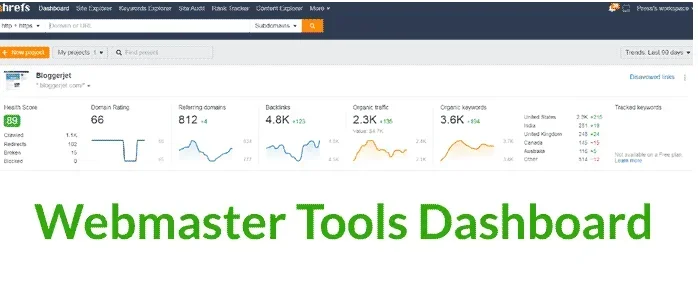
When you set up webmaster tools, you verify that you own the website. Once verified, you get access to a dashboard filled with reports and data. These reports cover everything from how Google crawls your pages to how users find your site through search. The platform also lets you submit your sitemap, which is a file that helps search engines understand the structure of your website.
The tool is not just for Google. Other search engines like Bing also offer similar platforms, sometimes called Bing Webmaster Tools. However, Google’s version is by far the most popular and widely used. Most website owners focus on Google’s tool because Google handles the majority of search traffic worldwide.
Who Should Use Webmaster Tools?
Anyone who owns a website should use webmaster tools. This includes bloggers, small business owners, e-commerce store operators, and large enterprise teams. If you have a website, you want it to show up in search results, and webmaster tools helps you do exactly that. It is also useful for people managing equipment websites, such as those reviewing ozone generators or other products, because it helps ensure their content ranks well.
Even if you hire an SEO agency or a web developer, it is a good idea to set up your own webmaster tools account. This way, you can see the data firsthand and make better decisions about your site. You do not need to know how to code or understand complex technical SEO concepts to use it. The interface is designed to be straightforward and accessible.
Why Webmaster Tools Matters for Your Website
You might wonder why you need webmaster tools when there are so many other SEO platforms out there. The answer is simple: webmaster tools gives you direct data from the search engine itself. Other tools estimate or guess what is happening, but webmaster tools shows you exactly what Google sees. This makes it the most reliable source of search performance data available.
Here are some key reasons why every website owner should use this platform:
- Find crawl errors fast: If Google cannot read certain pages on your site, webmaster tools alerts you right away. This helps you fix problems before they hurt your rankings.
- Track your keyword performance: You can see which search terms bring people to your site and how many clicks and impressions each page gets.
- Monitor indexing status: The tool tells you how many of your pages are actually in Google’s index and which ones are being ignored.
- Improve mobile experience: It provides a mobile usability report that highlights issues affecting mobile visitors.
- Submit and update your sitemap: This ensures search engines can discover all your new content quickly.
- Check security issues: If your site gets hacked or flagged for malware, webmaster tools notifies you immediately.
Without webmaster tools, you are essentially flying blind. You would not know if Google is having trouble crawling your pages or if certain pages are dropping out of the index. For anyone serious about growing their online presence, this tool is non-negotiable.
How Webmaster Tools Helps With Technical SEO
Technical SEO is the process of optimizing your website’s backend so search engines can crawl and index it efficiently. Webmaster tools plays a central role in this process. It highlights issues like broken links, slow-loading pages, and duplicate content that could hurt your rankings.
For example, if you run a website about power equipment and tools, you might have pages covering different topics like generators and outdoor gear. If one of those pages has a crawl error, webmaster tools will flag it. You can then fix the issue and resubmit the page for indexing. This keeps your entire site healthy and running smoothly.
Key Features of Webmaster Tools
The platform offers a wide range of features that help you manage and improve your website. Let us break down the most important ones so you know what to focus on when you first log in.
Performance Report
The Performance Report is one of the most valuable features in webmaster tools. It shows you how your site performs in Google search results. You can see data on clicks, impressions, average position, and click-through rate for your pages. This report helps you understand which pages are working well and which ones need improvement.
For instance, if you notice that a page about generators gets a lot of impressions but very few clicks, you might need to improve the title tag or meta description. Small changes like this can make a big difference in your organic traffic over time.
Coverage Report
The Coverage Report tells you which pages on your site have been successfully indexed by Google and which ones have issues. It breaks things down into categories like valid pages, excluded pages, and pages with errors. This report is essential for making sure all your important content is showing up in search results.
If you submit a new blog post or product page, you can check the coverage report to confirm that Google has picked it up. If it shows an error, you can investigate and fix the problem right away. This is much faster than waiting for Google to naturally discover and index your content.
URL Inspection Tool
The URL Inspection Tool lets you check the status of any specific page on your site. You enter a URL, and the tool tells you whether the page is indexed, when it was last crawled, and if there are any issues. This is incredibly useful when you want to verify that a particular page is showing up in Google search results.
Let us say you publish a new article about generac generators and want to make sure Google has indexed it. You simply paste the URL into the inspection tool and check the status. If it is not indexed yet, you can request indexing directly from the tool. This speeds up the process significantly.
Sitemap Submission
A sitemap is a file that lists all the important pages on your website. When you submit your sitemap through webmaster tools, you are telling Google exactly which pages you want it to crawl. This is especially helpful for new websites or sites with lots of pages.
Most content management systems like WordPress can generate a sitemap automatically. You just need to find the sitemap URL and submit it in the webmaster tools dashboard. Once submitted, Google will use it to discover and index your content more efficiently.
Experience and Core Web Vitals
Webmaster tools also tracks Core Web Vitals, which are metrics that measure user experience on your site. These include page loading speed, interactivity, and visual stability. Google uses these metrics as a ranking factor, so improving them can boost your search positions.
The Experience section in webmaster tools shows you which pages are performing well and which ones need attention. If your pages are slow or confusing to navigate, you can make improvements and then check back to see if your scores improve.
How to Get Started with Webmaster Tools
Getting started with webmaster tools is straightforward, even if you are not tech-savvy. Here is a simple step-by-step process to set up your account and start collecting data.
- Go to the Google Search Console website. You will need a Google account to sign in. If you already use Gmail or Google Analytics, you can use the same account.
- Add your property. A property is your website. Enter your full URL, including the https:// part, and click continue.
- Verify your ownership. Google will ask you to prove that you own the website. There are several methods available, including adding a DNS record, uploading an HTML file, or adding a meta tag to your site. The easiest method for most beginners is the HTML tag option.
- Submit your sitemap. Once verified, go to the sitemap section and enter your sitemap URL. This helps Google find all your pages quickly.
- Explore the dashboard. Take some time to look around the different sections. Check the performance report, coverage report, and any alerts that Google has sent you.
Once your account is set up, make it a habit to check webmaster tools at least once a week. Regular monitoring helps you catch issues early and stay on top of your site’s search performance. Many website owners set up email alerts so they get notified immediately when something goes wrong.
Connecting Webmaster Tools with Other Platforms
Webmaster tools works even better when you connect it with other platforms. For example, linking it to Google Analytics gives you a fuller picture of your traffic. You can see not just how people find your site through search, but also how they behave once they arrive. Similarly, connecting it to Google Ads can improve your paid search campaigns by sharing keyword data between the two platforms.
If you manage multiple websites, you can add all of them to one webmaster tools account. This makes it easy to monitor site performance across your entire portfolio from a single dashboard.
Common Tasks You Can Do in Webmaster Tools
Once you are familiar with the dashboard, you will find that webmaster tools helps you with a wide variety of day-to-day tasks. Here are some of the most common things you can do:
- Submit new pages for indexing: When you publish fresh content, use the URL inspection tool to request indexing. This gets your new pages into Google’s search results faster.
- Request removal of outdated content: If you have taken down a page but it still shows up in search results, you can request its removal through the tool.
- Check your backlink profile: The links section shows you which external sites are linking to yours. This helps you understand your backlink profile and spot any suspicious links.
- Fix HTML improvements: The tool highlights issues like missing title tags, meta descriptions, or structured data errors that you can fix to improve your rankings.
- Monitor manual actions: If Google applies a manual penalty to your site, webmaster tools will notify you and explain what needs to be fixed.
- Track your keyword rankings: The performance report shows you which keywords your pages rank for and how your positions change over time.
These tasks might sound technical, but webmaster tools makes them accessible to everyone. You do not need to be a developer or an SEO expert to use the platform effectively. The reports are designed to be clear and actionable, with simple recommendations you can follow.
Tips for Getting the Most Out of Webmaster Tools
Here are some practical tips to help you get the most value from webmaster tools:
- Check your email alerts regularly. Google sends notifications about critical issues like security problems or indexing errors. Do not ignore them.
- Compare date ranges. Use the date selector in the performance report to compare your results month over month or year over year. This helps you spot trends and measure the impact of your changes.
- Filter your data. The performance report lets you filter by page, query, country, and device. Use these filters to drill down into specific areas of interest.
- Fix errors promptly. When webmaster tools flags a crawl error, address it as soon as possible. Delaying fixes can lead to bigger problems over time.
- Keep your sitemap updated. Every time you add new content, make sure your sitemap reflects those changes and resubmit it.
Webmaster Tools vs Other SEO Tools
There are many SEO tools on the market, from free options to expensive enterprise platforms. How does webmaster tools compare to the competition? Here is a quick look at the differences.
Unlike third-party tools like Ahrefs or SEMrush, webmaster tools provides data directly from Google. This means the information is accurate and up-to-date. Third-party tools often rely on estimates and projections, which can be helpful but are not as reliable as first-party data. Webmaster tools also offers features that most paid tools do not, such as the ability to request indexing and submit a sitemap directly to Google.
That said, webmaster tools does have some limitations. It only covers Google search data, not data from other search engines like Bing or Yahoo. It also does not provide the same level of competitive analysis that paid tools offer. For the best results, many website owners use webmaster tools alongside other SEO platforms to get a complete picture of their site’s performance.
If you are on a budget, webmaster tools is an excellent starting point. It is completely free, and it offers more than enough data to help you improve your search rankings and grow your organic traffic. As your website grows, you can always add more advanced tools to your workflow.
When to Use Additional SEO Tools
While webmaster tools is powerful on its own, there are times when you might want to use additional tools. For example, if you want to research competitor keywords or analyze your backlink profile in detail, a paid tool like Ahrefs or Moz can be very helpful. However, for basic site health monitoring, indexing, and performance tracking, webmaster tools covers all the essentials.
Think of webmaster tools as your foundation. It handles the core tasks that every website needs. Other tools can build on top of that foundation to give you deeper insights and more advanced features. Together, they form a complete SEO toolkit that helps you succeed in search.
Conclusion
Webmaster tools is one of the most important free resources available to website owners today. It gives you direct access to Google’s data about your site, helping you find and fix problems, track your search performance, and improve your rankings over time. Whether you are a beginner just getting started or an experienced SEO practitioner, this platform has something valuable to offer.
The best part is that it is completely free and easy to use. You do not need any special skills or expensive software to get started. Simply sign up, verify your site, and begin exploring the reports. The more regularly you use it, the more you will understand your site and the better decisions you will make about your SEO strategy.
If you are running a website about products or equipment, using webmaster tools becomes even more important. It helps ensure your content gets the visibility it deserves. Start using webmaster tools today, and take control of your site’s search presence. Your future self will thank you for it.
Frequently Asked Questions
Is webmaster tools really free to use?
Yes, webmaster tools is completely free. Google offers it at no cost to help website owners improve their sites. You just need a Google account to sign up and get started.
Do I need to know coding or HTML to use webmaster tools?
No, you do not need any coding knowledge. The platform is designed to be user-friendly with clear reports and simple instructions. Most tasks can be done with just a few clicks.
How often should I check webmaster tools?
It is a good idea to check webmaster tools at least once a week. Regular monitoring helps you catch crawl errors, indexing issues, and performance changes early. Setting up email alerts ensures you do not miss any critical notifications.
Can webmaster tools help improve my search rankings?
Yes, by using webmaster tools to identify and fix issues like crawl errors, slow page speed, and missing structured data, you can improve your site’s health and boost your search rankings over time.
What is the difference between webmaster tools and Google Analytics?
Webmaster tools focuses on how your site performs in search results, while Google Analytics tracks how users behave on your site once they arrive. They complement each other and provide different but valuable insights.
Can I use webmaster tools for multiple websites?
Yes, you can add multiple properties to one webmaster tools account. This makes it easy to manage and monitor several websites from a single dashboard, which is great if you run multiple sites.