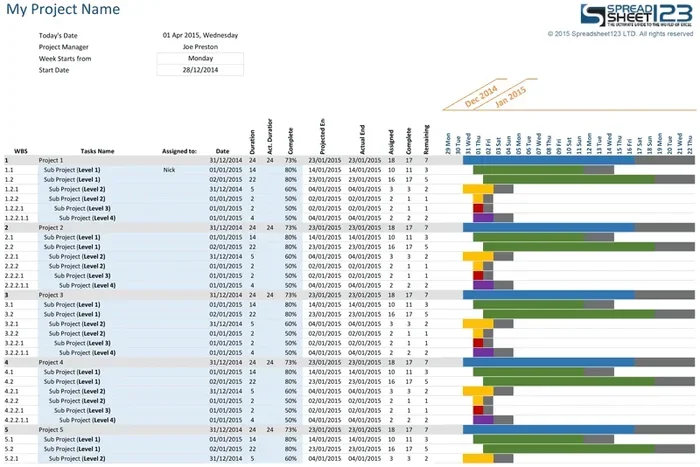
Best Project Management Tools With Gantt Chart Features
Finding the right project management tool with Gantt chart capabilities can transform how your team plans, tracks, and delivers projects on time. Gantt charts provide a visual timeline that makes complex project schedules easy to understand and manage. In this guide, we review the top project management software options that offer powerful Gantt chart features for every team size and budget. You will learn about key features, pricing, pros and cons, and which tool fits your specific workflow best.
Key Takeaways
- Gantt charts simplify project planning: They give you a clear visual timeline of tasks, deadlines, and dependencies.
- Multiple tools fit different needs: From free options to enterprise-grade platforms, there is a Gantt chart tool for every budget.
- Key features matter: Look for drag-and-drop editing, dependency mapping, resource allocation, and real-time collaboration.
- Integration is crucial: The best tools connect with your existing apps like Slack, Google Workspace, and email platforms.
- Ease of use wins: A steep learning curve kills adoption. Choose tools your entire team will actually use.
- Free trials help you decide: Most top platforms offer free plans or trials so you can test before committing.
📑 Table of Contents
- Why Gantt Charts Are Essential for Modern Project Management
- What to Look for in a Gantt Chart Project Management Tool
- Top Project Management Tools With Gantt Chart Features
- Comparison Table: Best Gantt Chart Tools at a Glance
- How to Choose the Right Gantt Chart Tool for Your Team
- Common Mistakes Teams Make When Using Gantt Charts
- Expert Tips for Getting the Most Out of Your Gantt Chart Tool
- Final Thoughts: Pick the Right Tool and Start Planning Better
Why Gantt Charts Are Essential for Modern Project Management
Managing a project without a clear timeline is like driving blindfolded. You might get somewhere, but you will waste time, miss deadlines, and frustrate your team. That is where Gantt chart tools come in. They turn chaotic project plans into clean, visual timelines that everyone can follow.
A Gantt chart displays tasks along a horizontal timeline. Each bar represents a task, its start date, its end date, and its progress. This simple visual format helps project managers spot bottlenecks, track project scheduling, and keep team collaboration on track. No wonder project management tools with Gantt features have become the go-to choice for teams worldwide.
Whether you are managing a small marketing campaign or a massive construction project, a good Gantt chart tool keeps everyone aligned. The right project planning software saves hours of confusion and prevents costly missed deadlines. Let us dive into the best options available today.
What to Look for in a Gantt Chart Project Management Tool
Not all Gantt chart tools are created equal. Before you pick one, you need to know what features actually matter. Here is what you should look for when evaluating Gantt chart software.
Drag-and-Drop Task Editing
The best project scheduling tools let you move tasks around with a simple click and drag. You should be able to adjust start dates, change durations, and reorder tasks without any hassle. If a tool forces you to manually edit dates in a spreadsheet, it is not worth your time.
Dependency Mapping
Tasks often depend on each other. For example, you cannot start design work until the brief is approved. Dependency mapping links these tasks together so that delays in one task automatically affect downstream tasks. This feature is a game-changer for project organization and keeps your project timeline realistic.
Resource Allocation
Good project management tools show you who is working on what and when. Resource allocation features help you avoid overloading team members and spot idle capacity. This is essential for keeping team productivity high without burning people out.
Real-Time Collaboration
Your team needs to collaborate in real time. Look for tools that allow comments, file sharing, and live updates on the project dashboard. When everyone sees the same up-to-date information, workflow management becomes much smoother.
Project Templates
Starting from scratch every time is exhausting. The best online project management platforms offer pre-built project templates for common workflows. These templates save you setup time and give you a solid starting point for task management.
Top Project Management Tools With Gantt Chart Features
Now let us get to the good stuff. Here are the best project management tools that offer strong Gantt chart capabilities. We have compared them across key areas so you can pick the right one for your team.
1. Monday.com
Monday.com is a flexible work operating system that excels at visual project tracking. Its Gantt chart view is intuitive and packed with useful features. You can set dependencies, assign owners, and track progress all in one place.
Key Features:
- Color-coded Gantt bars for easy status tracking
- Automated project scheduling alerts
- Seamless integration with 40+ third-party apps
- Customizable project dashboard views
- Scales well for small teams and large enterprises
Best For: Teams that want a highly customizable platform with strong visual project tracking. Monday.com also integrates well with construction and equipment planning workflows, making it a solid choice for teams that need to coordinate both project timelines and equipment resources.
2. Smartsheet
Smartsheet combines the familiarity of a spreadsheet with the power of a Gantt chart. It is one of the most popular project management tools for teams that love structured data and clean visuals.
Key Features:
- Robust Gantt chart with critical path highlighting
- Advanced resource allocation and workload views
- Automated workflows and approval processes
- Strong reporting and project tracking analytics
- Enterprise-grade security features
Best For: Medium to large teams that need detailed project scheduling with powerful reporting capabilities. Smartsheet is also a great pick for teams managing equipment or resource-heavy projects, similar to how teams plan for power tools and generator needs in construction projects.
3. TeamGantt
TeamGantt is a dedicated Gantt chart tool that focuses on simplicity and ease of use. If you want a tool built specifically for Gantt chart planning without the bloat, TeamGantt is worth a serious look.
Key Features:
- Clean, intuitive Gantt chart interface
- Easy task dependency setup
- Built-in time tracking and budgeting
- Simple project timeline sharing with clients
- Free plan available for small teams
Best For: Small to mid-sized teams that want a straightforward Gantt chart tool without a steep learning curve. It is perfect for freelancers and agencies managing multiple client projects.
4. Wrike
Wrike is a powerful enterprise-grade project management platform with excellent Gantt chart capabilities. It is built for teams that need advanced features like work breakdown structure support and detailed dependency mapping.
Key Features:
- Interactive Gantt charts with drag-and-drop editing
- Cross-project portfolio views
- Advanced critical path analysis
- Customizable workflow management automations
- Strong team collaboration and proofing tools
Best For: Larger organizations and enterprise teams that need deep project planning features and robust reporting. Wrike handles complex, multi-project environments with ease.
5. ClickUp
ClickUp is an all-in-one productivity platform that includes a solid Gantt chart view. It offers an impressive feature set at competitive prices, making it a favorite among budget-conscious teams.
Key Features:
- Free plan with Gantt chart access
- Multiple project views including list, board, and Gantt
- Built-in task management and goal tracking
- Custom fields and automation rules
- Strong Kanban boards alongside Gantt charts
Best For: Startups and growing teams that want a feature-rich platform without paying a premium. ClickUp is a versatile choice for Agile project management and traditional waterfall planning alike.
Comparison Table: Best Gantt Chart Tools at a Glance
| Tool | Free Plan | Starting Price | Best For | Key Strength |
|---|---|---|---|---|
| Monday.com | Yes (limited) | $9/user/month | Customizable workflows | Visual project tracking |
| Smartsheet | Yes (limited) | $7/user/month | Data-heavy teams | Reporting and analytics |
| TeamGantt | Yes | $24.95/user/month | Simple scheduling | Ease of use |
| Wrike | Yes (limited) | $9.80/user/month | Enterprise teams | Advanced dependencies |
| ClickUp | Yes | Free | Budget-conscious teams | All-in-one features |
As you can see, each tool has its strengths. The best project management tool for you depends on your team size, budget, and specific needs. Take advantage of free trials to test a few options before committing.
How to Choose the Right Gantt Chart Tool for Your Team
Picking the right Gantt chart software does not have to be overwhelming. Follow these steps to make a confident decision.
Step 1: Define Your Needs. List the features that matter most to your team. Do you need advanced dependency mapping or simple task tracking? Are you managing one project or a portfolio of projects? Writing down your priorities helps you narrow the field quickly.
Step 2: Consider Your Budget. Some tools offer free project management plans that work well for small teams. Others charge per user and scale better for larger organizations. Be realistic about what you can afford long term.
Step 3: Test Before You Buy. Almost every tool on this list offers a free trial. Use it. Invite your team, create a sample project, and see how the Gantt chart interface feels. If it feels clunky, keep looking.
Step 4: Check Integrations. Your project management tool should play nicely with your existing stack. Check for integrations with communication tools, file storage, and accounting software. Smooth workflow management depends on tools that connect well together.
Step 5: Think About Growth. Choose a tool that can grow with you. A platform that works for a 5-person team today should handle 50 people tomorrow without missing a beat.
Common Mistakes Teams Make When Using Gantt Charts
Even with the best project management tools, teams can stumble. Here are common mistakes to avoid.
- Overcomplicating the chart: Too many tasks and dependencies make Gantt charts hard to read. Keep it simple and focus on what matters most for project scheduling.
- Ignoring updates: A Gantt chart is only useful if it stays current. Assign someone to update task progress regularly so the project timeline stays accurate.
- Skipping dependency setup: Without proper dependencies, you lose the main benefit of a Gantt chart. Take the time to link tasks correctly for better project organization.
- Not involving the team: Gantt charts work best when the whole team contributes. Let team members update their own tasks for better team collaboration and accountability.
- Choosing features over usability: A tool with 100 features that nobody uses is worse than a simple tool everyone adopts. Prioritize ease of use for better team productivity.
Expert Tips for Getting the Most Out of Your Gantt Chart Tool
Tip 1: Start with a template. Most Gantt chart software offers pre-built templates for common project types. Starting with a template saves hours of setup time and gives you a proven project planning structure right out of the gate.
Tip 2: Use milestones to mark progress. Milestones are key checkpoints in your project timeline. They help you celebrate wins and verify that major phases are on track. Most project management tools let you mark milestones with special symbols on the Gantt chart.
Tip 3: Review weekly. Set a recurring weekly review to update your Gantt chart. This habit keeps your project tracking accurate and gives you time to adjust the schedule before small issues become big problems.
Tip 4: Share the view with stakeholders. Clients and executives love seeing a visual project timeline. Sharing the Gantt chart view builds trust and keeps everyone on the same page without lengthy status meetings.
Tip 5: Combine Gantt charts with other views. The best project management tools let you switch between Gantt, Kanban, and list views. Use each view for what it does best. Gantt charts for timeline planning, Kanban boards for daily task management, and list views for detailed data review.
Final Thoughts: Pick the Right Tool and Start Planning Better
Choosing the right project management tool with Gantt chart features is one of the best decisions you can make for your team. A good Gantt chart tool brings clarity to your project scheduling, improves team collaboration, and keeps everyone focused on deadlines and deliverables.
Whether you need a free tool for a small team or an enterprise-grade platform for complex project planning, there is a solution on this list that fits. Start with a free trial, involve your team in the decision, and commit to keeping your project timeline updated.
The right workflow management tool does more than just display tasks. It transforms how your team works together and delivers results. Invest the time to find the best fit, and you will see the difference in every project you run.
Frequently Asked Questions
What is a Gantt chart and why is it important for project management?
A Gantt chart is a visual bar chart that displays project tasks along a timeline. It shows task start and end dates, dependencies, and progress. It is important because it gives teams a clear picture of the project schedule, helping them spot delays early and keep project planning on track.
Which project management tool has the best Gantt chart features?
The best tool depends on your needs. Monday.com excels in visual customization, Smartsheet is great for data-heavy teams, and TeamGantt is the simplest dedicated Gantt tool. For enterprise teams, Wrike offers the most advanced features. Each platform has a free trial so you can test them yourself.
Are there free project management tools with Gantt charts?
Yes. ClickUp and TeamGantt both offer free plans that include Gantt chart views. These free options are perfect for small teams and freelancers who want to try project management tools without committing to a paid plan.
Can Gantt charts help with resource allocation and team productivity?
Absolutely. Most modern Gantt chart software includes resource allocation features that show who is working on what and when. This helps managers balance workloads, prevent burnout, and boost team productivity by ensuring no one is overwhelmed or idle.
How do Gantt charts handle task dependencies in project scheduling?
Gantt charts let you link tasks together using dependencies. When one task is delayed, the chart automatically adjusts the project timeline for all dependent tasks. This dependency mapping feature is essential for realistic project scheduling and helps prevent bottlenecks before they happen.
What should I look for when choosing Gantt chart software?
Look for drag-and-drop editing, dependency mapping, real-time collaboration, project dashboard views, and good integrations. Also consider ease of use, pricing, and whether the tool offers project templates that match your workflow. The best project management tools balance powerful features with a user-friendly interface.
=== CONCLUSION ===
Finding the right project management tools with Gantt chart features does not have to be a daunting task. With the options reviewed in this guide, you have everything you need to make a smart choice. From Monday.com and Smartsheet to TeamGantt, Wrike, and ClickUp, each tool brings something valuable to the table.
Remember, the best Gantt chart software is the one your team will actually use. Focus on ease of use, key features like dependency mapping and resource allocation, and a pricing plan that fits your budget. Start with a free trial, involve your team, and watch your project scheduling transform.
Take action today. Pick a tool, create your first project timeline, and experience the difference that clear visual planning makes. Your team will thank you, and your projects will run smoother than ever before.